> ## Documentation Index
> Fetch the complete documentation index at: https://docs.dqlabs.ai/llms.txt
> Use this file to discover all available pages before exploring further.
# Platform
> Configure platform mode, AI model routing, access tokens, cloud storage, and metadata extensions in Prizm.
## Overview
The **Platform** section in Settings manages the technical configuration of your Prizm instance — how autonomously the AI operates, where data is stored, and how the data model is extended.
Navigate to **Settings → Platform** to access this section.
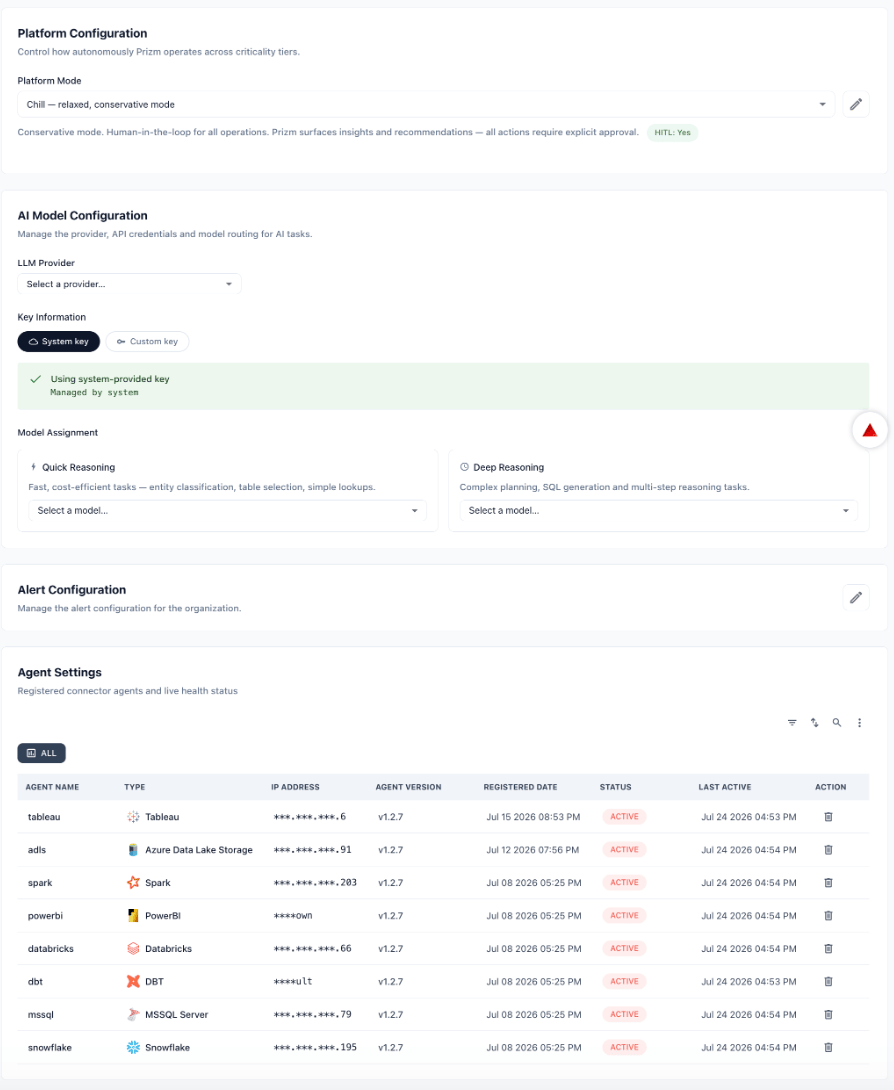
The Configuration tab controls how autonomously Prizm operates, which AI models handle different task types, and the health of connected agents.
 ### Platform Mode
Platform Mode sets the default level of AI autonomy across the organization. Think of the modes as a spectrum from conservative to fully autonomous — organizations typically start in Chill and expand as they build trust in the platform.
| Mode | Description | HITL |
| ----------------------------- | ------------------------------------------------------------------------------------------------------------------------------------------------------------------------------ | -------- |
| **Chill** (Stick Shift) | Conservative mode. Prizm surfaces insights and recommendations — all actions require explicit human approval before executing. Recommended starting point for new deployments. | Yes |
| **Standard** (Cruise Control) | Balanced automation with moderate human review checkpoints. Prizm acts autonomously on critical assets and recommends for others; key decisions still require approval. | Moderate |
| **Max** (Self Drive) | Most aggressive autonomous setting. Prizm acts independently across all criticality tiers with no human-in-the-loop checkpoints. | None |
Select a mode from the dropdown and click **Save** to apply. The description beneath the selector confirms the active mode and HITL status.
**HITL (Human-in-the-Loop)** controls whether AI-generated actions — such as closing issues, sending notifications, or applying remediations — require human approval before executing. When HITL is enabled, Prizm surfaces recommendations for review rather than acting autonomously.
### Custom Mode Configuration
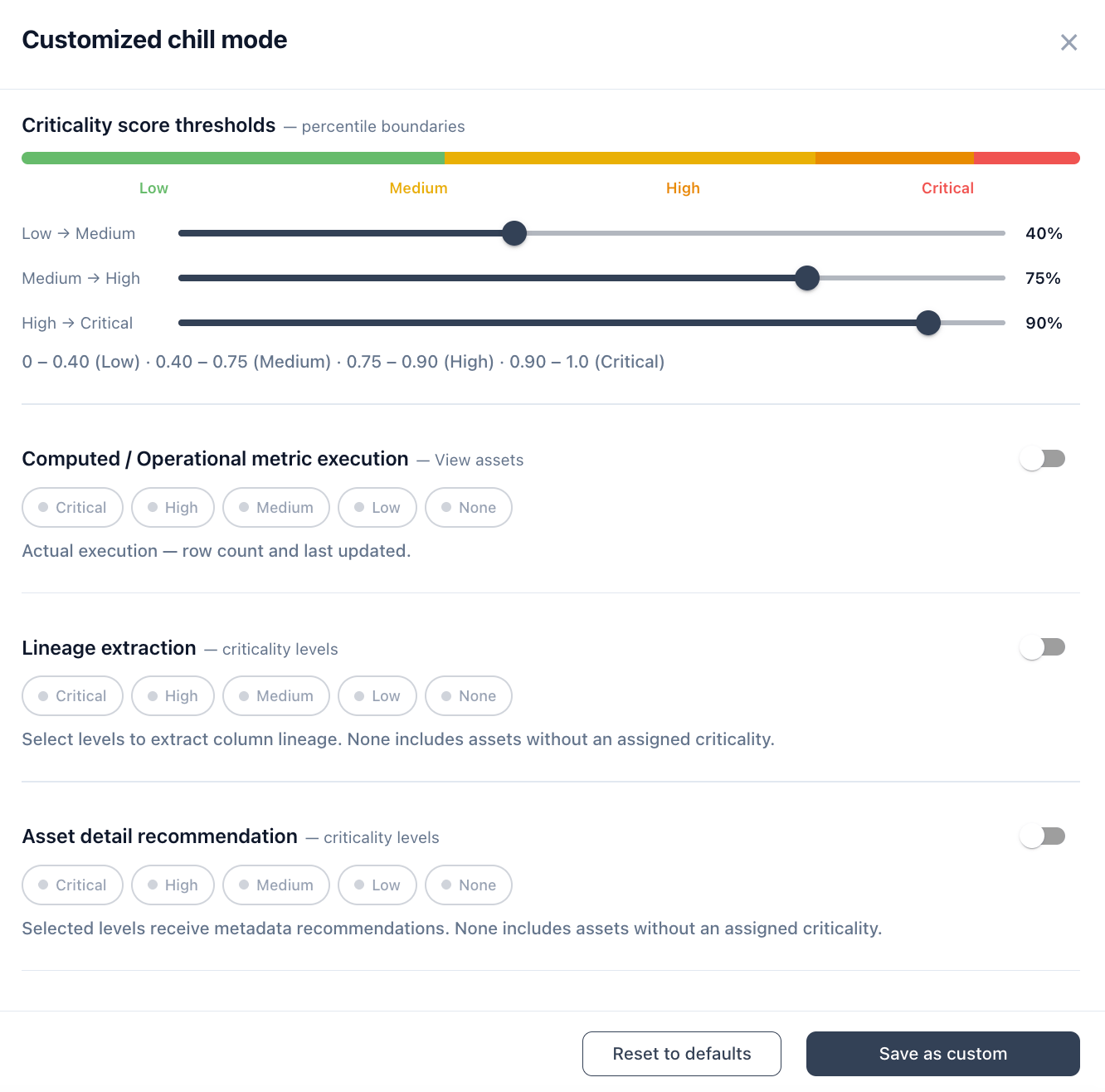
Any base mode can be fine-tuned per feature without switching modes. Click the **pencil icon** next to the Platform Mode selector to open the customization panel. After adjusting settings, click **Save as custom** to apply — the mode label updates to show it has been customized (e.g., "Customized max mode"). Click **Reset to defaults** to restore the selected base mode's defaults at any time.
### Platform Mode
Platform Mode sets the default level of AI autonomy across the organization. Think of the modes as a spectrum from conservative to fully autonomous — organizations typically start in Chill and expand as they build trust in the platform.
| Mode | Description | HITL |
| ----------------------------- | ------------------------------------------------------------------------------------------------------------------------------------------------------------------------------ | -------- |
| **Chill** (Stick Shift) | Conservative mode. Prizm surfaces insights and recommendations — all actions require explicit human approval before executing. Recommended starting point for new deployments. | Yes |
| **Standard** (Cruise Control) | Balanced automation with moderate human review checkpoints. Prizm acts autonomously on critical assets and recommends for others; key decisions still require approval. | Moderate |
| **Max** (Self Drive) | Most aggressive autonomous setting. Prizm acts independently across all criticality tiers with no human-in-the-loop checkpoints. | None |
Select a mode from the dropdown and click **Save** to apply. The description beneath the selector confirms the active mode and HITL status.
**HITL (Human-in-the-Loop)** controls whether AI-generated actions — such as closing issues, sending notifications, or applying remediations — require human approval before executing. When HITL is enabled, Prizm surfaces recommendations for review rather than acting autonomously.
### Custom Mode Configuration
Any base mode can be fine-tuned per feature without switching modes. Click the **pencil icon** next to the Platform Mode selector to open the customization panel. After adjusting settings, click **Save as custom** to apply — the mode label updates to show it has been customized (e.g., "Customized max mode"). Click **Reset to defaults** to restore the selected base mode's defaults at any time.
 #### Default settings per mode
The table below shows what each base mode enables by default. Custom mode lets you override any of these per setting.
| Setting | Max | Standard | Chill |
| ---------------------------------- | -------------------------------------------------------- | ---------------------------- | ------------------ |
| **Criticality thresholds** | 0.40 / 0.75 / 0.90 | 0.40 / 0.75 / 0.90 | 0.40 / 0.75 / 0.90 |
| **Incremental recommendation** | Yes | Yes | Yes |
| **Quality metric recommendation** | Critical — essential + advanced | Critical — essential only | None |
| **Profile recommendation** | Critical: essential + advanced; High: essential; monthly | Critical: essential; monthly | None |
| **Computed metric execution** | Critical + High view assets | Critical view assets only | None |
| **Business metric recommendation** | Critical + High | Critical only | None |
| **Asset detail recommendation** | Critical + High | Critical only | None |
| **Metric detail recommendation** | Yes (all business metrics) | Yes (all business metrics) | None |
| **Term recommendation** | Critical + High | Critical only | None |
| **Alert sensitivity** | Critical + High | Critical only | None |
| **AI summary** | Yes | Yes | Yes |
| **AI insight** | Yes | Yes | Yes |
| **Task recommendations** | Yes | No | No |
| **Actions** | Yes | No | No |
#### Criticality score thresholds
Defines the percentile score boundaries that assign assets to criticality tiers. All three base modes default to the same thresholds — adjust them here to change how broadly or narrowly each tier is applied.
| Boundary | Default |
| --------------- | ----------------------------------------------------- |
| Low → Medium | 40% (score 0 – 0.40 = Low) |
| Medium → High | 75% (score 0.40 – 0.75 = Medium) |
| High → Critical | 90% (score 0.75 – 0.90 = High, 0.90 – 1.0 = Critical) |
The live range display beneath the sliders updates as you adjust thresholds. Tightening the Critical boundary (e.g., raising to 95%) reduces the Critical population; lowering it broadens the tier.
#### Computed / Operational metric execution
Controls which criticality tiers have row counts and last-updated timestamps actively computed. This applies specifically to View, Materialized View, and Query-type assets — or any asset that does not expose native freshness and volume metadata. Execution here means Prizm runs a live job against the source, not just a recommendation.
* **Max default:** Critical + High view assets
* **Standard default:** Critical view assets only
* **Chill default:** None
#### Lineage extraction
Controls which criticality tiers have column-level lineage extracted. Lineage extraction traces data flow between columns across assets and is used to surface impact analysis in the asset detail view.
#### Asset detail recommendation
Controls which criticality tiers receive AI-generated metadata recommendations — asset description, attribute descriptions (only if not already populated), and fingerprint identification for tables, views, and attributes. Recommendations appear as accept/reject suggestions; Prizm does not apply them automatically.
* **Max default:** Critical + High
* **Standard default:** Critical only
* **Chill default:** None
#### Profile recommendation & execution
Controls data profiling behavior per criticality level. For each active level, configure two settings:
| Setting | Options |
| ---------------------- | -------------------------------------------- |
| **Profiling depth** | None · Essential only · Essential + advanced |
| **Schedule frequency** | 7 · 14 · 30 · 60 days |
The **Execution** toggle controls whether PROFILE jobs are actually allowed to run. Disabling execution while keeping recommendation enabled means Prizm generates profiling schedule recommendations but does not run them automatically — useful when you want to review before committing compute.
Default profile depth and schedule by mode:
| Criticality | Max | Standard | Chill |
| ------------ | ------------------------------ | ------------------------ | ----- |
| Critical | Essential + advanced · monthly | Essential only · monthly | None |
| High | Essential only · monthly | — | — |
| Medium / Low | None | None | None |
#### Structural (quality metric) recommendation & execution
Controls structural metric scheduling per criticality level using the same depth and frequency options as profiling. Structural metrics evaluate schema-level quality characteristics. The **Execution** toggle controls whether structural jobs are allowed to run.
* **Max default:** Critical — essential + advanced quality metrics
* **Standard default:** Critical — essential quality metrics
* **Chill default:** None
#### Business metric recommendation
Controls which criticality tiers receive AI-generated business metric recommendations. This is recommendation only — business metrics are not executed automatically from this setting.
* **Max default:** Critical + High
* **Standard default:** Critical only
* **Chill default:** None
#### Asset deletion scan
Controls which criticality tiers are scanned for deleted source objects. When a source table or view is removed from Snowflake or Databricks, Prizm automatically deprecates the corresponding asset for the selected tiers.
#### Term recommendation
Controls which criticality tiers receive AI-generated business term suggestions for assets and attributes.
* **Max default:** Critical + High
* **Standard default:** Critical only
* **Chill default:** None
#### Alert sensitivity
Controls which criticality tiers trigger alerts. Scoping to Critical and High reduces noise while ensuring high-priority data quality issues always surface.
* **Max default:** Critical + High
* **Standard default:** Critical only
* **Chill default:** None
#### AI and automation toggles
| Setting | Description | Max | Standard | Chill |
| -------------------------------- | ---------------------------------------------------------------------------------------------------------------------------------------------------------------------------------------- | --- | -------- | ----- |
| **AI summary** | Generate an AI-written summary for assets and issues. | Yes | Yes | Yes |
| **AI insight** | Generate AI insights alongside metric results and anomalies. | Yes | Yes | Yes |
| **Metric detail recommendation** | Populate metric description, rationale, and purpose automatically if not already present (accept/reject). | Yes | Yes | No |
| **Task recommendations** | Generate AI task suggestions on issues and assets. | Yes | No | No |
| **Actions** | Allow Prizm to execute autonomous actions (closing issues, applying remediations) without requiring human approval. Disabling forces all actions to require approval regardless of mode. | Yes | No | No |
### AI Model Configuration
Configure the LLM provider and model assignments for AI tasks across Prizm.
**LLM Provider** — Select the AI provider Prizm uses for all language model tasks.
**Key Information**
| Option | Description |
| -------------- | ------------------------------------------------------------------------------------------------------------------------------------------------------------------------- |
| **System key** | Uses the platform-provided API key managed by the Prizm deployment. No additional configuration required. |
| **Custom key** | Provide your own API key for the selected LLM provider. Use this if your organization requires billing under its own account or has specific key management requirements. |
**Model Assignment** — Prizm routes AI tasks to different models based on complexity:
| Task type | Description |
| ------------------- | ------------------------------------------------------------------------------------ |
| **Quick Reasoning** | Fast, cost-efficient tasks — entity classification, table selection, simple lookups. |
| **Deep Reasoning** | Complex planning, SQL generation, and multi-step reasoning tasks. |
### Alert Configuration
The Alert Configuration section controls organization-wide defaults for how alerts are generated and routed. Settings here apply across all connections unless overridden at the connection or asset level.
### Agent Settings
The Agent Settings table shows all connector agents registered to your Prizm organization — the processes that run alongside your data infrastructure to collect metadata and execute metric evaluations.
| Column | Description |
| ------------------- | ------------------------------------------------------------------------------------ |
| **Agent Name** | Identifier for the agent (e.g., `snowflake`, `dbt`, `tableau`). |
| **Type** | The data source or system type the agent connects to. |
| **IP Address** | IP address of the machine where the agent is running. Masked in the UI for security. |
| **Agent Version** | Version of the Prizm agent software running on this machine. |
| **Registered Date** | When the agent was first registered with Prizm. |
| **Status** | Current health status — **Active** or **Inactive**. |
| **Last Active** | Timestamp of the most recent successful communication from the agent. |
| **Action** | Available actions for the agent (e.g., remove, view logs). |
Check Agent Settings after any infrastructure changes (network updates, machine migrations, cloud region changes) to confirm all agents are still reporting as Active. A silently inactive agent stops collecting metadata and can cause stale quality scores without raising an explicit error.
The Token tab manages API and MCP tokens used to authenticate external systems to Prizm.
#### Default settings per mode
The table below shows what each base mode enables by default. Custom mode lets you override any of these per setting.
| Setting | Max | Standard | Chill |
| ---------------------------------- | -------------------------------------------------------- | ---------------------------- | ------------------ |
| **Criticality thresholds** | 0.40 / 0.75 / 0.90 | 0.40 / 0.75 / 0.90 | 0.40 / 0.75 / 0.90 |
| **Incremental recommendation** | Yes | Yes | Yes |
| **Quality metric recommendation** | Critical — essential + advanced | Critical — essential only | None |
| **Profile recommendation** | Critical: essential + advanced; High: essential; monthly | Critical: essential; monthly | None |
| **Computed metric execution** | Critical + High view assets | Critical view assets only | None |
| **Business metric recommendation** | Critical + High | Critical only | None |
| **Asset detail recommendation** | Critical + High | Critical only | None |
| **Metric detail recommendation** | Yes (all business metrics) | Yes (all business metrics) | None |
| **Term recommendation** | Critical + High | Critical only | None |
| **Alert sensitivity** | Critical + High | Critical only | None |
| **AI summary** | Yes | Yes | Yes |
| **AI insight** | Yes | Yes | Yes |
| **Task recommendations** | Yes | No | No |
| **Actions** | Yes | No | No |
#### Criticality score thresholds
Defines the percentile score boundaries that assign assets to criticality tiers. All three base modes default to the same thresholds — adjust them here to change how broadly or narrowly each tier is applied.
| Boundary | Default |
| --------------- | ----------------------------------------------------- |
| Low → Medium | 40% (score 0 – 0.40 = Low) |
| Medium → High | 75% (score 0.40 – 0.75 = Medium) |
| High → Critical | 90% (score 0.75 – 0.90 = High, 0.90 – 1.0 = Critical) |
The live range display beneath the sliders updates as you adjust thresholds. Tightening the Critical boundary (e.g., raising to 95%) reduces the Critical population; lowering it broadens the tier.
#### Computed / Operational metric execution
Controls which criticality tiers have row counts and last-updated timestamps actively computed. This applies specifically to View, Materialized View, and Query-type assets — or any asset that does not expose native freshness and volume metadata. Execution here means Prizm runs a live job against the source, not just a recommendation.
* **Max default:** Critical + High view assets
* **Standard default:** Critical view assets only
* **Chill default:** None
#### Lineage extraction
Controls which criticality tiers have column-level lineage extracted. Lineage extraction traces data flow between columns across assets and is used to surface impact analysis in the asset detail view.
#### Asset detail recommendation
Controls which criticality tiers receive AI-generated metadata recommendations — asset description, attribute descriptions (only if not already populated), and fingerprint identification for tables, views, and attributes. Recommendations appear as accept/reject suggestions; Prizm does not apply them automatically.
* **Max default:** Critical + High
* **Standard default:** Critical only
* **Chill default:** None
#### Profile recommendation & execution
Controls data profiling behavior per criticality level. For each active level, configure two settings:
| Setting | Options |
| ---------------------- | -------------------------------------------- |
| **Profiling depth** | None · Essential only · Essential + advanced |
| **Schedule frequency** | 7 · 14 · 30 · 60 days |
The **Execution** toggle controls whether PROFILE jobs are actually allowed to run. Disabling execution while keeping recommendation enabled means Prizm generates profiling schedule recommendations but does not run them automatically — useful when you want to review before committing compute.
Default profile depth and schedule by mode:
| Criticality | Max | Standard | Chill |
| ------------ | ------------------------------ | ------------------------ | ----- |
| Critical | Essential + advanced · monthly | Essential only · monthly | None |
| High | Essential only · monthly | — | — |
| Medium / Low | None | None | None |
#### Structural (quality metric) recommendation & execution
Controls structural metric scheduling per criticality level using the same depth and frequency options as profiling. Structural metrics evaluate schema-level quality characteristics. The **Execution** toggle controls whether structural jobs are allowed to run.
* **Max default:** Critical — essential + advanced quality metrics
* **Standard default:** Critical — essential quality metrics
* **Chill default:** None
#### Business metric recommendation
Controls which criticality tiers receive AI-generated business metric recommendations. This is recommendation only — business metrics are not executed automatically from this setting.
* **Max default:** Critical + High
* **Standard default:** Critical only
* **Chill default:** None
#### Asset deletion scan
Controls which criticality tiers are scanned for deleted source objects. When a source table or view is removed from Snowflake or Databricks, Prizm automatically deprecates the corresponding asset for the selected tiers.
#### Term recommendation
Controls which criticality tiers receive AI-generated business term suggestions for assets and attributes.
* **Max default:** Critical + High
* **Standard default:** Critical only
* **Chill default:** None
#### Alert sensitivity
Controls which criticality tiers trigger alerts. Scoping to Critical and High reduces noise while ensuring high-priority data quality issues always surface.
* **Max default:** Critical + High
* **Standard default:** Critical only
* **Chill default:** None
#### AI and automation toggles
| Setting | Description | Max | Standard | Chill |
| -------------------------------- | ---------------------------------------------------------------------------------------------------------------------------------------------------------------------------------------- | --- | -------- | ----- |
| **AI summary** | Generate an AI-written summary for assets and issues. | Yes | Yes | Yes |
| **AI insight** | Generate AI insights alongside metric results and anomalies. | Yes | Yes | Yes |
| **Metric detail recommendation** | Populate metric description, rationale, and purpose automatically if not already present (accept/reject). | Yes | Yes | No |
| **Task recommendations** | Generate AI task suggestions on issues and assets. | Yes | No | No |
| **Actions** | Allow Prizm to execute autonomous actions (closing issues, applying remediations) without requiring human approval. Disabling forces all actions to require approval regardless of mode. | Yes | No | No |
### AI Model Configuration
Configure the LLM provider and model assignments for AI tasks across Prizm.
**LLM Provider** — Select the AI provider Prizm uses for all language model tasks.
**Key Information**
| Option | Description |
| -------------- | ------------------------------------------------------------------------------------------------------------------------------------------------------------------------- |
| **System key** | Uses the platform-provided API key managed by the Prizm deployment. No additional configuration required. |
| **Custom key** | Provide your own API key for the selected LLM provider. Use this if your organization requires billing under its own account or has specific key management requirements. |
**Model Assignment** — Prizm routes AI tasks to different models based on complexity:
| Task type | Description |
| ------------------- | ------------------------------------------------------------------------------------ |
| **Quick Reasoning** | Fast, cost-efficient tasks — entity classification, table selection, simple lookups. |
| **Deep Reasoning** | Complex planning, SQL generation, and multi-step reasoning tasks. |
### Alert Configuration
The Alert Configuration section controls organization-wide defaults for how alerts are generated and routed. Settings here apply across all connections unless overridden at the connection or asset level.
### Agent Settings
The Agent Settings table shows all connector agents registered to your Prizm organization — the processes that run alongside your data infrastructure to collect metadata and execute metric evaluations.
| Column | Description |
| ------------------- | ------------------------------------------------------------------------------------ |
| **Agent Name** | Identifier for the agent (e.g., `snowflake`, `dbt`, `tableau`). |
| **Type** | The data source or system type the agent connects to. |
| **IP Address** | IP address of the machine where the agent is running. Masked in the UI for security. |
| **Agent Version** | Version of the Prizm agent software running on this machine. |
| **Registered Date** | When the agent was first registered with Prizm. |
| **Status** | Current health status — **Active** or **Inactive**. |
| **Last Active** | Timestamp of the most recent successful communication from the agent. |
| **Action** | Available actions for the agent (e.g., remove, view logs). |
Check Agent Settings after any infrastructure changes (network updates, machine migrations, cloud region changes) to confirm all agents are still reporting as Active. A silently inactive agent stops collecting metadata and can cause stale quality scores without raising an explicit error.
The Token tab manages API and MCP tokens used to authenticate external systems to Prizm.
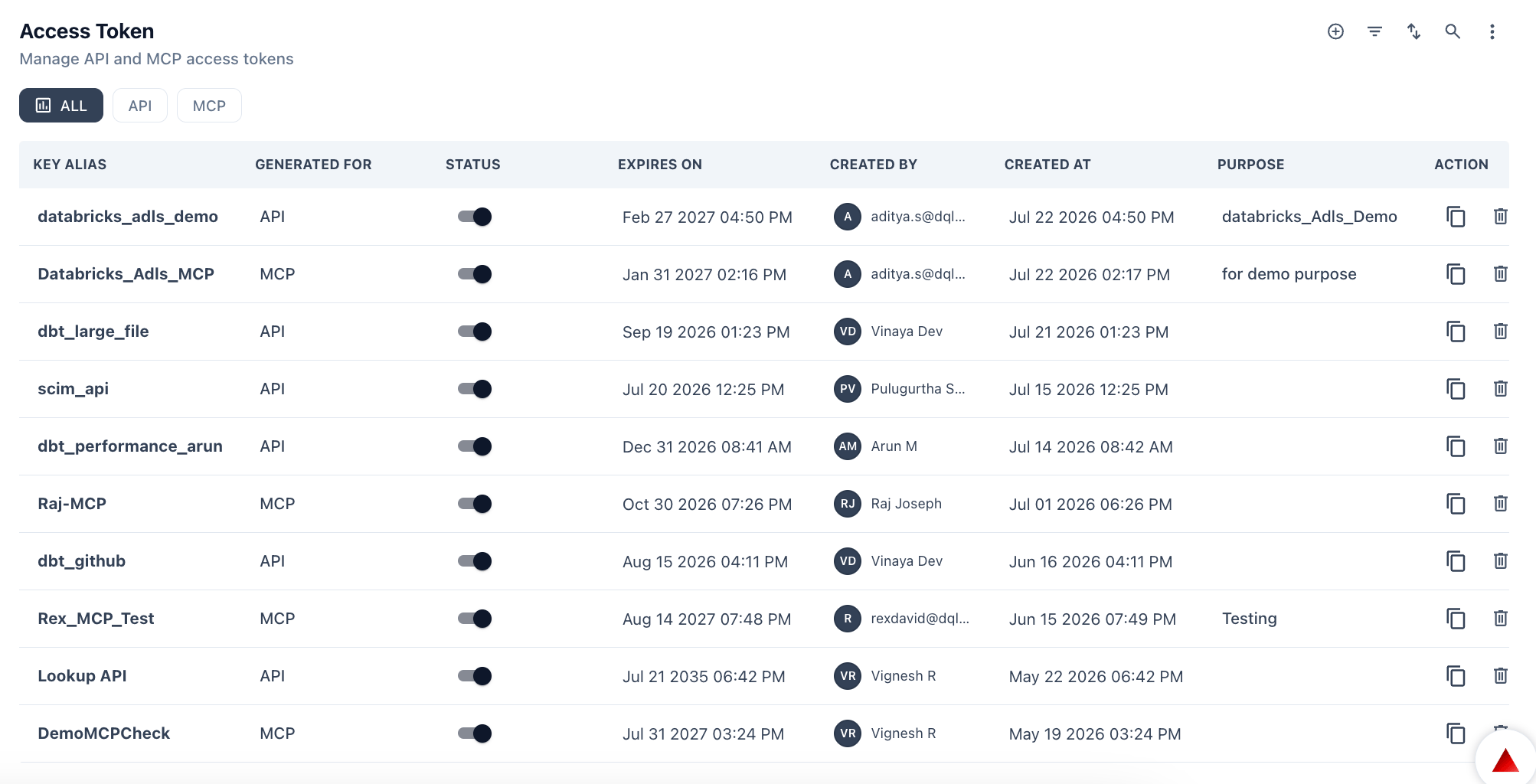 ### Token types
| Type | Use case |
| ------- | ---------------------------------------------------------------------------------------------------------------------- |
| **API** | Authenticate REST API requests — used by integrations, the GitHub Action (`PRIZM_TOKEN`), scripts, and external tools. |
| **MCP** | Authenticate connections from MCP-compatible clients to Prizm's MCP server. |
Use the **ALL / API / MCP** filter tabs to view tokens by type.
### Token table columns
| Column | Description |
| ----------------- | ------------------------------------------------------------------ |
| **Key Alias** | Human-readable name for the token (e.g., `dbt_github`, `Raj-MCP`). |
| **Generated For** | The user or system the token was issued to. |
| **Status** | Whether the token is currently active. |
| **Expires On** | The expiry date and time of the token. |
| **Created By** | The Prizm user who created the token. |
| **Created At** | When the token was created. |
| **Purpose** | Free-text description of what the token is used for. |
| **Action** | Options to copy, rotate, or revoke the token. |
### Creating a token
1. Navigate to **Settings → Platform → Token**.
2. Click **+ New Token**.
3. Enter a **Key Alias** that clearly identifies the token's purpose.
4. Select the **Token Type** — API or MCP.
5. Set an **Expiry Date** appropriate for the use case.
6. Optionally enter a **Purpose** description.
7. Click **Generate**. Copy the token value immediately — it is only shown once.
Token values are only displayed at creation time. If you lose the value, you must revoke the token and create a new one. Store tokens in a secrets manager or CI/CD secrets store rather than in plain text.
### Revoking a token
Locate the token in the table and use the **Action** menu to revoke it. Revoked tokens immediately stop authenticating requests. Update any integrations using the token before revoking.
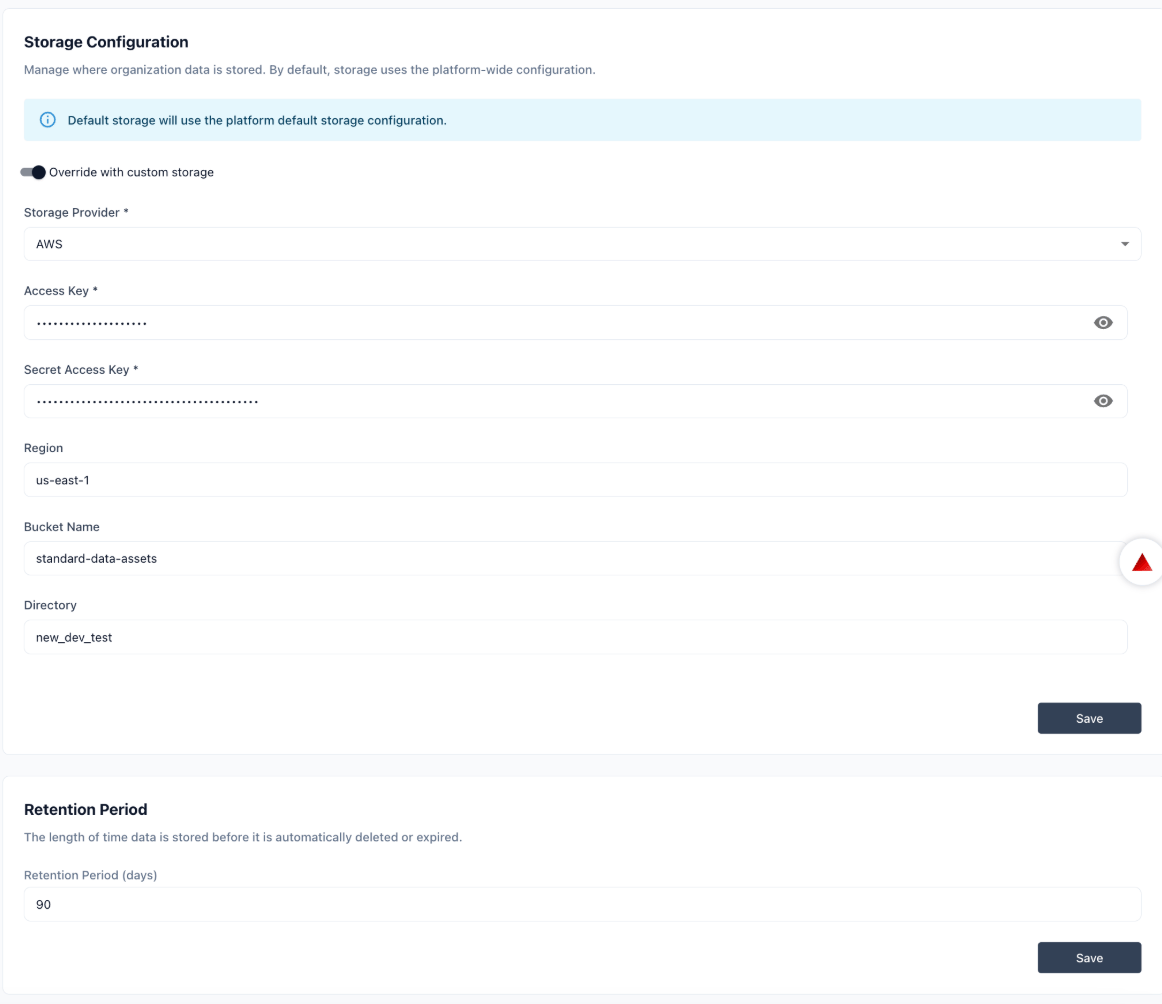
The Storage tab configures where Prizm stores organization data and how long it is retained.
### Token types
| Type | Use case |
| ------- | ---------------------------------------------------------------------------------------------------------------------- |
| **API** | Authenticate REST API requests — used by integrations, the GitHub Action (`PRIZM_TOKEN`), scripts, and external tools. |
| **MCP** | Authenticate connections from MCP-compatible clients to Prizm's MCP server. |
Use the **ALL / API / MCP** filter tabs to view tokens by type.
### Token table columns
| Column | Description |
| ----------------- | ------------------------------------------------------------------ |
| **Key Alias** | Human-readable name for the token (e.g., `dbt_github`, `Raj-MCP`). |
| **Generated For** | The user or system the token was issued to. |
| **Status** | Whether the token is currently active. |
| **Expires On** | The expiry date and time of the token. |
| **Created By** | The Prizm user who created the token. |
| **Created At** | When the token was created. |
| **Purpose** | Free-text description of what the token is used for. |
| **Action** | Options to copy, rotate, or revoke the token. |
### Creating a token
1. Navigate to **Settings → Platform → Token**.
2. Click **+ New Token**.
3. Enter a **Key Alias** that clearly identifies the token's purpose.
4. Select the **Token Type** — API or MCP.
5. Set an **Expiry Date** appropriate for the use case.
6. Optionally enter a **Purpose** description.
7. Click **Generate**. Copy the token value immediately — it is only shown once.
Token values are only displayed at creation time. If you lose the value, you must revoke the token and create a new one. Store tokens in a secrets manager or CI/CD secrets store rather than in plain text.
### Revoking a token
Locate the token in the table and use the **Action** menu to revoke it. Revoked tokens immediately stop authenticating requests. Update any integrations using the token before revoking.
The Storage tab configures where Prizm stores organization data and how long it is retained.
 ### Storage Configuration
By default, Prizm uses the platform-wide storage configuration. Enable the **Override with custom storage** toggle to configure your own cloud storage — this reveals the provider-specific fields below.
| Field | Description |
| ----------------------- | ------------------------------------------------------------------- |
| **Storage Provider**\* | Cloud provider for storage. Currently supports AWS. |
| **Access Key**\* | AWS access key ID. Stored as a masked password field. Required. |
| **Secret Access Key**\* | AWS secret access key. Stored as a masked password field. Required. |
| **Region** | AWS region where the bucket is located (e.g., `us-east-1`). |
| **Bucket Name** | Name of the S3 bucket Prizm will write to. |
| **Directory** | Optional directory path within the bucket. |
Click **Save** after entering credentials.
The storage provider fields only appear when **Override with custom storage** is enabled. Disabling the toggle reverts to the platform default.
### Retention Period
| Field | Description |
| --------------------------- | ---------------------------------------------------------------------------- |
| **Retention Period (days)** | Number of days data is stored before it is automatically deleted or expired. |
The Metadata tab lets you extend Prizm's data model with custom fields and define the data quality dimensions used for composite scoring. Both are managed from this same tab.
### Storage Configuration
By default, Prizm uses the platform-wide storage configuration. Enable the **Override with custom storage** toggle to configure your own cloud storage — this reveals the provider-specific fields below.
| Field | Description |
| ----------------------- | ------------------------------------------------------------------- |
| **Storage Provider**\* | Cloud provider for storage. Currently supports AWS. |
| **Access Key**\* | AWS access key ID. Stored as a masked password field. Required. |
| **Secret Access Key**\* | AWS secret access key. Stored as a masked password field. Required. |
| **Region** | AWS region where the bucket is located (e.g., `us-east-1`). |
| **Bucket Name** | Name of the S3 bucket Prizm will write to. |
| **Directory** | Optional directory path within the bucket. |
Click **Save** after entering credentials.
The storage provider fields only appear when **Override with custom storage** is enabled. Disabling the toggle reverts to the platform default.
### Retention Period
| Field | Description |
| --------------------------- | ---------------------------------------------------------------------------- |
| **Retention Period (days)** | Number of days data is stored before it is automatically deleted or expired. |
The Metadata tab lets you extend Prizm's data model with custom fields and define the data quality dimensions used for composite scoring. Both are managed from this same tab.
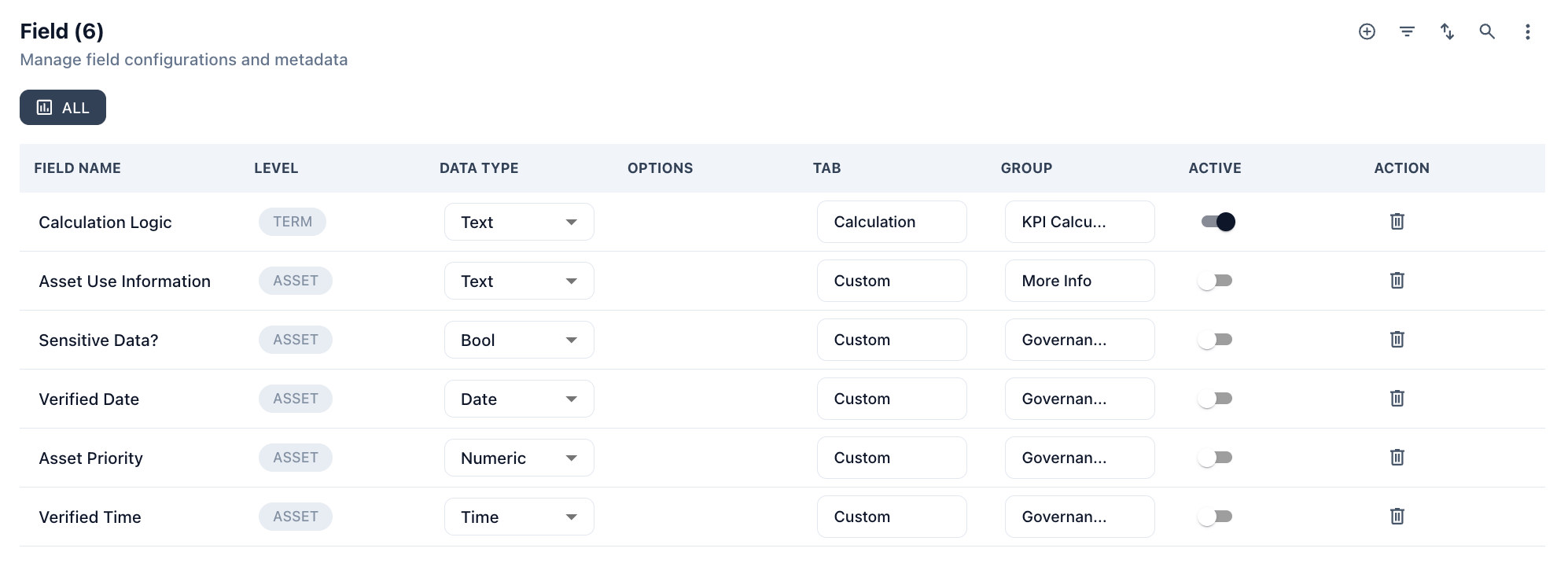 ### Field
Custom fields add organization-specific metadata attributes to Assets and Metrics, visible throughout the platform. Click **Add** to create a new custom field.
| Column | Description |
| -------------- | ------------------------------------------------------------------ |
| **Field Name** | Display name for the custom field. |
| **Level** | Where the field applies — Asset or Metric. |
| **Data Type** | One of: Text, Bool, Date, Numeric, Time. |
| **Options** | Allowed values (for constrained fields). |
| **Tab** | UI tab the field appears under in the asset or metric detail view. |
| **Group** | UI group the field is organized under. |
| **Active** | Whether the field is currently visible and in use. |
| **Action** | Edit or delete the field. |
### Dimension
Data quality dimensions define the scoring categories used for composite DQ scores. Each dimension has a name, description, and weightage.
| Dimension | Description |
| ---------------- | ---------------------------------------------------------------------------------------------- |
| **Timeliness** | Probability that a local data record reflects its original source at any given time. |
| **Relevance** | Degree to which data is relevant to the business purpose. |
| **Utilization** | Degree to which data is actively used to support business processes and analytics. |
| **Consistency** | Number of different forms, formats, or structures data takes across multiple systems. |
| **Validity** | How well non-missing data accurately represents reality, irrespective of precision or format. |
| **Completeness** | Percentage of missing fields in a record or instances of data recorded versus total available. |
| **Accuracy** | Degree to which the data value accurately describes the real-world object or event it models. |
| **Uniqueness** | Percentage of alternate or duplicative forms of a data instance that exist. |
Each dimension has a **Weightage** value (0–100) that determines its contribution to the composite score. Custom dimensions can be added alongside the defaults.
### Field
Custom fields add organization-specific metadata attributes to Assets and Metrics, visible throughout the platform. Click **Add** to create a new custom field.
| Column | Description |
| -------------- | ------------------------------------------------------------------ |
| **Field Name** | Display name for the custom field. |
| **Level** | Where the field applies — Asset or Metric. |
| **Data Type** | One of: Text, Bool, Date, Numeric, Time. |
| **Options** | Allowed values (for constrained fields). |
| **Tab** | UI tab the field appears under in the asset or metric detail view. |
| **Group** | UI group the field is organized under. |
| **Active** | Whether the field is currently visible and in use. |
| **Action** | Edit or delete the field. |
### Dimension
Data quality dimensions define the scoring categories used for composite DQ scores. Each dimension has a name, description, and weightage.
| Dimension | Description |
| ---------------- | ---------------------------------------------------------------------------------------------- |
| **Timeliness** | Probability that a local data record reflects its original source at any given time. |
| **Relevance** | Degree to which data is relevant to the business purpose. |
| **Utilization** | Degree to which data is actively used to support business processes and analytics. |
| **Consistency** | Number of different forms, formats, or structures data takes across multiple systems. |
| **Validity** | How well non-missing data accurately represents reality, irrespective of precision or format. |
| **Completeness** | Percentage of missing fields in a record or instances of data recorded versus total available. |
| **Accuracy** | Degree to which the data value accurately describes the real-world object or event it models. |
| **Uniqueness** | Percentage of alternate or duplicative forms of a data instance that exist. |
Each dimension has a **Weightage** value (0–100) that determines its contribution to the composite score. Custom dimensions can be added alongside the defaults.