> ## Documentation Index
> Fetch the complete documentation index at: https://docs.dqlabs.ai/llms.txt
> Use this file to discover all available pages before exploring further.
# Asset Overview
> Any data object cataloged, governed, and monitored within DQLabs Prizm.
Every data asset tells a story — what it is, who relies on it, and where it fits in your pipeline. The **Overview** tab brings that story together in one place, combining quality signals, business context, ownership, and lineage so you can quickly judge whether an asset is trustworthy and ready to use. Whether you're an engineer tracing structure or a business user assessing fit, this is where you start.
## Asset Navigation Tabs
Every asset page is organized into tabs. The available tabs are:
| Tab | What it contains |
| :---------------- | :------------------------------------------------------------------------------------------------- |
| **Overview** | Summary of quality, governance, ownership, and lineage — the starting point for any asset |
| **Attribute** | Column-level detail: names, data types, descriptions, tags, and governance metadata for each field |
| **Metric** | All quality metrics configured against this asset and their latest results |
| **Usage** | Query and access activity — who is using the asset and how frequently |
| **Lineage** | Full interactive lineage graph showing upstream sources and downstream consumers |
| **Audit** | Change history for the asset's metadata within Prizm |
| **Documentation** | Free-form documentation and notes attached to the asset |
| **Conversation** | Threaded comments and discussions about this asset |
Users can also create **Custom tabs** on any asset page. Custom tabs are user-named workspaces for pinning metrics, notes, or views specific to a team's workflow. Use the **Rename tab** button to relabel any custom tab.
***
## Asset Overview
The **Overview** tab is the landing page for any asset (table, view, schema, etc.) in DQLabs Prizm. It consolidates key metrics, business context, ownership, and lineage into a single view, giving users a quick understanding of what the asset is, its health, and how it fits into the broader data ecosystem.
Use the search bar at the top of the Assets page — or press **⌘K** — to find any asset by name, source, or column across all connected databases without switching tabs.
***
### Key Metrics
At the top of the Overview tab, a row of KPI cards gives an instant health snapshot for the asset:
| Card | What it shows |
| :------------ | :-------------------------------------------------------------------------------------------------------------------------------------------------------------- |
| **Volume** | Current row count of the asset (e.g., `1,002`) |
| **Schema** | Number of columns, plus a **Schema Changes** badge showing how many structural changes were detected in the latest catalog run (e.g., `30 columns · 4 Changes`) |
| **Freshness** | Time since the asset was last updated at the source, as measured by the freshness metric; shows `NA` if no freshness metric is configured |
| **Metrics** | Total number of quality metrics configured against this asset |
***
### Asset Overview Purpose
The Overview tab is designed to answer, at a glance:
1. **What is this asset?** (Description, semantic context)
2. **Is it trustworthy?** (Verified status, freshness, completeness score)
3. **Who owns it and who should use it?** (Owners, Audience, AI guidance)
4. **Where does it fit in the pipeline?** (Lineage preview)
5. **Is it healthy?** (Alerts, Issues, Criticality badge)
This makes it the primary entry point for both technical users assessing structure and business users assessing trust and applicability before relying on the data.
### Asset Overview Header
The asset page header gives a quick view of all the critical values related to the asset.
 | Element | Description |
| :-------------------- | :------------------------------------------------------------------------------------------------------------------------------------------------------------------------------------------------------------------------------------------------------------------------------------------------------------------------ |
| **Asset Name** | The technical name of the asset (e.g., `SILVER_DIM_DATE`). |
| **Source Icon** | Indicates the connected platform (e.g., Snowflake). |
| **Quality Score** | Provides the Data Quality score, if configured. |
| **Status Badge** | Workflow status of the asset: **Pending**, **Ready For Review**, **Verified**, or **Deprecated** — this badge aggregates the asset's whole governance surface, so an action like approving one AI recommendation can move it backwards (e.g. Ready For Review → Pending) if other governance fields are still incomplete. |
| **Criticality Badge** | Business-impact rating of the asset (e.g., *Critical*, *High*, *Medium, Low*), shown top-right. |
| **Short Description** | One-line summary of the asset's purpose. |
| **Controls** | Quick-action buttons including **Run Job Now** (manually triggers the next catalog/observability job for this asset) and **Approve Recommendations** (bulk-accepts any pending AI-generated metadata suggestions) |
| **Activity Counters** | Quick counts for Alerts, Issues, Views, Queries, Likes/Dislikes, and Conversations. |
| **Owner Avatar** | Shows the assigned owner; "NA" indicates no owner has been assigned yet. |
| **Semantic Tags** | Shows all business classification metadata tags |
| **Breadcrumb** | Hierarchical path showing Database → Schema (e.g., `PRIZM_RETAIL > SILVER_REF`). |
***
## Asset Details
### Asset Description
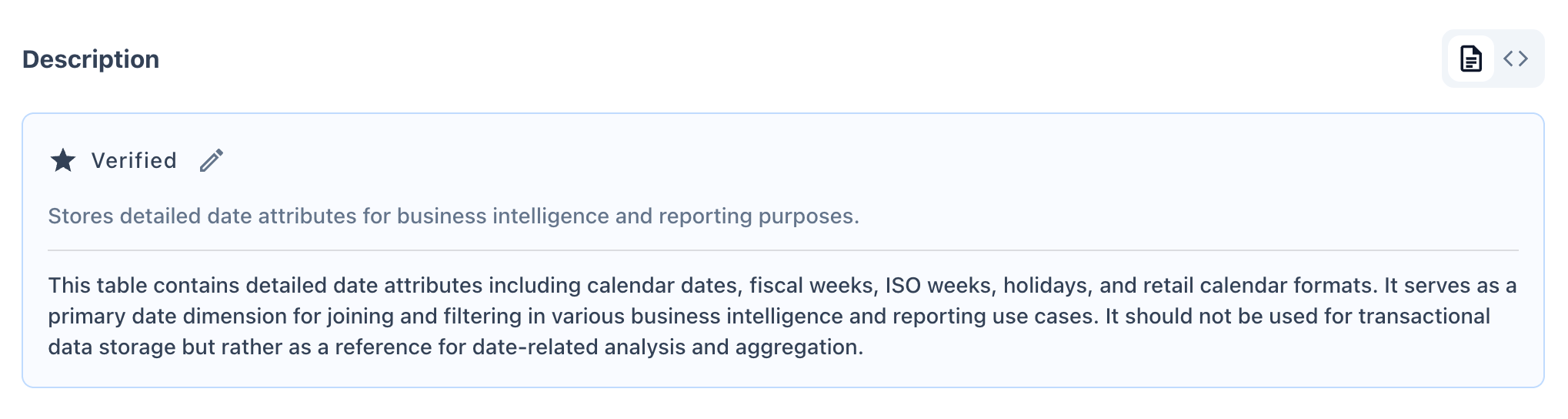
Displays the asset's business and technical description.
* **Verified badge** indicates the description has been reviewed and confirmed accurate by a steward/owner.
* Edit icon allows authorized users to update the description directly.
* Typically includes both a short summary and an extended explanation of intended use (and misuse) of the asset.
* The panel has two view modes toggled by buttons at the top: **View description** (the business/technical write-up) and **View preview data** (a sample of actual rows from the asset for quick data inspection).
The description panel also contains two separate **Prizm AI suggested** sections:
| AI Panel | Purpose |
| :----------------------------- | :--------------------------------------------------------------------------------------------------------------------------------- |
| **Definition recommendation** | AI-generated one-line definition of what the asset represents; refresh via the **Refresh definition recommendation** button |
| **Description recommendation** | AI-generated long-form description of the asset's purpose and usage; refresh via the **Refresh description recommendation** button |
Each panel has an **Edit** button to accept and modify the AI suggestion before saving it as the verified description.
| Element | Description |
| :-------------------- | :------------------------------------------------------------------------------------------------------------------------------------------------------------------------------------------------------------------------------------------------------------------------------------------------------------------------ |
| **Asset Name** | The technical name of the asset (e.g., `SILVER_DIM_DATE`). |
| **Source Icon** | Indicates the connected platform (e.g., Snowflake). |
| **Quality Score** | Provides the Data Quality score, if configured. |
| **Status Badge** | Workflow status of the asset: **Pending**, **Ready For Review**, **Verified**, or **Deprecated** — this badge aggregates the asset's whole governance surface, so an action like approving one AI recommendation can move it backwards (e.g. Ready For Review → Pending) if other governance fields are still incomplete. |
| **Criticality Badge** | Business-impact rating of the asset (e.g., *Critical*, *High*, *Medium, Low*), shown top-right. |
| **Short Description** | One-line summary of the asset's purpose. |
| **Controls** | Quick-action buttons including **Run Job Now** (manually triggers the next catalog/observability job for this asset) and **Approve Recommendations** (bulk-accepts any pending AI-generated metadata suggestions) |
| **Activity Counters** | Quick counts for Alerts, Issues, Views, Queries, Likes/Dislikes, and Conversations. |
| **Owner Avatar** | Shows the assigned owner; "NA" indicates no owner has been assigned yet. |
| **Semantic Tags** | Shows all business classification metadata tags |
| **Breadcrumb** | Hierarchical path showing Database → Schema (e.g., `PRIZM_RETAIL > SILVER_REF`). |
***
## Asset Details
### Asset Description
Displays the asset's business and technical description.
* **Verified badge** indicates the description has been reviewed and confirmed accurate by a steward/owner.
* Edit icon allows authorized users to update the description directly.
* Typically includes both a short summary and an extended explanation of intended use (and misuse) of the asset.
* The panel has two view modes toggled by buttons at the top: **View description** (the business/technical write-up) and **View preview data** (a sample of actual rows from the asset for quick data inspection).
The description panel also contains two separate **Prizm AI suggested** sections:
| AI Panel | Purpose |
| :----------------------------- | :--------------------------------------------------------------------------------------------------------------------------------- |
| **Definition recommendation** | AI-generated one-line definition of what the asset represents; refresh via the **Refresh definition recommendation** button |
| **Description recommendation** | AI-generated long-form description of the asset's purpose and usage; refresh via the **Refresh description recommendation** button |
Each panel has an **Edit** button to accept and modify the AI suggestion before saving it as the verified description.
 ***
### Semantic Context
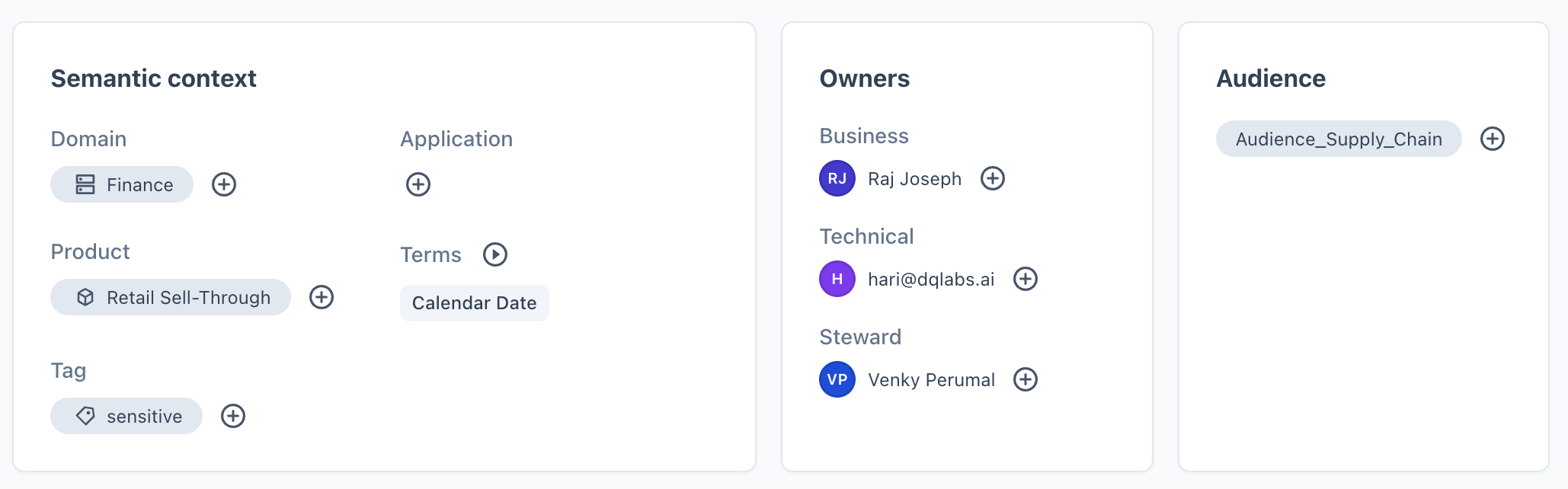
Captures business classification metadata to aid discovery and governance:
| Field | Description |
| :-------------- | :----------------------------------------------------------------------------------------- |
| **Domain** | Business domain the asset belongs to (e.g., Retail, Finance). |
| **Application** | Source application or system associated with the asset. |
| **Product** | Product line the asset supports. |
| **Terms** | Linked glossary terms providing standardized business definitions (e.g., "Calendar Date"). |
| **Tag** | Free-form labels for categorization or sensitivity marking. |
***
### Semantic Context
Captures business classification metadata to aid discovery and governance:
| Field | Description |
| :-------------- | :----------------------------------------------------------------------------------------- |
| **Domain** | Business domain the asset belongs to (e.g., Retail, Finance). |
| **Application** | Source application or system associated with the asset. |
| **Product** | Product line the asset supports. |
| **Terms** | Linked glossary terms providing standardized business definitions (e.g., "Calendar Date"). |
| **Tag** | Free-form labels for categorization or sensitivity marking. |
 ***
### Owners
Identifies accountable individuals for the asset:
* **Business Owner** — accountable for business relevance and usage.
* **Technical Owner** — accountable for technical implementation.
* **Steward** — responsible for data quality and governance upkeep.
> Each role can be assigned via the "+" icon if not already populated.
Each Owner field is a **user picker** — it only resolves against people who already hold a licensed Prizm platform account. You cannot enter a free-text role, team name, or the name of someone without a Prizm login. If the accountable party doesn't have a Prizm account, record their name and role in the asset **Description** instead, so the accountability is still documented even though it can't be structured into the Owners field.
***
### Audience
Lists the user groups or teams intended to consume this asset (e.g., `Audience_Supply_Chain`). Helps with access governance and discovery relevance.
***
### Who Should Use This
An AI-generated (Prizm AI) recommendation describing the ideal audience and appropriate use cases for the asset. If not yet generated, it will display a placeholder message and can be manually authored via the edit icon.
***
### Owners
Identifies accountable individuals for the asset:
* **Business Owner** — accountable for business relevance and usage.
* **Technical Owner** — accountable for technical implementation.
* **Steward** — responsible for data quality and governance upkeep.
> Each role can be assigned via the "+" icon if not already populated.
Each Owner field is a **user picker** — it only resolves against people who already hold a licensed Prizm platform account. You cannot enter a free-text role, team name, or the name of someone without a Prizm login. If the accountable party doesn't have a Prizm account, record their name and role in the asset **Description** instead, so the accountability is still documented even though it can't be structured into the Owners field.
***
### Audience
Lists the user groups or teams intended to consume this asset (e.g., `Audience_Supply_Chain`). Helps with access governance and discovery relevance.
***
### Who Should Use This
An AI-generated (Prizm AI) recommendation describing the ideal audience and appropriate use cases for the asset. If not yet generated, it will display a placeholder message and can be manually authored via the edit icon.
 ***
### Lineage Preview
A condensed view of the asset's data flow:
* **Upstream** — traces the asset back to its origin source (e.g., `REF_CALENDAR → BRONZE_REF_CALENDAR → SILVER_DIM_DATE`).
* **Downstream** — shows dependent assets consuming this data (e.g., dashboards, staging tables, views).
* The expand icon links to the full **Lineage** tab for an interactive, detailed graph.
* If a schema change was detected on this asset, a **"X assets affected by schema change"** banner appears in the lineage preview, indicating how many downstream assets may be impacted by the structural change.
***
### Lineage Preview
A condensed view of the asset's data flow:
* **Upstream** — traces the asset back to its origin source (e.g., `REF_CALENDAR → BRONZE_REF_CALENDAR → SILVER_DIM_DATE`).
* **Downstream** — shows dependent assets consuming this data (e.g., dashboards, staging tables, views).
* The expand icon links to the full **Lineage** tab for an interactive, detailed graph.
* If a schema change was detected on this asset, a **"X assets affected by schema change"** banner appears in the lineage preview, indicating how many downstream assets may be impacted by the structural change.
 ***
## Context & More Information
Together, **Context** and **More Info** answer two distinct questions:
* **Context** → Is this asset well-documented and governed?
* **More Info** → What exactly is this asset, technically, and when did it last change?
This split lets technical users — engineers and stewards — verify lineage accuracy, freshness, and structural identity without leaving the Overview page.
### Context
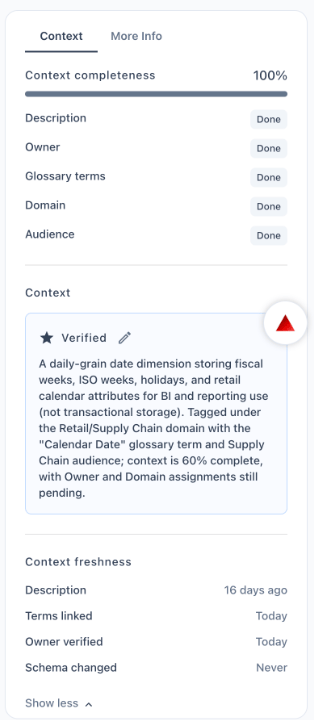
* **Context Completeness %** — a score reflecting how much governance metadata (description, owner, glossary terms, domain, audience) has been filled in.
* **Field-level status** — shows whether each governance field is *Done* or *Pending*.
* **Prizm AI Suggested Context** — AI-generated contextual insights; displays a placeholder if not yet generated.
* **Context Freshness** — shows how recently each governance field was last updated and flags fields that have *Never* been reviewed. Tracked fields include: **Description**, **Terms linked**, **Owner verified**, and **Schema changed**. A stale warning appears when the schema has changed since the description was last reviewed.
***
## Context & More Information
Together, **Context** and **More Info** answer two distinct questions:
* **Context** → Is this asset well-documented and governed?
* **More Info** → What exactly is this asset, technically, and when did it last change?
This split lets technical users — engineers and stewards — verify lineage accuracy, freshness, and structural identity without leaving the Overview page.
### Context
* **Context Completeness %** — a score reflecting how much governance metadata (description, owner, glossary terms, domain, audience) has been filled in.
* **Field-level status** — shows whether each governance field is *Done* or *Pending*.
* **Prizm AI Suggested Context** — AI-generated contextual insights; displays a placeholder if not yet generated.
* **Context Freshness** — shows how recently each governance field was last updated and flags fields that have *Never* been reviewed. Tracked fields include: **Description**, **Terms linked**, **Owner verified**, and **Schema changed**. A stale warning appears when the schema has changed since the description was last reviewed.
 ### More Information
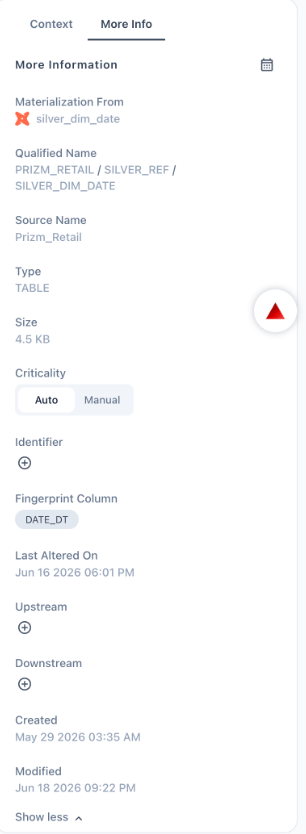
The **More Info** panel complements the **Context** panel by focusing on **system and technical metadata** rather than business/governance metadata.
The **More Info** panel also includes an **Open schedule** button that links directly to the job schedule configuration for this asset — showing the cadence at which observability, catalog, and performance jobs run against it.
#### Field Reference
| Field | Description |
| :----------------------- | :------------------------------------------------------------------------------------------------------------------------------------------------------------------------------------------------------------------------------------------------------------------------- |
| **Materialization From** | Identifies the upstream tool/object the asset is materialized from, along with a platform icon (e.g., dbt model `silver_dim_date`). Useful for tracing how the asset is built. |
| **Qualified Name** | The full hierarchical path of the asset — Database / Schema / Asset Name (e.g., `PRIZM_RETAIL / SILVER_REF / SILVER_DIM_DATE`). Acts as the asset's unique address within the platform. |
| **Source Name** | The connected data source the asset originates from (e.g., `Prizm_Retail`). |
| **Type** | The classification of the asset (e.g., `TABLE`, `VIEW`, `SCHEMA`). |
| **Size** | Current storage footprint of the asset (e.g., `4.5 KB`). |
| **Criticality** | Indicates the business-impact level of the asset. Can be toggled between:
### More Information
The **More Info** panel complements the **Context** panel by focusing on **system and technical metadata** rather than business/governance metadata.
The **More Info** panel also includes an **Open schedule** button that links directly to the job schedule configuration for this asset — showing the cadence at which observability, catalog, and performance jobs run against it.
#### Field Reference
| Field | Description |
| :----------------------- | :------------------------------------------------------------------------------------------------------------------------------------------------------------------------------------------------------------------------------------------------------------------------- |
| **Materialization From** | Identifies the upstream tool/object the asset is materialized from, along with a platform icon (e.g., dbt model `silver_dim_date`). Useful for tracing how the asset is built. |
| **Qualified Name** | The full hierarchical path of the asset — Database / Schema / Asset Name (e.g., `PRIZM_RETAIL / SILVER_REF / SILVER_DIM_DATE`). Acts as the asset's unique address within the platform. |
| **Source Name** | The connected data source the asset originates from (e.g., `Prizm_Retail`). |
| **Type** | The classification of the asset (e.g., `TABLE`, `VIEW`, `SCHEMA`). |
| **Size** | Current storage footprint of the asset (e.g., `4.5 KB`). |
| **Criticality** | Indicates the business-impact level of the asset. Can be toggled between:
• **Auto** — system-calculated based on usage, lineage, and downstream impact.
• **Manual** — user-defined override for cases where business judgment differs from the system score. |
| **Identifier** | An optional custom identifier that can be added via the "+" icon for cross-system reference or integration. |
| **Fingerprint Column** | The column used to uniquely identify/track row-level changes for the asset (e.g., `DATE_DT`). Used internally for change detection. |
| **Last Altered On** | Timestamp of the most recent change to the asset at the source system level (e.g., `Jun 16 2026 06:01 PM`). |
| **Upstream** | Manual entry point to add upstream dependencies not automatically captured by lineage detection. |
| **Downstream** | Manual entry point to add downstream dependencies not automatically captured by lineage detection. |
| **Created** | Date and time the asset was first cataloged in Prizm (e.g., `May 29 2026 03:35 AM`). |
| **Modified** | Date and time of the most recent metadata change within Prizm itself (e.g., `Jun 18 2026 09:22 PM`). |