> ## Documentation Index
> Fetch the complete documentation index at: https://docs.dqlabs.ai/llms.txt
> Use this file to discover all available pages before exploring further.
# Audit Log
> How Prizm's organization-wide Application Audit Log captures every API call, AI action, and background job execution across the platform.
## Overview
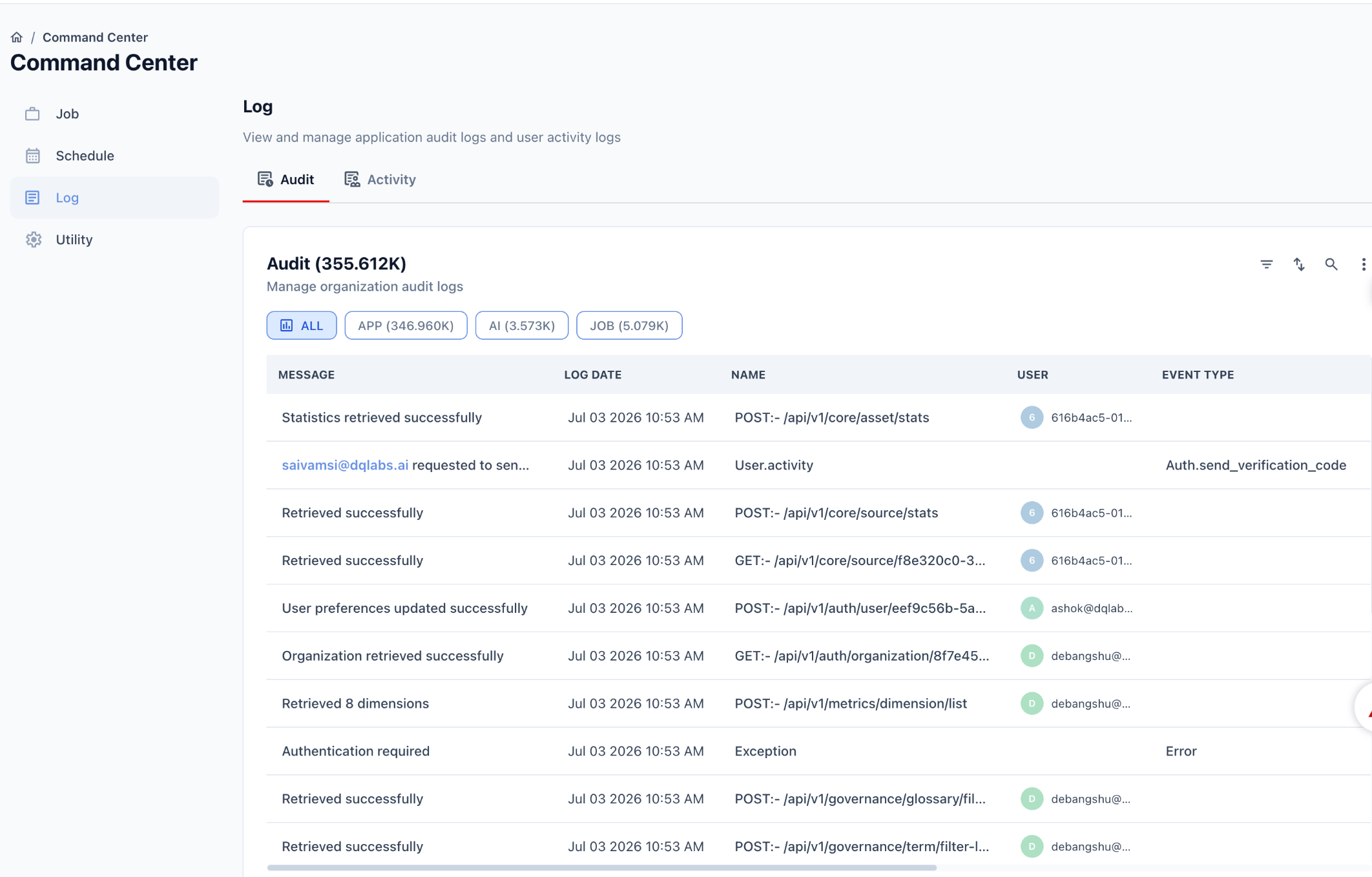
The **Application Audit Log** is the organization-wide, system-level audit trail. Unlike the [asset-level Audit tab](/asset/audit), which only shows business-readable events for one specific asset, this log captures **every request and background action across the entire platform** — API calls, AI actions, and scheduled job executions.
 This is one of three related surfaces. See the [Audit & Activity Logging Overview](/architecture/log/logging-overview) for how it relates to the asset-level Audit tab and the Activity Log.
## Navigating there
From the left-hand navigation:
```text theme={null}
Command Center → Log → Audit
```
The **Log** section sits alongside **Job**, **Schedule**, and **Utility** in the Command Center sidebar. Within Log, **Audit** and **Activity** appear as tabs.
## Audit panel
The panel header shows the total number of recorded events across the organization, e.g. `Audit (355.612K)`.
### Filters
Events are categorized into three types, each with its own count shown on the filter button:
| Filter | Description |
| ------- | ---------------------------------------------------------------------------------------------------------------------------------------------- |
| **ALL** | Every event, across all categories |
| **APP** | Standard application/API events — REST calls to endpoints like `/api/v1/core/*`, `/api/v1/auth/*`, `/api/v1/metrics/*`, `/api/v1/governance/*` |
| **AI** | Events triggered by AI/copilot actions |
| **JOB** | Background or scheduled job executions |
### Table columns
| Column | Description |
| -------------- | ----------------------------------------------------------------------------------------------------------------------------------------------------------------------------------------------------------------------------------------------- |
| **Message** | A short, human-readable outcome of the event, e.g. *"Statistics retrieved successfully"*, *"User preferences updated successfully"*, or a user-attributed message like *"[saivamsi@dqlabs.ai](mailto:saivamsi@dqlabs.ai) requested to send..."* |
| **Log Date** | Timestamp the event occurred |
| **Name** | The underlying call or event identifier. For API events this is formatted as `METHOD:- /path`, e.g. `POST:- /api/v1/core/asset/stats`. For non-API events it's a system label, e.g. `User.activity` or `Exception` |
| **User** | An avatar and identifier (user ID or email) for who triggered the event. Left blank for system-generated or anonymous events |
| **Event Type** | A structured classification, populated mainly for auth and AI-related events, e.g. `Auth.send_verification_code`, or `Error` for exceptions |
### Example entries
* `POST:- /api/v1/core/asset/stats` → *"Statistics retrieved successfully"* — a routine API call
* `User.activity` with Event Type `Auth.send_verification_code` → a user requested a verification code
* `Exception` with Event Type `Error` → *"Authentication required"*, an auth failure
* `POST:- /api/v1/metrics/dimension/list` → *"Retrieved 8 dimensions"* — a metrics query
## Common use cases
* **Debugging** — trace an API error (e.g. `Exception` / `Error` entries) back to the exact request, timestamp, and user
* **Security review** — audit authentication events like verification code requests or failed logins
* **AI oversight** — review what actions an AI/copilot feature took using the `AI` filter
* **Job monitoring** — confirm scheduled or triggered jobs ran, using the `JOB` filter
## How this differs from the asset-level Audit tab
| | Asset Audit tab | Application Audit Log |
| -------- | --------------------------------------------- | -------------------------------------- |
| Scope | One asset | Entire organization |
| Volume | Dozens to hundreds of events | Hundreds of thousands of events |
| Content | Business actions (create, update, link, view) | Every technical request (API, AI, job) |
| Audience | Data owners, stewards | Admins, engineers, security/compliance |
## Related pages
See how this fits with the other two logging surfaces
See session-level rollups of this same activity
See a curated, business-readable audit trail for a single asset
This is one of three related surfaces. See the [Audit & Activity Logging Overview](/architecture/log/logging-overview) for how it relates to the asset-level Audit tab and the Activity Log.
## Navigating there
From the left-hand navigation:
```text theme={null}
Command Center → Log → Audit
```
The **Log** section sits alongside **Job**, **Schedule**, and **Utility** in the Command Center sidebar. Within Log, **Audit** and **Activity** appear as tabs.
## Audit panel
The panel header shows the total number of recorded events across the organization, e.g. `Audit (355.612K)`.
### Filters
Events are categorized into three types, each with its own count shown on the filter button:
| Filter | Description |
| ------- | ---------------------------------------------------------------------------------------------------------------------------------------------- |
| **ALL** | Every event, across all categories |
| **APP** | Standard application/API events — REST calls to endpoints like `/api/v1/core/*`, `/api/v1/auth/*`, `/api/v1/metrics/*`, `/api/v1/governance/*` |
| **AI** | Events triggered by AI/copilot actions |
| **JOB** | Background or scheduled job executions |
### Table columns
| Column | Description |
| -------------- | ----------------------------------------------------------------------------------------------------------------------------------------------------------------------------------------------------------------------------------------------- |
| **Message** | A short, human-readable outcome of the event, e.g. *"Statistics retrieved successfully"*, *"User preferences updated successfully"*, or a user-attributed message like *"[saivamsi@dqlabs.ai](mailto:saivamsi@dqlabs.ai) requested to send..."* |
| **Log Date** | Timestamp the event occurred |
| **Name** | The underlying call or event identifier. For API events this is formatted as `METHOD:- /path`, e.g. `POST:- /api/v1/core/asset/stats`. For non-API events it's a system label, e.g. `User.activity` or `Exception` |
| **User** | An avatar and identifier (user ID or email) for who triggered the event. Left blank for system-generated or anonymous events |
| **Event Type** | A structured classification, populated mainly for auth and AI-related events, e.g. `Auth.send_verification_code`, or `Error` for exceptions |
### Example entries
* `POST:- /api/v1/core/asset/stats` → *"Statistics retrieved successfully"* — a routine API call
* `User.activity` with Event Type `Auth.send_verification_code` → a user requested a verification code
* `Exception` with Event Type `Error` → *"Authentication required"*, an auth failure
* `POST:- /api/v1/metrics/dimension/list` → *"Retrieved 8 dimensions"* — a metrics query
## Common use cases
* **Debugging** — trace an API error (e.g. `Exception` / `Error` entries) back to the exact request, timestamp, and user
* **Security review** — audit authentication events like verification code requests or failed logins
* **AI oversight** — review what actions an AI/copilot feature took using the `AI` filter
* **Job monitoring** — confirm scheduled or triggered jobs ran, using the `JOB` filter
## How this differs from the asset-level Audit tab
| | Asset Audit tab | Application Audit Log |
| -------- | --------------------------------------------- | -------------------------------------- |
| Scope | One asset | Entire organization |
| Volume | Dozens to hundreds of events | Hundreds of thousands of events |
| Content | Business actions (create, update, link, view) | Every technical request (API, AI, job) |
| Audience | Data owners, stewards | Admins, engineers, security/compliance |
## Related pages
See how this fits with the other two logging surfaces
See session-level rollups of this same activity
See a curated, business-readable audit trail for a single asset