> ## Documentation Index
> Fetch the complete documentation index at: https://docs.dqlabs.ai/llms.txt
> Use this file to discover all available pages before exploring further.
# Overview
> What Schema metrics are in Prizm — monitor the structure of a data asset for column, type, and constraint changes that can silently break pipelines.
## What is a Schema metric?
Schema metrics monitor the **structure of a data asset** — whether the expected columns are present, whether data types match, and whether the schema has drifted from its baseline. Schema changes are one of the most common causes of silent downstream failures in data pipelines.
**Type:** Automatic — Schema metrics are enabled on all connected assets by default as part of the Essential observability profile. No configuration is required to activate them.
Schema metrics answer the question: *Is the shape of the data what consumers expect?*
Prizm captures a schema snapshot on the first profiling run and establishes it as the baseline. On each subsequent run, the current schema is compared against the baseline. Any structural difference triggers a schema change detection event.
### Metrics
| Metric | Level | Subcategory | Dimension | Description |
| ------------ | --------- | ----------- | --------- | --------------------------------------------------------------------------------------------------------------------------------------------------------------------------------------------------------------- |
| Schema | Asset | Schema | Integrity | Validates the overall schema structure. Monitors the full set of column names, data types, and counts. Alerts when any structural difference is detected relative to the established baseline. |
| Column Count | Asset | Schema | Integrity | Tracks the total number of columns in the asset. A column count change is often the first signal of a column addition or deletion. |
| Schema Name | Asset | Schema | Integrity | Monitors the namespace (schema or database) the asset belongs to. Alerts if the asset is moved to a different schema — which can silently break lineage-dependent queries referencing the fully qualified path. |
| Schema Type | Attribute | Schema | Integrity | Tracks the data type of individual columns at the attribute level. Alerts when a column's type changes — e.g., `NUMERIC` to `VARCHAR` — which can cause silent failures in downstream aggregations. |
### What Schema monitoring detects
Prizm tracks eight categories of structural change:
| Change type | Description | Example |
| ---------------------- | ------------------------------------------------- | -------------------------------------------------------------------------------------------------------------------- |
| **Attribute addition** | A new column appears that was not in the baseline | A migration script adds `created_by` to `orders` |
| **Attribute deletion** | An existing column is removed | A cleanup script drops `legacy_flag` without notifying downstream teams |
| **Attribute rename** | A column appears under a new name | `cust_id` renamed to `customer_id` during a normalisation project |
| **Attribute resize** | A column's data type or size/precision changes | `transaction_amount` changes from `NUMERIC(10,2)` to `VARCHAR`, or `name` grows from `VARCHAR(50)` to `VARCHAR(255)` |
| **PK addition** | A primary key constraint is added to a column | A previously unkeyed table gets a `PRIMARY KEY` applied during a schema migration |
| **PK deletion** | An existing primary key constraint is removed | A `PRIMARY KEY` is dropped as part of a table restructure |
| **FK addition** | A foreign key constraint is added | A new relationship is established between `orders.customer_id` and `customers.id` |
| **FK deletion** | An existing foreign key constraint is removed | A FK is dropped to allow orphaned rows or as part of a denormalization effort |
For each detected change, Prizm records the **before** and **after** state — column name, data type, length, and constraint changes (PK, FK) — so you can see exactly what changed without querying the data platform directly.
### Example use cases
**Detecting an accidental column drop:** A database migration script drops a column that downstream dbt models depend on. Prizm fires a Schema alert immediately on the next scan — before any dbt jobs fail — allowing the team to roll back the migration before impact propagates.
**Catching an upstream attribute resize:** A source system changes `transaction_amount` from `NUMERIC(10,2)` to `VARCHAR` during a system upgrade. The column appears in queries but downstream aggregations silently return nulls. Prizm's Schema alert fires on the resize before any dashboard shows incorrect totals.
**Surfacing unannounced column additions:** An upstream team adds new columns to a shared source table without notifying consumers. The Schema alert surfaces the addition immediately — allowing data consumers to assess whether to incorporate the new columns in their models.
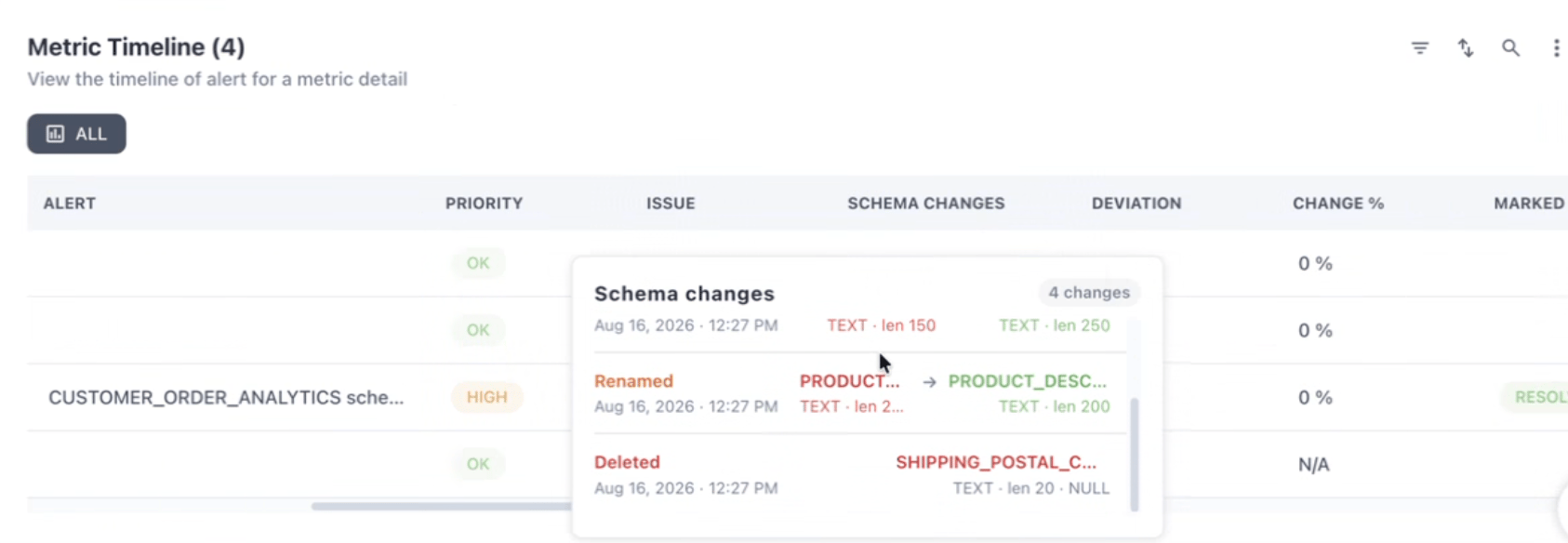 Schema alerts fire on any detected structural change. Planned schema changes (intentional column additions, DDL deployments) will also trigger alerts. Acknowledge expected changes promptly from the Alert page so alerts remain meaningful for actual unintended drift.
Set thresholds, understand the diff view, acknowledge schema changes, and configure alerts.
Schema alerts fire on any detected structural change. Planned schema changes (intentional column additions, DDL deployments) will also trigger alerts. Acknowledge expected changes promptly from the Alert page so alerts remain meaningful for actual unintended drift.
Set thresholds, understand the diff view, acknowledge schema changes, and configure alerts.