> ## Documentation Index
> Fetch the complete documentation index at: https://docs.dqlabs.ai/llms.txt
> Use this file to discover all available pages before exploring further.
# Product
> How to create and manage Data Products — logical groupings of data assets organized around a business concept with defined quality expectations.
A **Data Product** is a logical unit that groups data assets around a business concept and makes them available to consumers under a defined set of quality expectations. Where a Domain sets ownership, a Product defines what is being delivered — the curated, accountable dataset that a business function depends on.
Every data product belongs to exactly one owning Domain, has a type that describes its position in the data flow, and exposes a set of health metrics that track whether it is meeting its SLA.
## Product types
| Type | Description | Examples |
| ------------- | ------------------------------------------------------------------------------- | -------------------------------------- |
| **Source** | Data closely aligned with operational source systems; minimally transformed | Raw Salesforce export, SAP master data |
| **Aggregate** | Processed or enriched data combining multiple source products | `customer_360`, `revenue_summary_mart` |
| **Consumer** | Data optimized for a specific consumer use case with significant transformation | BI-ready star schema, ML feature store |
## How to create a Product
Click **Semantics** in the top navigation bar, then select **Product**.
Click **+ Add Product** to open the creation form.
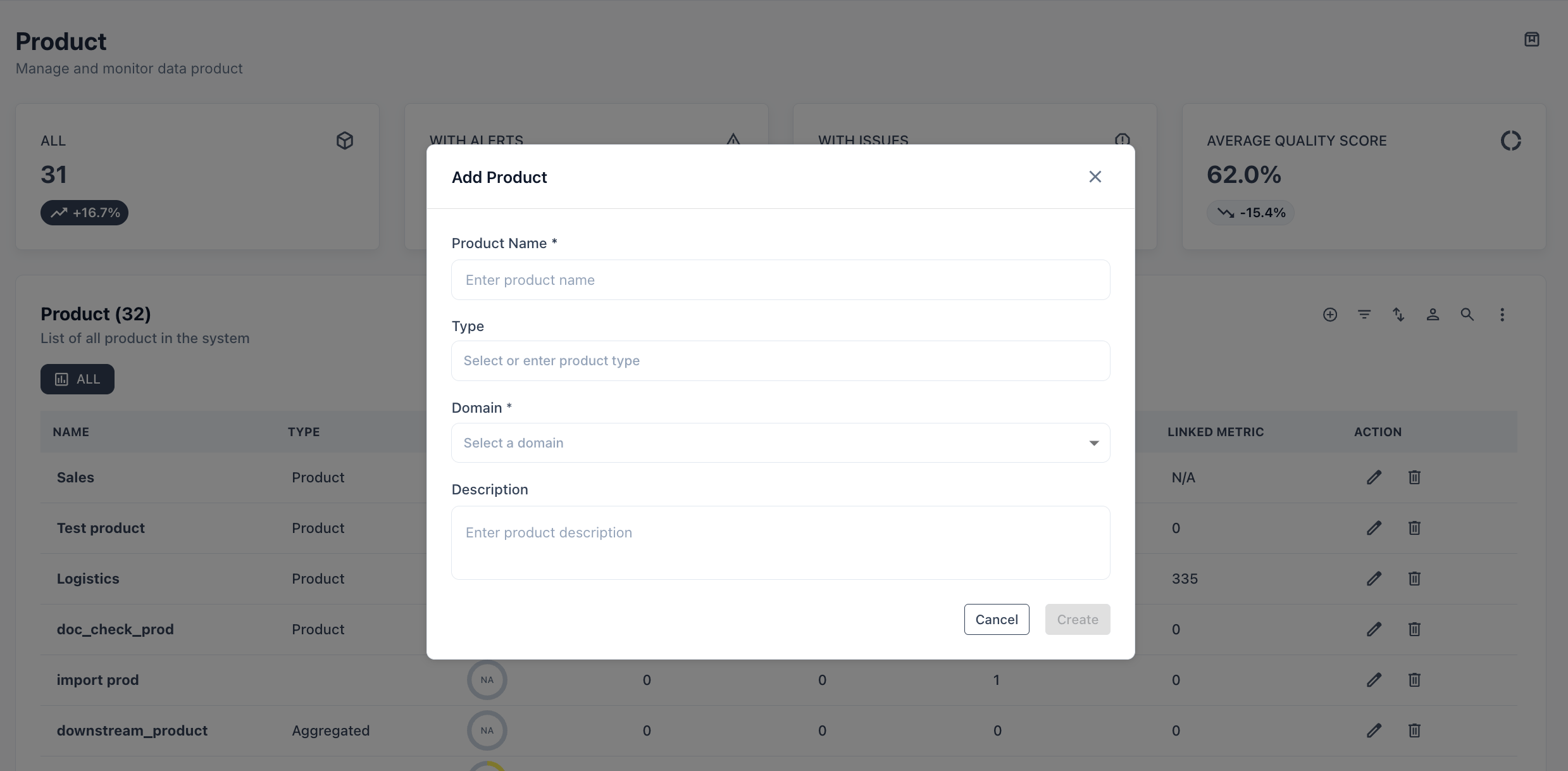 | Field | Required | Notes |
| --------------- | -------- | ---------------------------------------------------------------------- |
| **Name** | Yes | Use the business concept name, e.g., `Customer 360`, `Sales Analytics` |
| **Type** | Yes | Source, Aggregate, or Consumer |
| **Domain** | Yes | Exactly one owning domain |
| **Description** | No | What this product delivers and who consumes it |
| **Owner** | No | One or more users responsible for this product |
| **Active** | — | True by default; set to False to retire without deleting |
Switch to the **Linked Assets** tab. Add any combination of tables, views, attributes, or other assets that make up this product. These are the assets whose quality scores roll up to the product's overall health.
Click **Save**. The product appears in the list and is immediately available as a filter in the Asset catalog.
## Product list
| Column | Description |
| ------------------ | ------------------------------------------------------- |
| **Name** | Product name |
| **Type** | Source, Aggregate, or Consumer |
| **Score** | Average quality score across all linked assets |
| **Alert** | Active alert count |
| **Issue** | Open issue count |
| **Linked Assets** | Number of assets linked to this product |
| **Linked Metrics** | Number of quality metrics running against linked assets |
| **Action** | Edit or delete |
## Product detail page
Clicking a product name opens its detail view with four tabs:
**Overview** — Key health metrics at a glance:
| Metric | What it measures |
| ----------------- | ---------------------------------------------------------------------- |
| **Health Index** | Single reliability score across the product's full asset ecosystem |
| **Freshness SLA** | % of linked datasets updated within their defined SLA window |
| **Adoption** | % of linked assets that have been accessed or queried |
| **Impact** | Cost vs. utilization alignment — is the investment justified by usage? |
Recent alerts (top 5) are surfaced inline with a link to view all alerts filtered to this product.
**Linked Assets** — Add or remove assets from this product.
**Audit** — Full change log: who changed what and when.
**Readme** — Free-form documentation for consumers of this product.
## Use cases
**End-to-end product health** — link the 15 tables that make up your `Customer 360` product. Track one score instead of monitoring 15 tables independently.
**SLA accountability** — set a Freshness SLA on the product level. Alert the product owner when any linked asset misses its update window.
**Consumer discovery** — tag a product as `Consumer-ready` and link it from your data catalog. Analysts find the product instead of hunting through individual tables.
**Cross-domain products** — if a product draws from multiple domains (e.g., a Finance product consuming Customer data), assign ownership to the primary domain and capture the contributing domains through Application links.
Each product must have exactly one owning Domain. If a product genuinely spans multiple domains equally, create a shared or enterprise domain and assign ownership there.
| Field | Required | Notes |
| --------------- | -------- | ---------------------------------------------------------------------- |
| **Name** | Yes | Use the business concept name, e.g., `Customer 360`, `Sales Analytics` |
| **Type** | Yes | Source, Aggregate, or Consumer |
| **Domain** | Yes | Exactly one owning domain |
| **Description** | No | What this product delivers and who consumes it |
| **Owner** | No | One or more users responsible for this product |
| **Active** | — | True by default; set to False to retire without deleting |
Switch to the **Linked Assets** tab. Add any combination of tables, views, attributes, or other assets that make up this product. These are the assets whose quality scores roll up to the product's overall health.
Click **Save**. The product appears in the list and is immediately available as a filter in the Asset catalog.
## Product list
| Column | Description |
| ------------------ | ------------------------------------------------------- |
| **Name** | Product name |
| **Type** | Source, Aggregate, or Consumer |
| **Score** | Average quality score across all linked assets |
| **Alert** | Active alert count |
| **Issue** | Open issue count |
| **Linked Assets** | Number of assets linked to this product |
| **Linked Metrics** | Number of quality metrics running against linked assets |
| **Action** | Edit or delete |
## Product detail page
Clicking a product name opens its detail view with four tabs:
**Overview** — Key health metrics at a glance:
| Metric | What it measures |
| ----------------- | ---------------------------------------------------------------------- |
| **Health Index** | Single reliability score across the product's full asset ecosystem |
| **Freshness SLA** | % of linked datasets updated within their defined SLA window |
| **Adoption** | % of linked assets that have been accessed or queried |
| **Impact** | Cost vs. utilization alignment — is the investment justified by usage? |
Recent alerts (top 5) are surfaced inline with a link to view all alerts filtered to this product.
**Linked Assets** — Add or remove assets from this product.
**Audit** — Full change log: who changed what and when.
**Readme** — Free-form documentation for consumers of this product.
## Use cases
**End-to-end product health** — link the 15 tables that make up your `Customer 360` product. Track one score instead of monitoring 15 tables independently.
**SLA accountability** — set a Freshness SLA on the product level. Alert the product owner when any linked asset misses its update window.
**Consumer discovery** — tag a product as `Consumer-ready` and link it from your data catalog. Analysts find the product instead of hunting through individual tables.
**Cross-domain products** — if a product draws from multiple domains (e.g., a Finance product consuming Customer data), assign ownership to the primary domain and capture the contributing domains through Application links.
Each product must have exactly one owning Domain. If a product genuinely spans multiple domains equally, create a shared or enterprise domain and assign ownership there.