> ## Documentation Index
> Fetch the complete documentation index at: https://docs.dqlabs.ai/llms.txt
> Use this file to discover all available pages before exploring further.
# Tag
> How to create and apply Tags in Prizm — flexible labels for classifying, filtering, and targeting assets and attributes.
**Tags** are free-form labels you can attach to any asset or attribute. Unlike Domains (which establish ownership) or Terms (which define business meaning), Tags are flexible — you create them as needed, apply as many as relevant, and use them across the platform for filtering, grouping, and policy targeting.
## Cardinality
| Entity | Tags |
| ----------------------------------------- | ------ |
| **Asset** (table, view, pipeline, report) | 0–many |
| **Attribute** (column) | 0–many |
## Common tag patterns
| Pattern | Examples |
| ------------------------ | ------------------------------------------------------ |
| **Data classification** | `PII`, `PHI`, `PCI`, `Confidential`, `Public` |
| **Environment** | `Production`, `Staging`, `Dev`, `Sandbox` |
| **Certification status** | `Certified`, `Deprecated`, `Under Review`, `Draft` |
| **Compliance scope** | `SOX`, `GDPR`, `HIPAA`, `CCPA` |
| **Business initiative** | `AI-Ready`, `Migration Target`, `Golden Record` |
| **Team** | `Finance Team`, `Data Platform`, `Marketing Analytics` |
## How to create a Tag
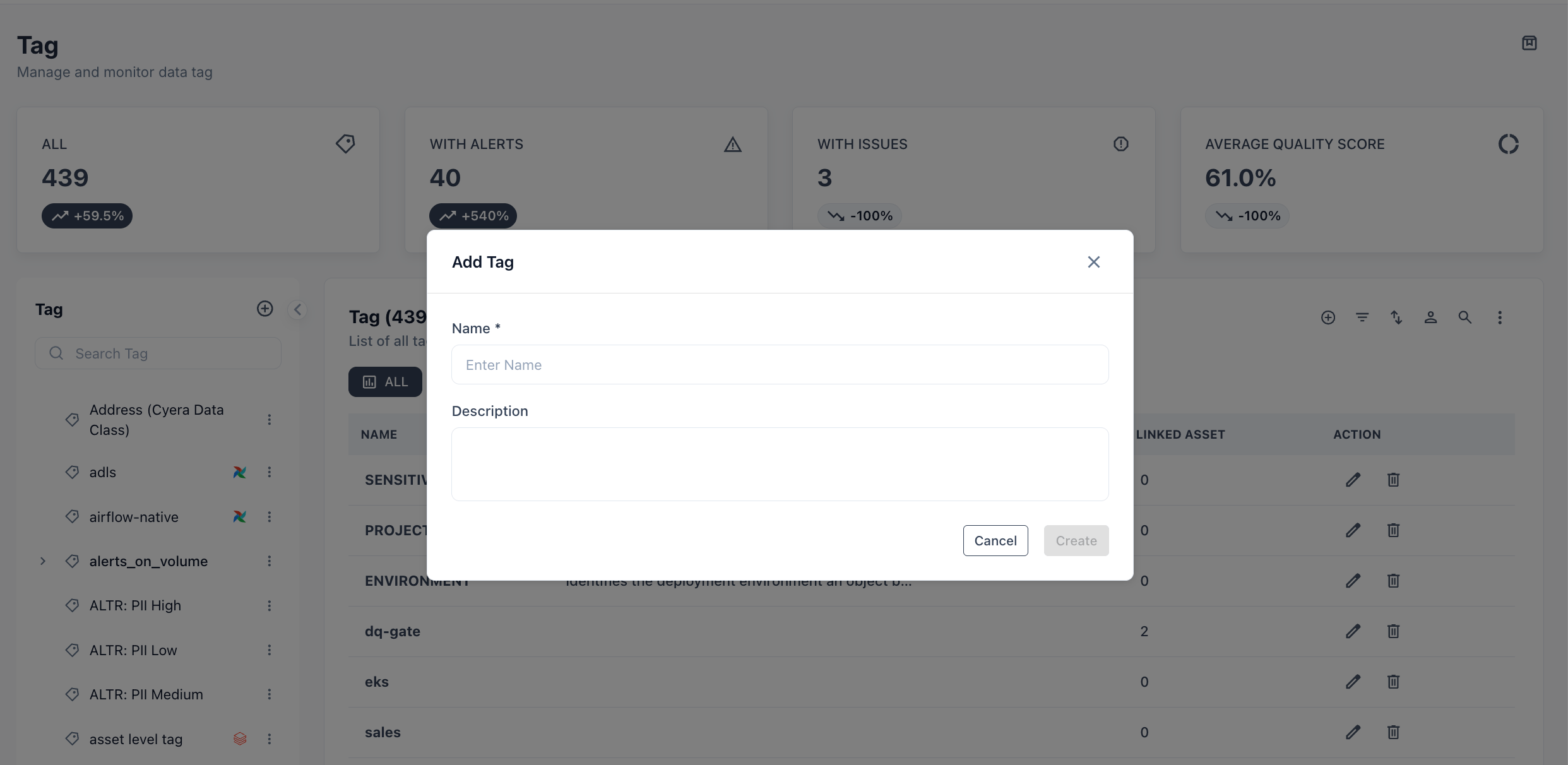
Click **Semantics** in the top navigation bar, then select **Tag**.
Click **+ Add Tag**, enter a name, and click **Save**. Tags are available immediately for assignment.
 ## How to apply a Tag
**From an asset or attribute detail page:** Open any asset or attribute → right-side panel → **Tag** field → search and select one or more tags.
**From the Asset catalog:** Multi-select assets in the catalog table → use the bulk action menu → **Add Tag** → select tags to apply to all selected assets at once.
## Where tags appear
| Surface | How tags are used |
| ---------------------- | ------------------------------------------------------------------- |
| **Asset catalog** | Filter panel — show only assets with a specific tag |
| **Quality score page** | Grouping dimension — view average score by tag |
| **RBAC** | Resource scoping — grant access to all assets tagged `Finance Team` |
| **Alert rules** | Scope — trigger alert policies on assets tagged `PII` |
| **Converse** | Natural language filter — "show me all certified production tables" |
## Use cases
**Data classification and masking** — tag all columns containing personal data with `PII`. Apply a masking policy at the tag level rather than column by column. When new PII columns are added and tagged, the policy applies automatically.
**Certification workflow** — stewards tag assets as `Under Review` during the review process and update to `Certified` on approval. Consumers filter the Asset catalog to `Certified` tables before building pipelines.
**Compliance scoping** — tag all assets in scope for SOX or GDPR. Generate a report of quality scores across the `SOX` tag to demonstrate control health to auditors.
**Environment separation** — tag assets by environment (`Production`, `Staging`). Alert rules and access policies can target only `Production` assets, reducing noise from development data.
Tags are case-sensitive and shared across the organization. Agree on a naming convention before creating tags (e.g., all-caps for classification: `PII`, title case for teams: `Finance Team`) to prevent duplicates like `pii`, `Pii`, and `PII` coexisting.
## How to apply a Tag
**From an asset or attribute detail page:** Open any asset or attribute → right-side panel → **Tag** field → search and select one or more tags.
**From the Asset catalog:** Multi-select assets in the catalog table → use the bulk action menu → **Add Tag** → select tags to apply to all selected assets at once.
## Where tags appear
| Surface | How tags are used |
| ---------------------- | ------------------------------------------------------------------- |
| **Asset catalog** | Filter panel — show only assets with a specific tag |
| **Quality score page** | Grouping dimension — view average score by tag |
| **RBAC** | Resource scoping — grant access to all assets tagged `Finance Team` |
| **Alert rules** | Scope — trigger alert policies on assets tagged `PII` |
| **Converse** | Natural language filter — "show me all certified production tables" |
## Use cases
**Data classification and masking** — tag all columns containing personal data with `PII`. Apply a masking policy at the tag level rather than column by column. When new PII columns are added and tagged, the policy applies automatically.
**Certification workflow** — stewards tag assets as `Under Review` during the review process and update to `Certified` on approval. Consumers filter the Asset catalog to `Certified` tables before building pipelines.
**Compliance scoping** — tag all assets in scope for SOX or GDPR. Generate a report of quality scores across the `SOX` tag to demonstrate control health to auditors.
**Environment separation** — tag assets by environment (`Production`, `Staging`). Alert rules and access policies can target only `Production` assets, reducing noise from development data.
Tags are case-sensitive and shared across the organization. Agree on a naming convention before creating tags (e.g., all-caps for classification: `PII`, title case for teams: `Finance Team`) to prevent duplicates like `pii`, `Pii`, and `PII` coexisting.