> ## Documentation Index
> Fetch the complete documentation index at: https://docs.dqlabs.ai/llms.txt
> Use this file to discover all available pages before exploring further.
# Deployment Overview
> Deployment models, environments, and hosting options for PRIZM.
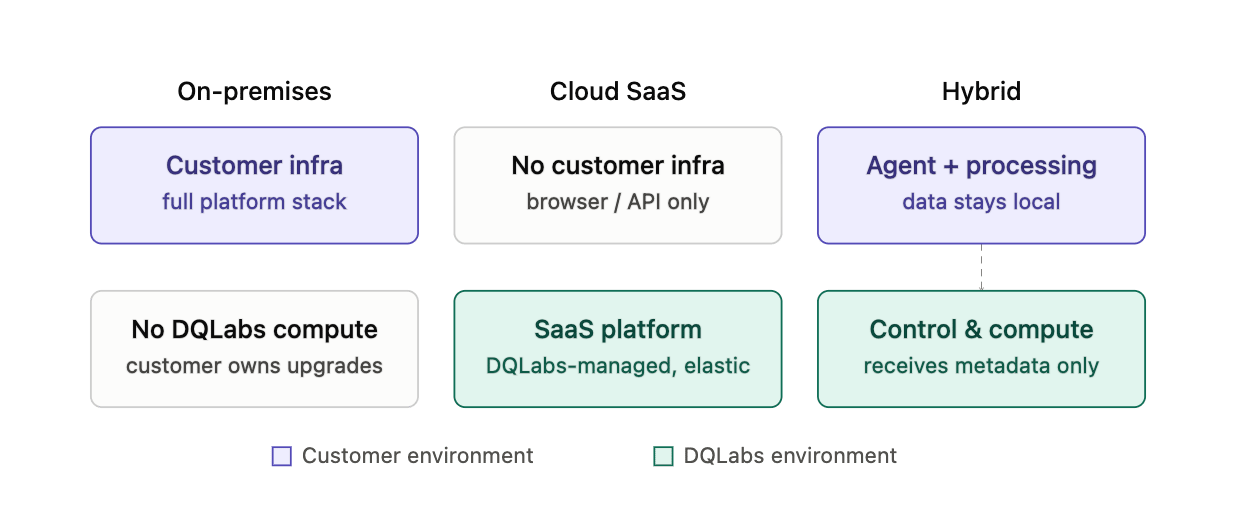
Prizm supports three deployment models. The right choice depends on where you need the platform to run and how much infrastructure you want to manage.
 ## 1. On-Premises / Customer-Hosted
The full Prizm platform — control plane, UI, and agents — runs entirely within your infrastructure. You provision, operate, and upgrade all components. Two variants are available depending on whether your environment has internet access.
## 1. On-Premises / Customer-Hosted
The full Prizm platform — control plane, UI, and agents — runs entirely within your infrastructure. You provision, operate, and upgrade all components. Two variants are available depending on whether your environment has internet access.
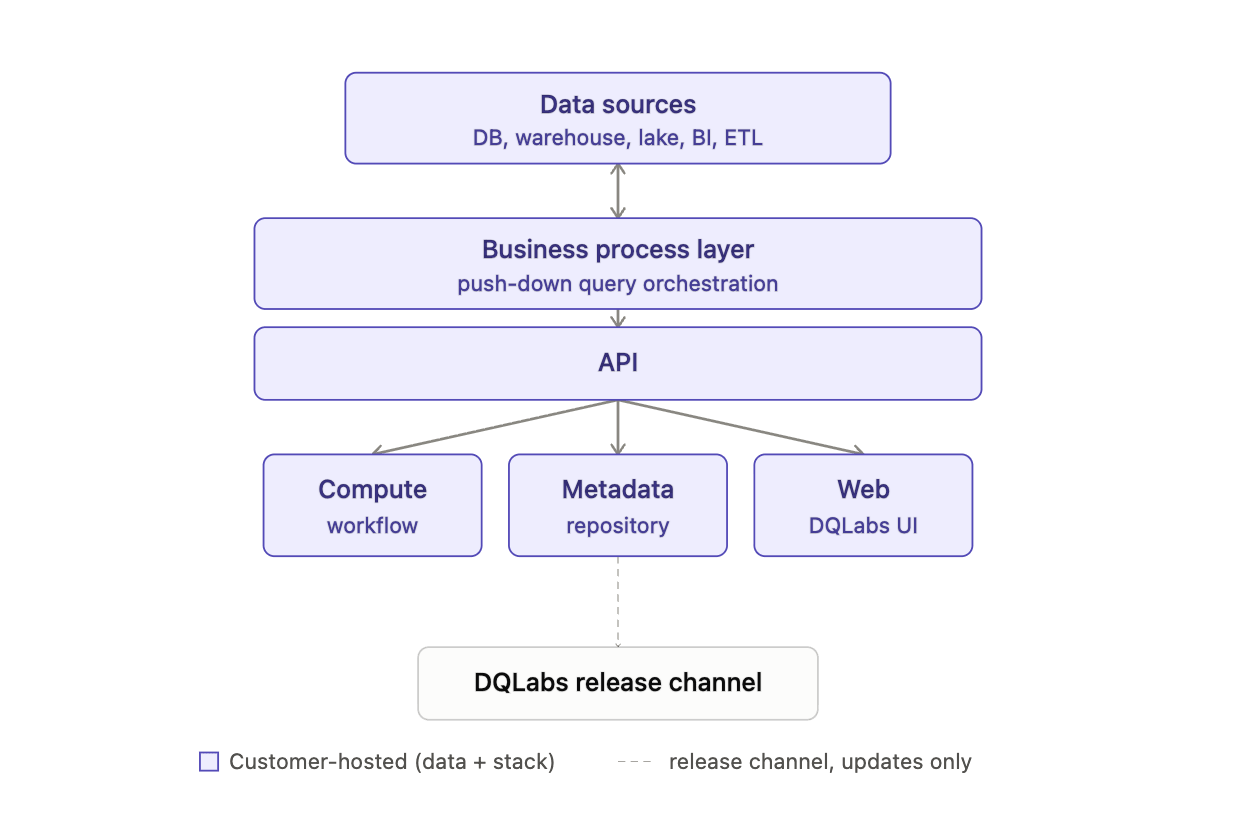 **Online** — Your server has outbound internet access. Prizm validates the license and pulls software updates over the internet. This is the standard on-premises path for environments with a network connection.
**Offline** — Your server is air-gapped or on a private network with no direct internet access. License validation and image delivery are handled through an alternate channel (VPN tunnel, port forwarding, or a pre-loaded registry). Suited for high-security or regulated environments.
## 2. Cloud SaaS
Prizm is fully hosted and managed by DQLabs. Your data sources remain in your environment; the platform connects to them over an encrypted channel, executes queries in place (push-down), and returns only metadata and results — raw data never leaves your infrastructure.
**Online** — Your server has outbound internet access. Prizm validates the license and pulls software updates over the internet. This is the standard on-premises path for environments with a network connection.
**Offline** — Your server is air-gapped or on a private network with no direct internet access. License validation and image delivery are handled through an alternate channel (VPN tunnel, port forwarding, or a pre-loaded registry). Suited for high-security or regulated environments.
## 2. Cloud SaaS
Prizm is fully hosted and managed by DQLabs. Your data sources remain in your environment; the platform connects to them over an encrypted channel, executes queries in place (push-down), and returns only metadata and results — raw data never leaves your infrastructure.
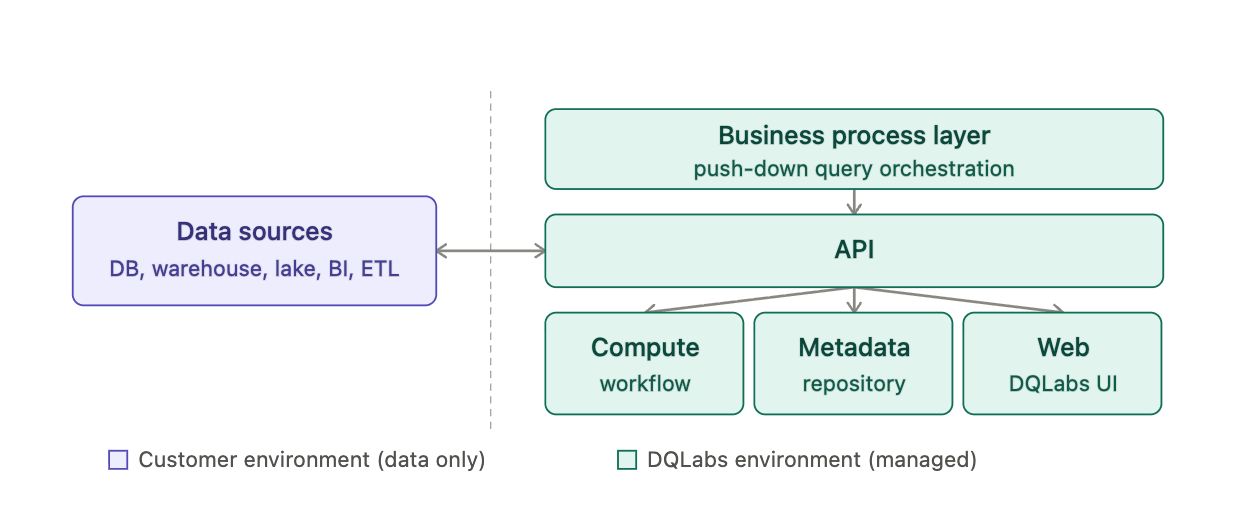 No infrastructure to provision or maintain on your side. Contact DQLabs to get started.
## 3. Hybrid (Agent Outbound)
Lightweight agent containers run inside your environment, close to your data sources. The agents connect outbound to the Prizm-managed platform over an encrypted NATS channel — no inbound connections, no VPN, and no firewall changes beyond opening outbound port 443. The Prizm platform itself is hosted and managed by DQLabs.
No infrastructure to provision or maintain on your side. Contact DQLabs to get started.
## 3. Hybrid (Agent Outbound)
Lightweight agent containers run inside your environment, close to your data sources. The agents connect outbound to the Prizm-managed platform over an encrypted NATS channel — no inbound connections, no VPN, and no firewall changes beyond opening outbound port 443. The Prizm platform itself is hosted and managed by DQLabs.
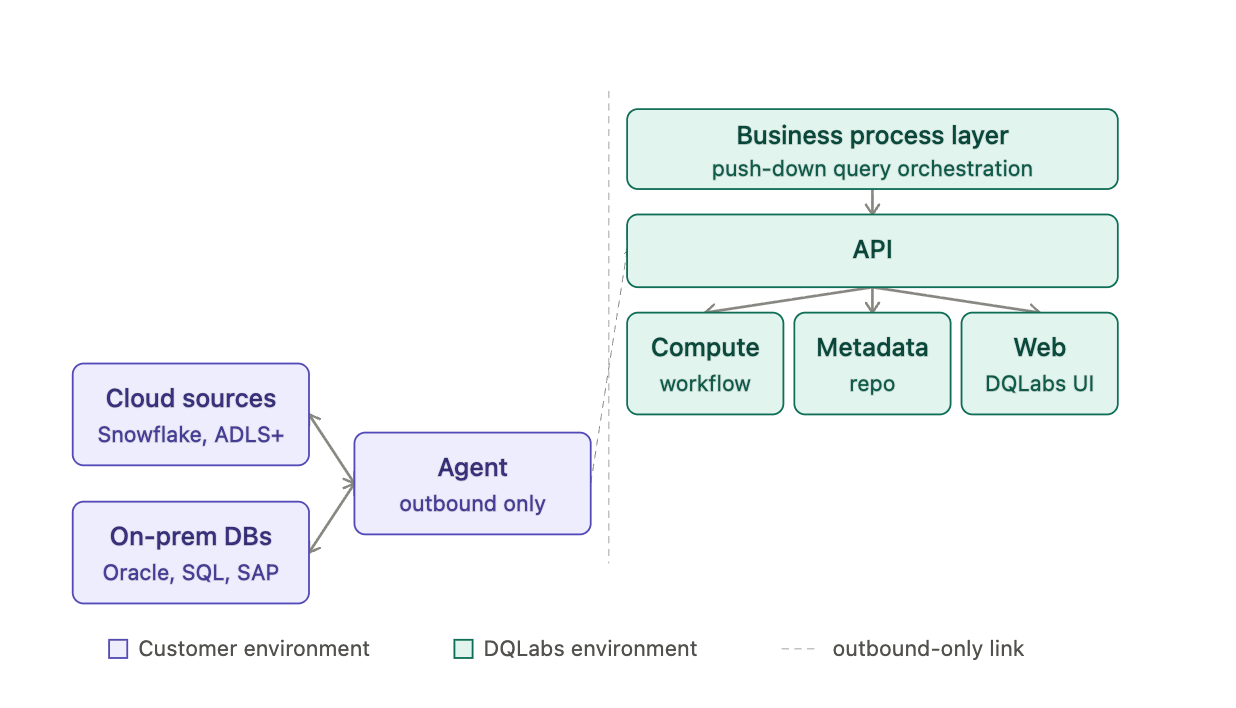 Four deployment targets are available:
* **AWS Agent Outbound** — agents deployed on Amazon EKS or an EC2 instance
* **AKS Agent Outbound** — agents deployed on Azure Kubernetes Service or an Azure VM
* **GCP Agent Outbound** — agents deployed on Google Kubernetes Engine or a Compute Engine VM
* **VM Agent Outbound** — agents deployed on an on-premises VM or self-managed Kubernetes cluster
## Deployment Topology
In all three deployments, Prizm actually places compute relative to data.
Four deployment targets are available:
* **AWS Agent Outbound** — agents deployed on Amazon EKS or an EC2 instance
* **AKS Agent Outbound** — agents deployed on Azure Kubernetes Service or an Azure VM
* **GCP Agent Outbound** — agents deployed on Google Kubernetes Engine or a Compute Engine VM
* **VM Agent Outbound** — agents deployed on an on-premises VM or self-managed Kubernetes cluster
## Deployment Topology
In all three deployments, Prizm actually places compute relative to data.
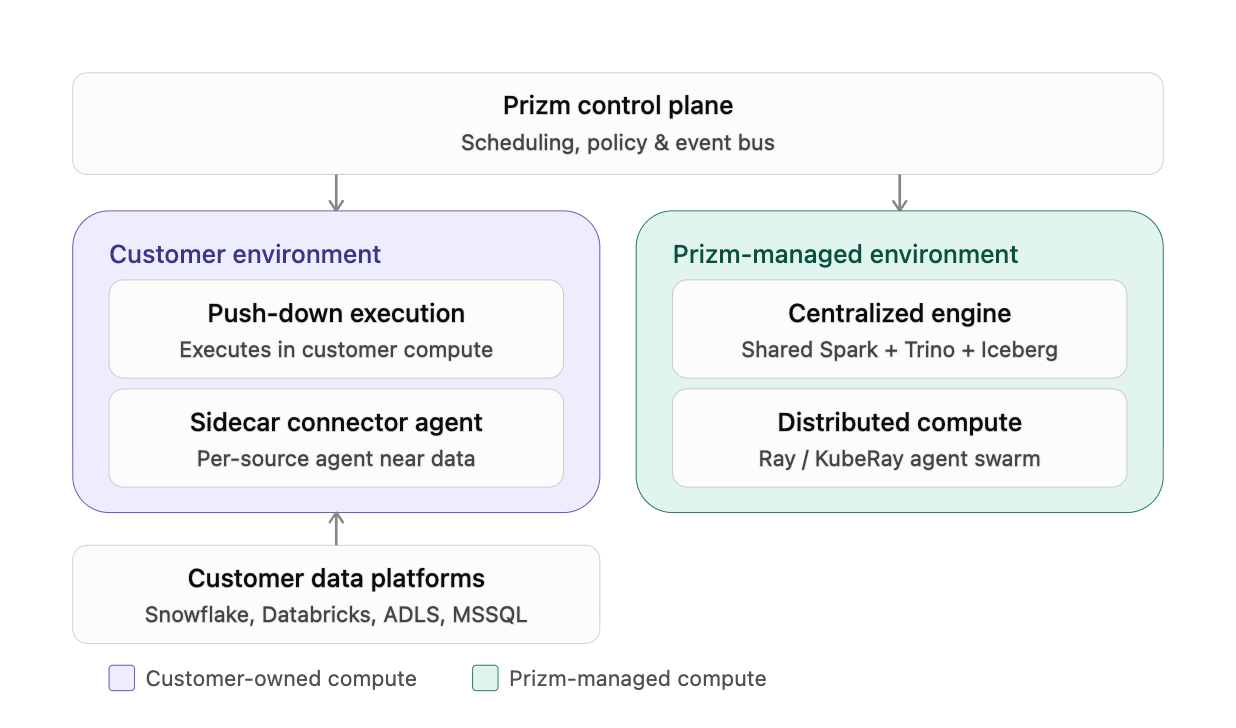 **Push-down.** Wherever a source has native query compute, Prizm keeps execution there instead of pulling data out. For e.g., The Databricks connector runs parameterized SQL directly against `information_schema` and `system.*` tables on the customer's own SQL Warehouse/cluster; the Converse natural-language-to-SQL feature explicitly generates SQL that's "executed as a push-down operation into your warehouse (e.g. Snowflake) through your existing connector — all AI reasoning happens within Prizm, nothing is pushed to the warehouse beyond the resulting query." The ADLS agent takes this further with cost-aware push-down choices: `DESCRIBE HISTORY` reads the Delta transaction log (pure metadata, \~50–200ms, no executors) instead of `SELECT COUNT(*)` (a full Spark table scan), and Databricks customers can route conversion/observability jobs to run entirely as notebook Jobs on their own Databricks cluster rather than Prizm's compute. Nothing is copied out; only credentials and job parameters cross the boundary.
**Sidecar.** Each data source gets its own connector agent (`prizm-adls-agent`, a Snowflake agent, a Databricks agent, etc.) — small, independently deployed MCP services that own credential resolution and protocol translation for exactly one source type. They're outbound-only over NATS JetStream (no inbound HTTP endpoint), registering with `prizm-core`/`prizm-schedule` via tool-call subjects and heartbeats. This is a sidecar pattern in the literal sense: in the hybrid deployment model, these agent processes can run inside the customer's network, close to the data, while the control plane (UI, API, scheduling, policy) stays centralized i.e., Control plane and UI can be centralized while execution plane runs closer to customer data."
**Centralized engine.** When a source has no native query layer (flat files on ADLS/S3), Prizm falls back to its own shared compute: files get converted to Iceberg tables via a platform Spark cluster (`prizm_spark_trino` engine id), cataloged in Nessie, and queried through a centrally-hosted Trino layer for metric reads — one engine shared across tenants for that class of source, as an alternative to push-down when push-down isn't available.
**Distributed.** The AI/analytics tier that powers profiling, anomaly detection, and the wider agent swarm (asset discovery, DQ rules, observability, root cause, remediation agents, etc., coordinated by an Agent Orchestrator + event bus + prioritized task queue) runs on Ray/KubeRay, horizontally distributed across per-tenant node pools (`ray-primary`, `ray-secondary`, `ray-third`) inside Prizm's AKS clusters. This scales elastically per tenant rather than as one monolithic process.
These four aren't mutually exclusive — they're options the platform picks per source and per deployment model (Prizm-managed SaaS, customer-managed VPC/on-prem, or hybrid), all coordinated by the same control plane over NATS.
## Metastore Architecture
The metastore is per-tenant Postgres, not a shared multi-tenant database. Each tenant provisioned through the Centralized Tenant Creation Portal gets an isolated database with no cross-tenant data access, plus its own Database Scaling Config set at provisioning time — isolation is the primary scaling axis, not sharding within one instance.
**Push-down.** Wherever a source has native query compute, Prizm keeps execution there instead of pulling data out. For e.g., The Databricks connector runs parameterized SQL directly against `information_schema` and `system.*` tables on the customer's own SQL Warehouse/cluster; the Converse natural-language-to-SQL feature explicitly generates SQL that's "executed as a push-down operation into your warehouse (e.g. Snowflake) through your existing connector — all AI reasoning happens within Prizm, nothing is pushed to the warehouse beyond the resulting query." The ADLS agent takes this further with cost-aware push-down choices: `DESCRIBE HISTORY` reads the Delta transaction log (pure metadata, \~50–200ms, no executors) instead of `SELECT COUNT(*)` (a full Spark table scan), and Databricks customers can route conversion/observability jobs to run entirely as notebook Jobs on their own Databricks cluster rather than Prizm's compute. Nothing is copied out; only credentials and job parameters cross the boundary.
**Sidecar.** Each data source gets its own connector agent (`prizm-adls-agent`, a Snowflake agent, a Databricks agent, etc.) — small, independently deployed MCP services that own credential resolution and protocol translation for exactly one source type. They're outbound-only over NATS JetStream (no inbound HTTP endpoint), registering with `prizm-core`/`prizm-schedule` via tool-call subjects and heartbeats. This is a sidecar pattern in the literal sense: in the hybrid deployment model, these agent processes can run inside the customer's network, close to the data, while the control plane (UI, API, scheduling, policy) stays centralized i.e., Control plane and UI can be centralized while execution plane runs closer to customer data."
**Centralized engine.** When a source has no native query layer (flat files on ADLS/S3), Prizm falls back to its own shared compute: files get converted to Iceberg tables via a platform Spark cluster (`prizm_spark_trino` engine id), cataloged in Nessie, and queried through a centrally-hosted Trino layer for metric reads — one engine shared across tenants for that class of source, as an alternative to push-down when push-down isn't available.
**Distributed.** The AI/analytics tier that powers profiling, anomaly detection, and the wider agent swarm (asset discovery, DQ rules, observability, root cause, remediation agents, etc., coordinated by an Agent Orchestrator + event bus + prioritized task queue) runs on Ray/KubeRay, horizontally distributed across per-tenant node pools (`ray-primary`, `ray-secondary`, `ray-third`) inside Prizm's AKS clusters. This scales elastically per tenant rather than as one monolithic process.
These four aren't mutually exclusive — they're options the platform picks per source and per deployment model (Prizm-managed SaaS, customer-managed VPC/on-prem, or hybrid), all coordinated by the same control plane over NATS.
## Metastore Architecture
The metastore is per-tenant Postgres, not a shared multi-tenant database. Each tenant provisioned through the Centralized Tenant Creation Portal gets an isolated database with no cross-tenant data access, plus its own Database Scaling Config set at provisioning time — isolation is the primary scaling axis, not sharding within one instance.
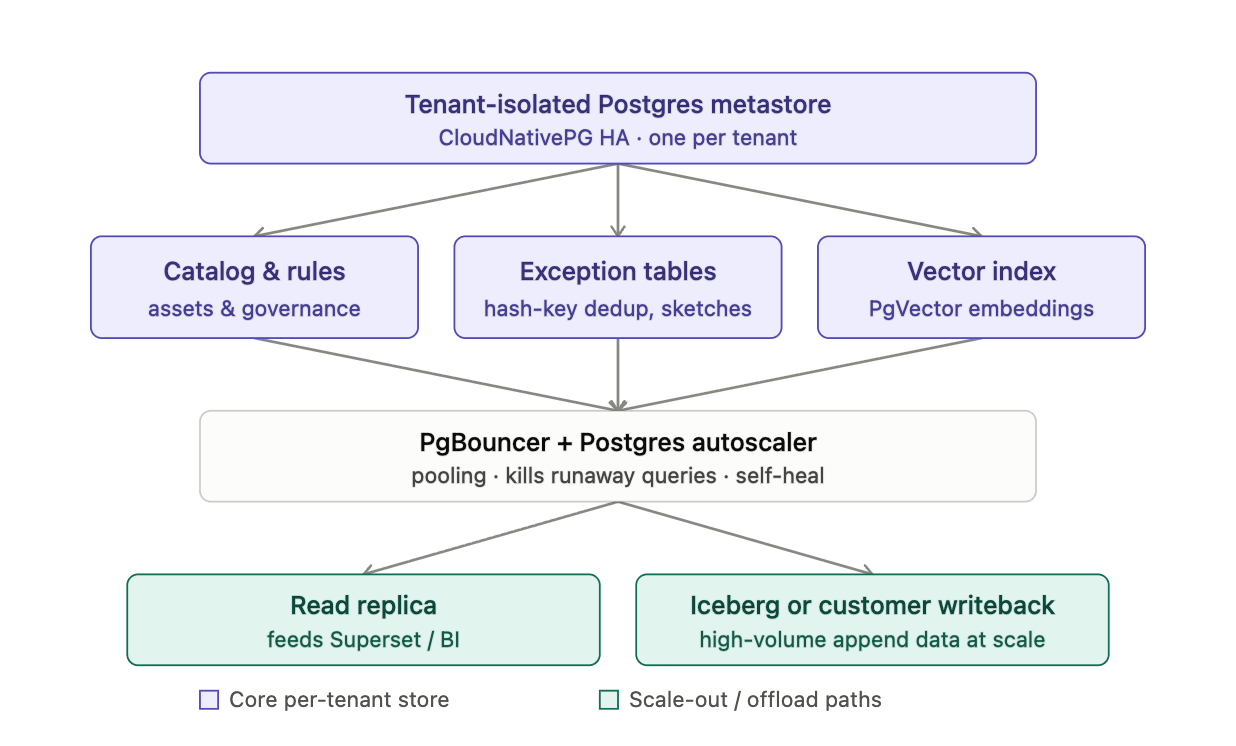 What's stored: the T/O/L/U/P/C/B MetaStore components (tenant config, object catalog, lineage, users, policies, connectors, business terms) sit alongside a governance schema (rule\_template, rule\_assignment, rule\_run, metric\_detail), Exception and Exception Metric tables (deduplicated on hash\_key), and PgVector embeddings for schema, column-profile, and governance-term similarity search used by the agentic runtime. Mergeable sketches (HLL, KLL/TDigest, Top-k) are stored alongside profiling baselines so recomputing distributions doesn't require rescanning source data.
Where it lives: each tenant's Postgres runs as a CloudNativePG-managed HA StatefulSet inside that tenant's dedicated Kubernetes namespace, fronted by PgBouncer for connection pooling. A custom Postgres Autoscaler watches the instance, kills runaway queries, and self-heals rather than relying on manual intervention. For very high-volume append-only data (profiling history, exception detail at scale), three Metastore Approaches exist as alternatives to raw Postgres growth: Iceberg tables on customer-owned object storage, a Postgres StatefulSet still in the customer's data plane, or writeback directly into the customer's own warehouse — chosen based on data volume and how much the customer wants to host themselves. Analytics offload runs through a read replica of the internal Postgres metastore that Apache Superset queries directly, keeping BI traffic off the primary.
How it scales: scaling is tenant-by-tenant (isolated databases with independent scaling configs) rather than one large multi-tenant schema, which is also why noisy-neighbor query load in one tenant can't starve another's metastore. Within a tenant, CloudNativePG HA + PgBouncer + the autoscaler handle vertical/connection scaling, and the roadmap explicitly calls out partitioning and partition-wise joins for high-volume tables once single-tenant data volume justifies it. Right-sizing by environment tier (small/medium/large/xlarge) and periodic index/materialized-view review round out the operational scaling story.
## Metadata Flow
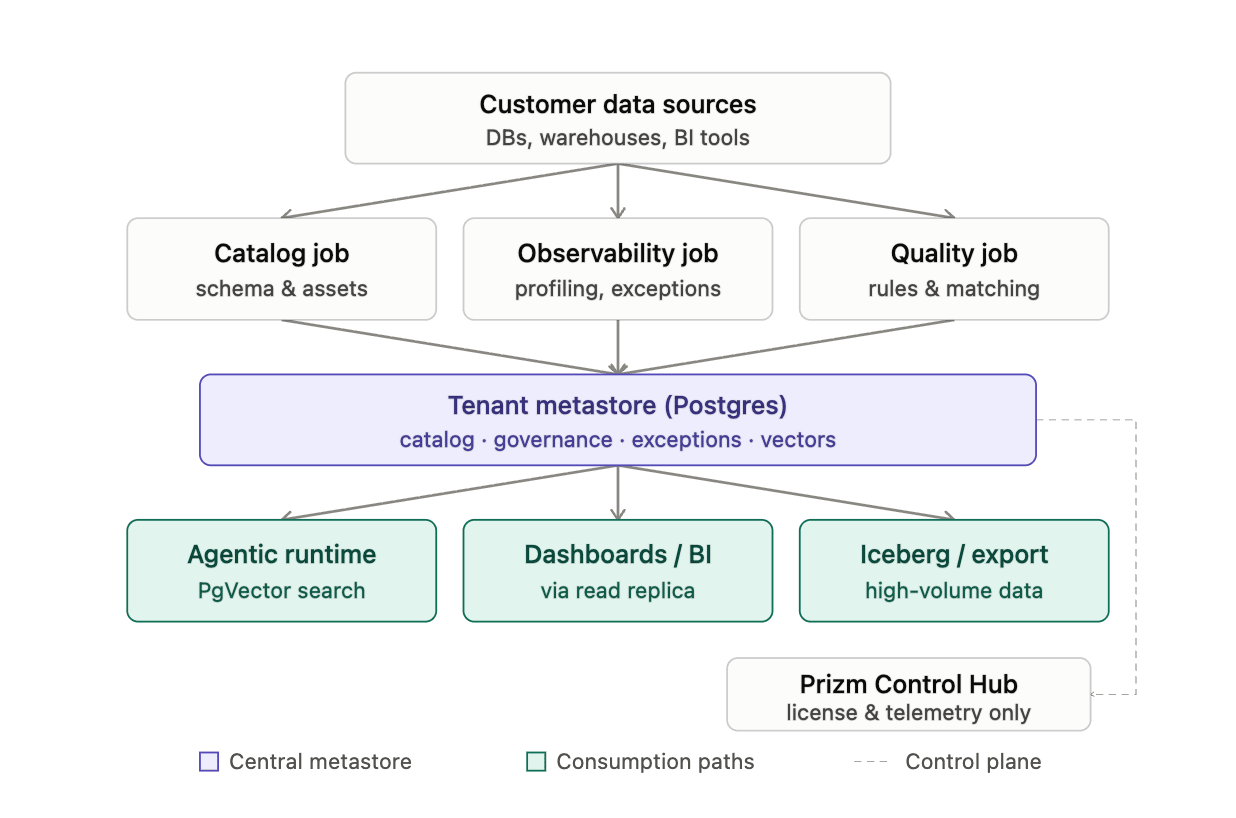
Below is a full metadata lifecycle: customer sources feed the catalog, observability, and quality jobs, which all write into the per-tenant Postgres metastore; from there the agentic runtime (PgVector search), dashboards/Postgres, and Iceberg/customer-export paths consume it. The dashed side branch to the Prizm Control Hub carries only license and telemetry data — no business metadata ever crosses that line, keeping the control plane genuinely metadata-blind.
What's stored: the T/O/L/U/P/C/B MetaStore components (tenant config, object catalog, lineage, users, policies, connectors, business terms) sit alongside a governance schema (rule\_template, rule\_assignment, rule\_run, metric\_detail), Exception and Exception Metric tables (deduplicated on hash\_key), and PgVector embeddings for schema, column-profile, and governance-term similarity search used by the agentic runtime. Mergeable sketches (HLL, KLL/TDigest, Top-k) are stored alongside profiling baselines so recomputing distributions doesn't require rescanning source data.
Where it lives: each tenant's Postgres runs as a CloudNativePG-managed HA StatefulSet inside that tenant's dedicated Kubernetes namespace, fronted by PgBouncer for connection pooling. A custom Postgres Autoscaler watches the instance, kills runaway queries, and self-heals rather than relying on manual intervention. For very high-volume append-only data (profiling history, exception detail at scale), three Metastore Approaches exist as alternatives to raw Postgres growth: Iceberg tables on customer-owned object storage, a Postgres StatefulSet still in the customer's data plane, or writeback directly into the customer's own warehouse — chosen based on data volume and how much the customer wants to host themselves. Analytics offload runs through a read replica of the internal Postgres metastore that Apache Superset queries directly, keeping BI traffic off the primary.
How it scales: scaling is tenant-by-tenant (isolated databases with independent scaling configs) rather than one large multi-tenant schema, which is also why noisy-neighbor query load in one tenant can't starve another's metastore. Within a tenant, CloudNativePG HA + PgBouncer + the autoscaler handle vertical/connection scaling, and the roadmap explicitly calls out partitioning and partition-wise joins for high-volume tables once single-tenant data volume justifies it. Right-sizing by environment tier (small/medium/large/xlarge) and periodic index/materialized-view review round out the operational scaling story.
## Metadata Flow
Below is a full metadata lifecycle: customer sources feed the catalog, observability, and quality jobs, which all write into the per-tenant Postgres metastore; from there the agentic runtime (PgVector search), dashboards/Postgres, and Iceberg/customer-export paths consume it. The dashed side branch to the Prizm Control Hub carries only license and telemetry data — no business metadata ever crosses that line, keeping the control plane genuinely metadata-blind.
 ## Metadata Model
Everything hangs off a single polymorphic **Asset** table (id, name, type, external\_id, created\_at) — the same row shape whether the underlying object is a table, view, external table, routine, pipeline/job, Power BI report, or dashboard. Connector-specific detail lives in thin extension tables keyed by asset\_id (e.g. PowerBIWorkspace, PowerBIDataset, PowerBIReport each carry asset\_id as FK plus platform-specific fields), so every connector normalizes into the same core model rather than inventing its own schema.
## Metadata Model
Everything hangs off a single polymorphic **Asset** table (id, name, type, external\_id, created\_at) — the same row shape whether the underlying object is a table, view, external table, routine, pipeline/job, Power BI report, or dashboard. Connector-specific detail lives in thin extension tables keyed by asset\_id (e.g. PowerBIWorkspace, PowerBIDataset, PowerBIReport each carry asset\_id as FK plus platform-specific fields), so every connector normalizes into the same core model rather than inventing its own schema.
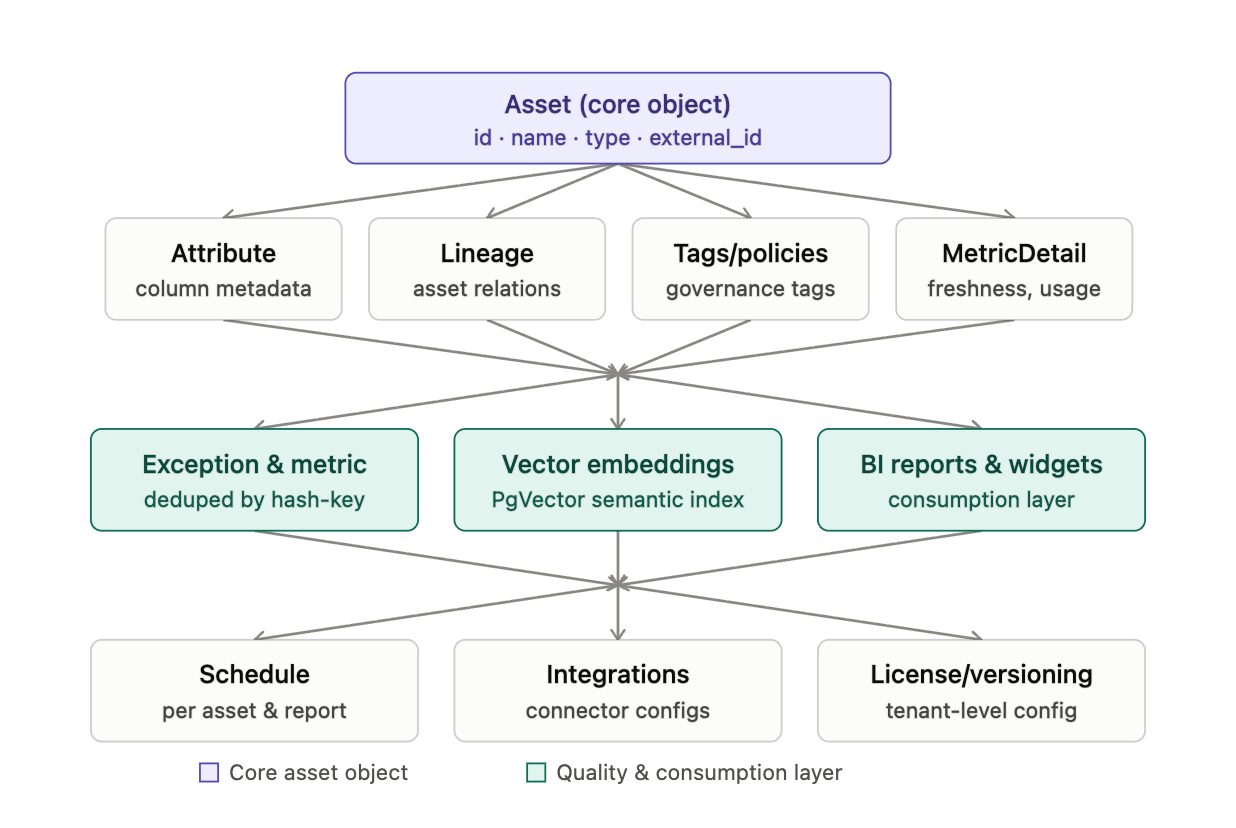 Around that core Asset object: Attribute holds column-level metadata (the "column" object type). Lineage stores asset-to-asset relations, built at connector time from query history or platform lineage APIs (table-level, column-level where available). Tags/policies capture governance labels — PII flags, business terms, masking/row-access policies. MetricDetail stores computed metrics per asset (asset\_id, metric\_type, value, timestamp) — freshness, reliability, usage, volume, cost.
One layer out: Exception and Exception Metric tables hold quality findings, deduplicated by hash\_key so reruns don't create duplicate issues. Vector embeddings (PgVector) index schema, column-profile, and governance-term text for the agentic runtime's semantic search. BI reports, dashboards, and widgets are modeled as their own asset subtypes but historically kept in separate data models from core catalog objects (a known gap the team has flagged for consolidation).
Tenant/platform-level objects sit apart from the per-asset graph: Schedule (tracked separately for assets vs. reports today), Integrations/Channels (connector configs, currently combined into one model but slated for functional separation — ticketing, catalog, communication), and License/versioning (license activation plus version history on assets, application, and domains)
## Prizm Agent
Prizm agents are lightweight containers that run in your environment and connect your data sources — Snowflake, Databricks, Tableau, dbt, and Spark — to the Prizm platform. This page covers the architecture, deployment options, and what Prizm provides before you begin.
Prizm uses a fully outbound NATS JetStream architecture. Agents initiate outbound connections to the Prizm-managed NATS server — no inbound ports, no VPN, and no firewall changes are required on your infrastructure beyond opening outbound port 443.
**How a job flows:**
1. A user initiates a job in the Prizm UI — a data quality scan, metric computation, or workflow execution.
2. Prizm core services process the request and publish agent tool call requests to NATS JetStream subjects.
3. Agents in your environment maintain an outbound poll connection to NATS at sub-second intervals (\~0.5s). No inbound connection is ever made to your environment.
4. The agent receives the task, connects directly to your data source within your network, and executes the operation.
5. The agent publishes the result back to a NATS reply inbox. Only aggregated results and structured metadata are returned — raw data rows never leave your environment.
6. NATS delivers the result to Prizm and the message is deleted after acknowledgement.
| Component | Location |
| --------------------- | ---------------------------------------------------- |
| Prizm SaaS Platform | Hosted and managed by Prizm |
| NATS JetStream Broker | Hosted and managed by Prizm |
| Agent containers | Your environment — outbound only |
| Agent image registry | Public registry — no authentication required to pull |
Prizm manages the NATS service. You do not need to set up or maintain NATS. Prizm provides NATS connection details (host, port, credentials, environment) before deployment begins.
### Deployment options
Two deployment options are available for each platform. Choose based on your infrastructure and production requirements.
| Option | When to use | Complexity |
| ---------------------------------------------------------- | ------------------------------------------------------------------------------------------------------------------- | ---------- |
| **Option A — Kubernetes** (AKS / GKE / EKS / self-managed) | You have or can provision a Kubernetes cluster. Recommended for production with high job volume or HA requirements. | Medium |
| **Option B — VM + Docker** | You have a high-spec VM and prefer a simpler setup without Kubernetes. | Low |
### What Prizm provides
Before deployment begins, the Prizm team provides:
* **NATS connection details** — host, port, username, password, environment name
* **Agent image tags** — specific versioned image tags for each agent release
* **Helm chart** (Azure AKS only) — ZIP file containing the `customer-agents` Helm chart
* **Pre-filled kubectl secret command** (AKS) — ready to run with your NATS credentials
* **Ongoing support** — upgrades, troubleshooting, and maintenance
### Firewall and port requirements
Only outbound port 443 is required. No inbound rules are needed on your agent cluster or VM.
| Port | Protocol | Direction | Purpose |
| -------- | -------- | --------- | ------------------------------------------------------------------ |
| 443 | WSS | Outbound | Agent → Prizm NATS — required; agents cannot function without this |
| 443 | HTTPS | Outbound | Agent → Snowflake, Databricks, dbt Cloud, Spark cluster |
| 80 / 443 | HTTP/S | Outbound | Agent → Tableau server |
| 22 | TCP | Inbound | SSH admin access — restrict to your IP only (VM deployments) |
### Supported agents
Each agent type connects to a specific data source and subscribes to its own NATS subject. You can deploy any combination of agents — only deploy the agents for data sources you use.
| Agent | Port | Data source |
| ---------- | ---- | -------------------------- |
| Snowflake | 8001 | Snowflake |
| Databricks | 8022 | Databricks |
| dbt | 8017 | dbt Cloud / dbt Core |
| Tableau | 8033 | Tableau Server |
| Spark | 8044 | Spark / Livy REST endpoint |
### Multi-agent routing
Prizm routes tool calls to the correct agent using NATS JetStream subjects. Each agent type subscribes to its own subject. Agents on different platforms (Azure, GCP, on-premises) all connect outbound to the same NATS server — no special routing configuration is needed.
If you deploy multiple replicas of the same agent type, NATS JetStream WorkQueue retention delivers each message to exactly one pod. Whichever pod is free picks up the next job and connects to the data source specified in the message payload — not from the pod's own environment variables. To scale, increase replicas in the deployment.
### VPN and private connectivity
Agents connect to NATS over the public internet by default (outbound WSS on port 443). Private connectivity options are also supported:
* **Azure → Azure**: Azure VNet Peering or VPN Gateway
* **GCP → Azure**: GCP Cloud VPN to Azure VPN Gateway
* **AWS → Azure**: AWS VPN Gateway to Azure VPN Gateway
* **On-premises → Azure**: Azure ExpressRoute (recommended) or IPSec VPN
In all VPN scenarios, only `NATS_HOST` changes from a public hostname to the private IP of the NATS server. No inbound rules are required on your side.
VPN setup is the responsibility of your network team. Once the tunnel is established, contact the Prizm team for the NATS server private IP.
### Deployment guides
#### 1. On-Premises / Customer-Hosted
**Online** — server has outbound internet access
Architecture, prerequisites, sizing, and key environment variables.
Step-by-step Docker Swarm installation, common operations, and troubleshooting.
**Offline** — air-gapped or private network
Architecture, access options (VPN tunnel, port forwarding, offline), prerequisites, and sizing.
Step-by-step Docker Swarm installation, common operations, and troubleshooting.
#### 2. Cloud SaaS
Contact DQLabs to provision a managed Prizm tenant. No infrastructure deployment required.
#### 3. Hybrid (Agent Outbound)
**AWS Agent Outbound**
Prerequisites, firewall rules, sizing, and NATS reference.
Deploy agents on Amazon EKS using kubectl manifests.
Deploy agents on an EC2 instance using Docker Compose.
**AKS Agent Outbound**
Prerequisites, firewall rules, sizing, and NATS reference.
Deploy agents on Azure Kubernetes Service using the Prizm Helm chart.
Deploy agents on an Azure VM using Docker Compose.
**GCP Agent Outbound**
Prerequisites, firewall rules, sizing, and NATS reference.
Deploy agents on Google Kubernetes Engine using kubectl manifests.
Deploy agents on a Compute Engine VM using Docker Compose.
**VM Agent Outbound**
Prerequisites, firewall rules, sizing, and NATS reference.
Deploy agents on a self-managed cluster (bare-metal, VMware, Hyper-V, or OpenStack).
Deploy agents on an on-premises Ubuntu VM using Docker Compose.
Around that core Asset object: Attribute holds column-level metadata (the "column" object type). Lineage stores asset-to-asset relations, built at connector time from query history or platform lineage APIs (table-level, column-level where available). Tags/policies capture governance labels — PII flags, business terms, masking/row-access policies. MetricDetail stores computed metrics per asset (asset\_id, metric\_type, value, timestamp) — freshness, reliability, usage, volume, cost.
One layer out: Exception and Exception Metric tables hold quality findings, deduplicated by hash\_key so reruns don't create duplicate issues. Vector embeddings (PgVector) index schema, column-profile, and governance-term text for the agentic runtime's semantic search. BI reports, dashboards, and widgets are modeled as their own asset subtypes but historically kept in separate data models from core catalog objects (a known gap the team has flagged for consolidation).
Tenant/platform-level objects sit apart from the per-asset graph: Schedule (tracked separately for assets vs. reports today), Integrations/Channels (connector configs, currently combined into one model but slated for functional separation — ticketing, catalog, communication), and License/versioning (license activation plus version history on assets, application, and domains)
## Prizm Agent
Prizm agents are lightweight containers that run in your environment and connect your data sources — Snowflake, Databricks, Tableau, dbt, and Spark — to the Prizm platform. This page covers the architecture, deployment options, and what Prizm provides before you begin.
Prizm uses a fully outbound NATS JetStream architecture. Agents initiate outbound connections to the Prizm-managed NATS server — no inbound ports, no VPN, and no firewall changes are required on your infrastructure beyond opening outbound port 443.
**How a job flows:**
1. A user initiates a job in the Prizm UI — a data quality scan, metric computation, or workflow execution.
2. Prizm core services process the request and publish agent tool call requests to NATS JetStream subjects.
3. Agents in your environment maintain an outbound poll connection to NATS at sub-second intervals (\~0.5s). No inbound connection is ever made to your environment.
4. The agent receives the task, connects directly to your data source within your network, and executes the operation.
5. The agent publishes the result back to a NATS reply inbox. Only aggregated results and structured metadata are returned — raw data rows never leave your environment.
6. NATS delivers the result to Prizm and the message is deleted after acknowledgement.
| Component | Location |
| --------------------- | ---------------------------------------------------- |
| Prizm SaaS Platform | Hosted and managed by Prizm |
| NATS JetStream Broker | Hosted and managed by Prizm |
| Agent containers | Your environment — outbound only |
| Agent image registry | Public registry — no authentication required to pull |
Prizm manages the NATS service. You do not need to set up or maintain NATS. Prizm provides NATS connection details (host, port, credentials, environment) before deployment begins.
### Deployment options
Two deployment options are available for each platform. Choose based on your infrastructure and production requirements.
| Option | When to use | Complexity |
| ---------------------------------------------------------- | ------------------------------------------------------------------------------------------------------------------- | ---------- |
| **Option A — Kubernetes** (AKS / GKE / EKS / self-managed) | You have or can provision a Kubernetes cluster. Recommended for production with high job volume or HA requirements. | Medium |
| **Option B — VM + Docker** | You have a high-spec VM and prefer a simpler setup without Kubernetes. | Low |
### What Prizm provides
Before deployment begins, the Prizm team provides:
* **NATS connection details** — host, port, username, password, environment name
* **Agent image tags** — specific versioned image tags for each agent release
* **Helm chart** (Azure AKS only) — ZIP file containing the `customer-agents` Helm chart
* **Pre-filled kubectl secret command** (AKS) — ready to run with your NATS credentials
* **Ongoing support** — upgrades, troubleshooting, and maintenance
### Firewall and port requirements
Only outbound port 443 is required. No inbound rules are needed on your agent cluster or VM.
| Port | Protocol | Direction | Purpose |
| -------- | -------- | --------- | ------------------------------------------------------------------ |
| 443 | WSS | Outbound | Agent → Prizm NATS — required; agents cannot function without this |
| 443 | HTTPS | Outbound | Agent → Snowflake, Databricks, dbt Cloud, Spark cluster |
| 80 / 443 | HTTP/S | Outbound | Agent → Tableau server |
| 22 | TCP | Inbound | SSH admin access — restrict to your IP only (VM deployments) |
### Supported agents
Each agent type connects to a specific data source and subscribes to its own NATS subject. You can deploy any combination of agents — only deploy the agents for data sources you use.
| Agent | Port | Data source |
| ---------- | ---- | -------------------------- |
| Snowflake | 8001 | Snowflake |
| Databricks | 8022 | Databricks |
| dbt | 8017 | dbt Cloud / dbt Core |
| Tableau | 8033 | Tableau Server |
| Spark | 8044 | Spark / Livy REST endpoint |
### Multi-agent routing
Prizm routes tool calls to the correct agent using NATS JetStream subjects. Each agent type subscribes to its own subject. Agents on different platforms (Azure, GCP, on-premises) all connect outbound to the same NATS server — no special routing configuration is needed.
If you deploy multiple replicas of the same agent type, NATS JetStream WorkQueue retention delivers each message to exactly one pod. Whichever pod is free picks up the next job and connects to the data source specified in the message payload — not from the pod's own environment variables. To scale, increase replicas in the deployment.
### VPN and private connectivity
Agents connect to NATS over the public internet by default (outbound WSS on port 443). Private connectivity options are also supported:
* **Azure → Azure**: Azure VNet Peering or VPN Gateway
* **GCP → Azure**: GCP Cloud VPN to Azure VPN Gateway
* **AWS → Azure**: AWS VPN Gateway to Azure VPN Gateway
* **On-premises → Azure**: Azure ExpressRoute (recommended) or IPSec VPN
In all VPN scenarios, only `NATS_HOST` changes from a public hostname to the private IP of the NATS server. No inbound rules are required on your side.
VPN setup is the responsibility of your network team. Once the tunnel is established, contact the Prizm team for the NATS server private IP.
### Deployment guides
#### 1. On-Premises / Customer-Hosted
**Online** — server has outbound internet access
Architecture, prerequisites, sizing, and key environment variables.
Step-by-step Docker Swarm installation, common operations, and troubleshooting.
**Offline** — air-gapped or private network
Architecture, access options (VPN tunnel, port forwarding, offline), prerequisites, and sizing.
Step-by-step Docker Swarm installation, common operations, and troubleshooting.
#### 2. Cloud SaaS
Contact DQLabs to provision a managed Prizm tenant. No infrastructure deployment required.
#### 3. Hybrid (Agent Outbound)
**AWS Agent Outbound**
Prerequisites, firewall rules, sizing, and NATS reference.
Deploy agents on Amazon EKS using kubectl manifests.
Deploy agents on an EC2 instance using Docker Compose.
**AKS Agent Outbound**
Prerequisites, firewall rules, sizing, and NATS reference.
Deploy agents on Azure Kubernetes Service using the Prizm Helm chart.
Deploy agents on an Azure VM using Docker Compose.
**GCP Agent Outbound**
Prerequisites, firewall rules, sizing, and NATS reference.
Deploy agents on Google Kubernetes Engine using kubectl manifests.
Deploy agents on a Compute Engine VM using Docker Compose.
**VM Agent Outbound**
Prerequisites, firewall rules, sizing, and NATS reference.
Deploy agents on a self-managed cluster (bare-metal, VMware, Hyper-V, or OpenStack).
Deploy agents on an on-premises Ubuntu VM using Docker Compose.