> ## Documentation Index
> Fetch the complete documentation index at: https://docs.dqlabs.ai/llms.txt
> Use this file to discover all available pages before exploring further.
# Setup
> Step-by-step guide to connecting AWS Secrets Manager to Prizm so connector credentials are retrieved at runtime instead of stored in Prizm.
## Connecting AWS Secrets Manager to Prizm
Before starting, complete the [AWS prerequisites](/integrations/aws-secret-manager/prerequisites) to create an IAM user with Secrets Manager read access and generate an Access Key ID and Secret Access Key.
Navigate to **Organization** → **Integration** and click **Add** to open the channel catalog. Click the **Vault** filter tab, then click the **AWS secrets manager** tile to open the configuration form.
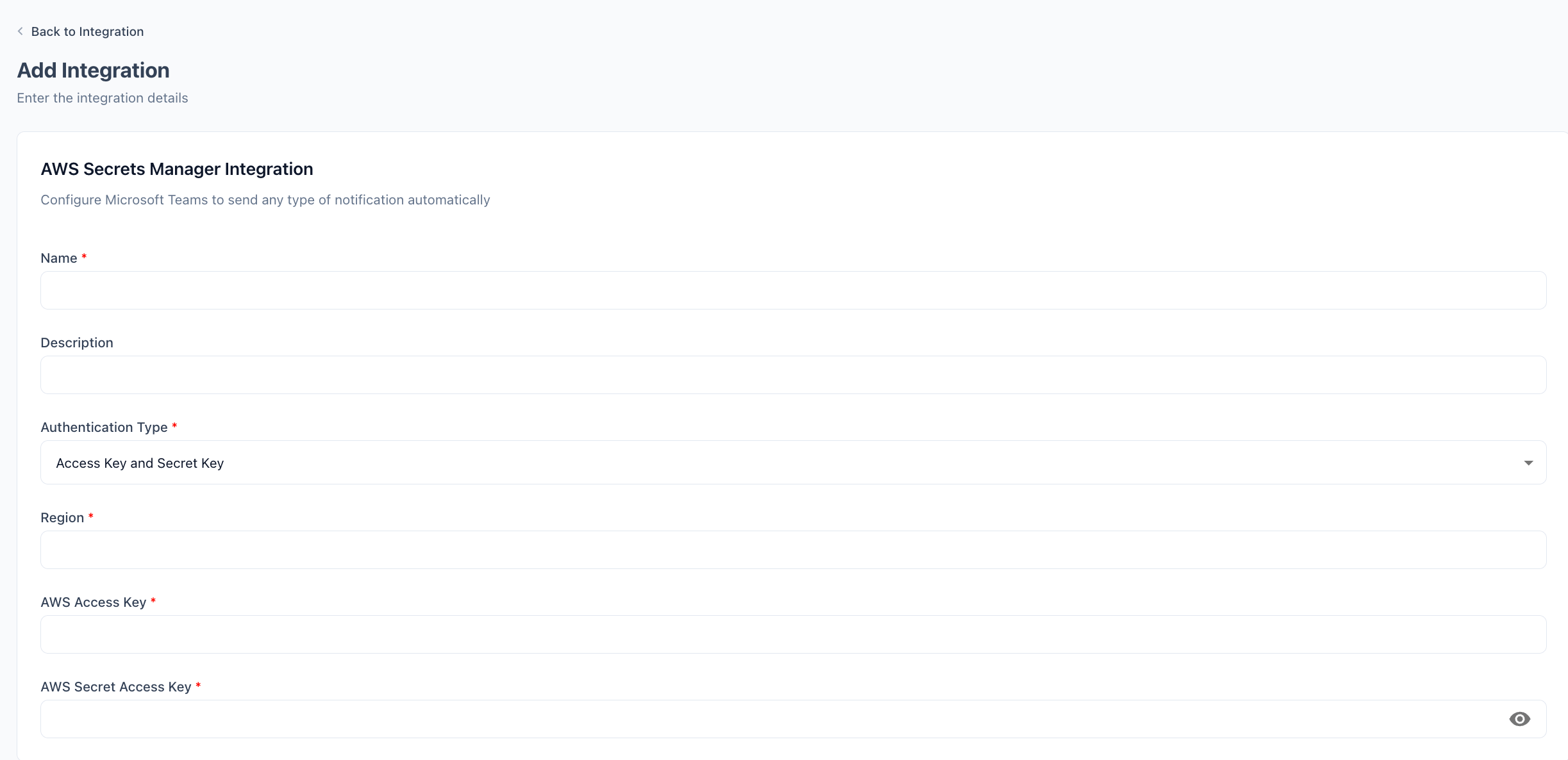 Enter a display **Name** for this connection (e.g., `AWS Secrets Manager - Production`). Optionally add a **Description**.
**Authentication Type** is pre-set to **Access Key and Secret Key** — no change needed.
Enter the **Region** where your secrets are stored (e.g., `us-east-1`, `eu-west-1`). Prizm calls the Secrets Manager API endpoint in this region.
Paste the **Access Key ID** and **Secret Access Key** generated during the prerequisites step.
Click **Update Integration**. Prizm validates the credentials by calling the AWS Secrets Manager API and confirms the connection is active.
## Configuration reference
| Field | Required | Description |
| ----------------------- | -------- | ---------------------------------------------------------------------------- |
| **Name** | Yes | Display name for this connection (e.g., `AWS Secrets Manager - Production`). |
| **Description** | No | Optional description to distinguish this integration from others. |
| **Authentication Type** | Yes | Pre-set to **Access Key and Secret Key** — no change needed. |
| **Region** | Yes | AWS region where your secrets are stored (e.g., `us-east-1`). |
| **Access Key ID** | Yes | AWS IAM access key ID for the user Prizm uses to read secrets. |
| **Secret Access Key** | Yes | AWS IAM secret access key paired with the Access Key ID. |
When you rotate the IAM access key, update both the Access Key ID and Secret Access Key in Prizm before deactivating the old key to avoid connector failures.
Enter a display **Name** for this connection (e.g., `AWS Secrets Manager - Production`). Optionally add a **Description**.
**Authentication Type** is pre-set to **Access Key and Secret Key** — no change needed.
Enter the **Region** where your secrets are stored (e.g., `us-east-1`, `eu-west-1`). Prizm calls the Secrets Manager API endpoint in this region.
Paste the **Access Key ID** and **Secret Access Key** generated during the prerequisites step.
Click **Update Integration**. Prizm validates the credentials by calling the AWS Secrets Manager API and confirms the connection is active.
## Configuration reference
| Field | Required | Description |
| ----------------------- | -------- | ---------------------------------------------------------------------------- |
| **Name** | Yes | Display name for this connection (e.g., `AWS Secrets Manager - Production`). |
| **Description** | No | Optional description to distinguish this integration from others. |
| **Authentication Type** | Yes | Pre-set to **Access Key and Secret Key** — no change needed. |
| **Region** | Yes | AWS region where your secrets are stored (e.g., `us-east-1`). |
| **Access Key ID** | Yes | AWS IAM access key ID for the user Prizm uses to read secrets. |
| **Secret Access Key** | Yes | AWS IAM secret access key paired with the Access Key ID. |
When you rotate the IAM access key, update both the Access Key ID and Secret Access Key in Prizm before deactivating the old key to avoid connector failures.