> ## Documentation Index
> Fetch the complete documentation index at: https://docs.dqlabs.ai/llms.txt
> Use this file to discover all available pages before exploring further.
# rbac
> How Prizm's Role-Based Access Control (RBAC) with optional ABAC filters works — roles, groups, permission sets, and access evaluation logic.
## Overview
The Prizm platform utilizes a flexible Role-Based Access Control (RBAC) system with optional Attribute-Based Access Control (ABAC) filters. This model provides granular control over resource access while remaining operationally manageable for enterprise administrators.
The RBAC system enables organizations to align access controls with their specific organizational structure and security requirements through custom roles, hierarchical inheritance, and tag-based filtering.
## Core Principles
| Principle | Description |
| ----------------------------- | ---------------------------------------------------------------------------------------------- |
| **Resource Independence** | Domains, Products, Apps, and other resources are independently secured |
| **Hierarchical Inheritance** | Permissions cascade based on resource relationships |
| **Role Precedence** | Higher-priority roles take precedence in access decisions |
| **Tag-Based Filtering** | Additional constraints based on data classification tags |
| **RBAC + ABAC** | Role-Based Access Control with optional Attribute-Based filters (tags, ownership, sensitivity) |
| **Highest-Role-Wins** | When multiple roles apply, the highest permission level takes precedence |
| **Loosely Coupled Resources** | Domains, Products, Apps, Tags, and Connections are independently assignable |
| **Custom Roles** | Administrators can define tailored roles for advanced use cases |
## Key Entities
| Entity | Description |
| --------------- | ------------------------------------------------------------------------------------------- |
| **Member** | People or agents interacting with the system, authenticated via SSO or direct login |
| **Groups** | Logical collections of users (e.g., Marketing, Engineering) that map to SSO groups |
| **Roles** | Abstract responsibilities (Owner, Steward, Member, Admin) with defined permission sets |
| **Permissions** | Atomic actions (read, write, approve, manage security) defining what operations are allowed |
| **Assignments** | Mappings of roles to users/groups for specific resources with optional constraints |
| **Resources** | Domain, Product, App, Connection — loosely linked with Tags as optional constraints |
## Access
The Prizm platform uses a flexible Role-Based Access Control (RBAC) system with optional Attribute-Based Access Control (ABAC) tag filters. The **Access** module is the central hub for managing all of this — Members, Groups, Roles, Permission Sets, and Audiences are all managed here.
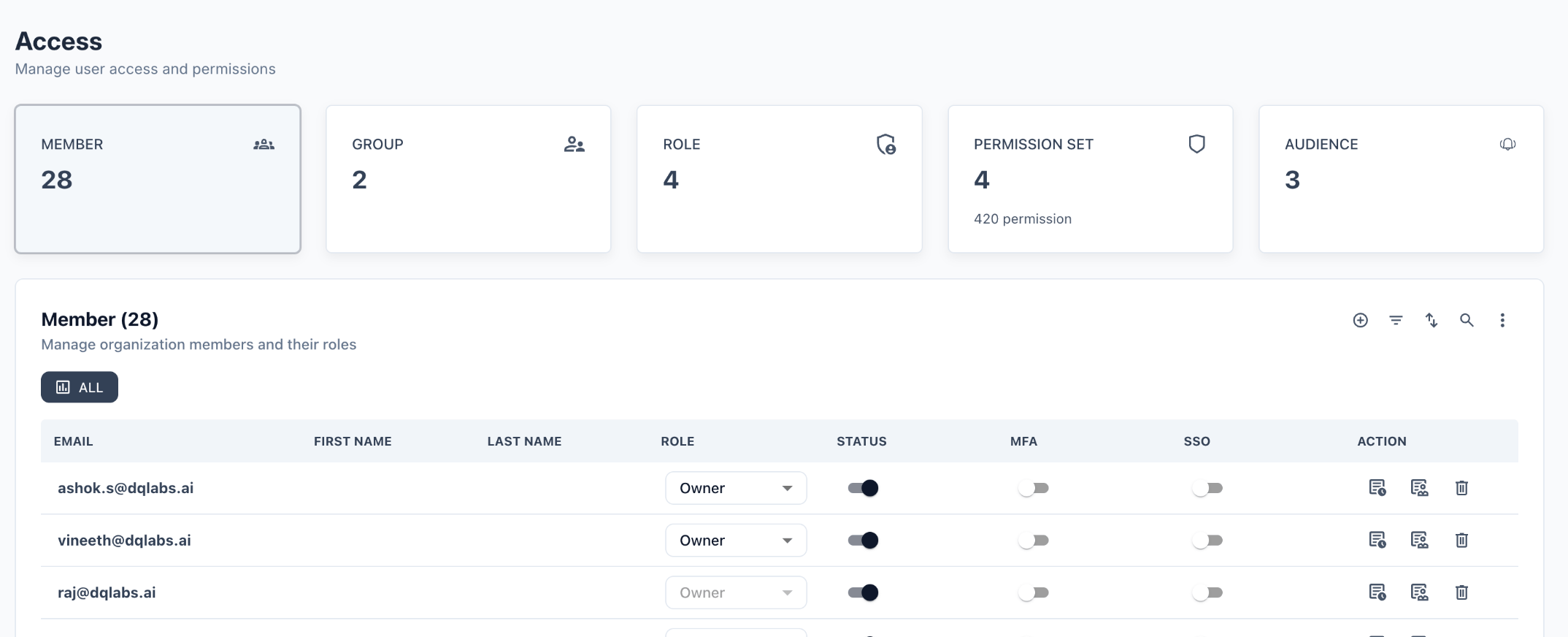 The Access dashboard surfaces five key counters at a glance:
| Entity | Count | Purpose |
| ------------------ | ----- | -------------------------------------------------------- |
| **Member** | 28 | Individual users in the organization |
| **Group** | 2 | Collections of users sharing a role assignment |
| **Role** | 4 | Named permission profiles (Owner, Steward, User, custom) |
| **Permission Set** | 4 | Sets of toggled permissions (420 total defined) |
| **Audience** | 2–3 | Notification channel subscriber groups |
***
## Members
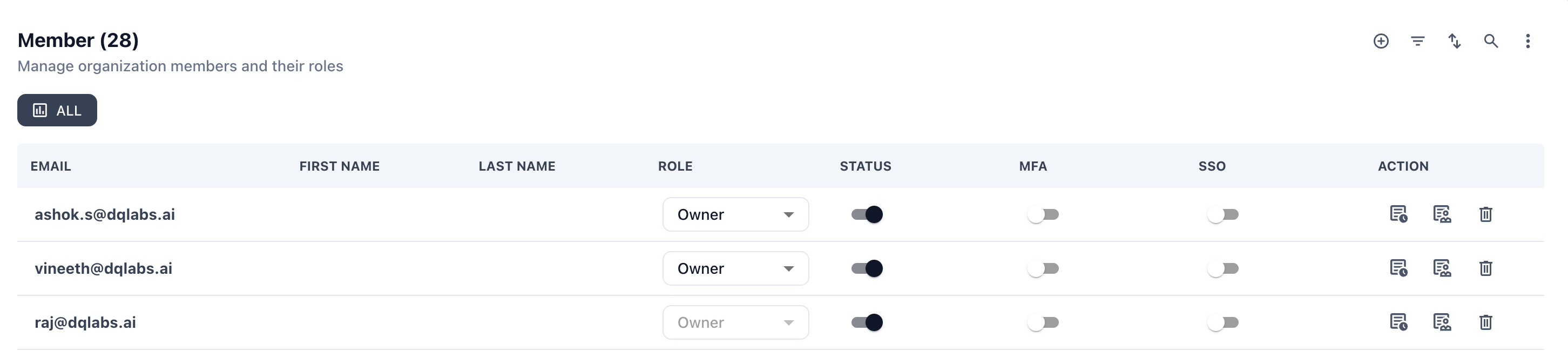
The **Member** tab lists every user in the organization along with their assigned role, active status, MFA enrollment, and SSO status.
The Access dashboard surfaces five key counters at a glance:
| Entity | Count | Purpose |
| ------------------ | ----- | -------------------------------------------------------- |
| **Member** | 28 | Individual users in the organization |
| **Group** | 2 | Collections of users sharing a role assignment |
| **Role** | 4 | Named permission profiles (Owner, Steward, User, custom) |
| **Permission Set** | 4 | Sets of toggled permissions (420 total defined) |
| **Audience** | 2–3 | Notification channel subscriber groups |
***
## Members
The **Member** tab lists every user in the organization along with their assigned role, active status, MFA enrollment, and SSO status.
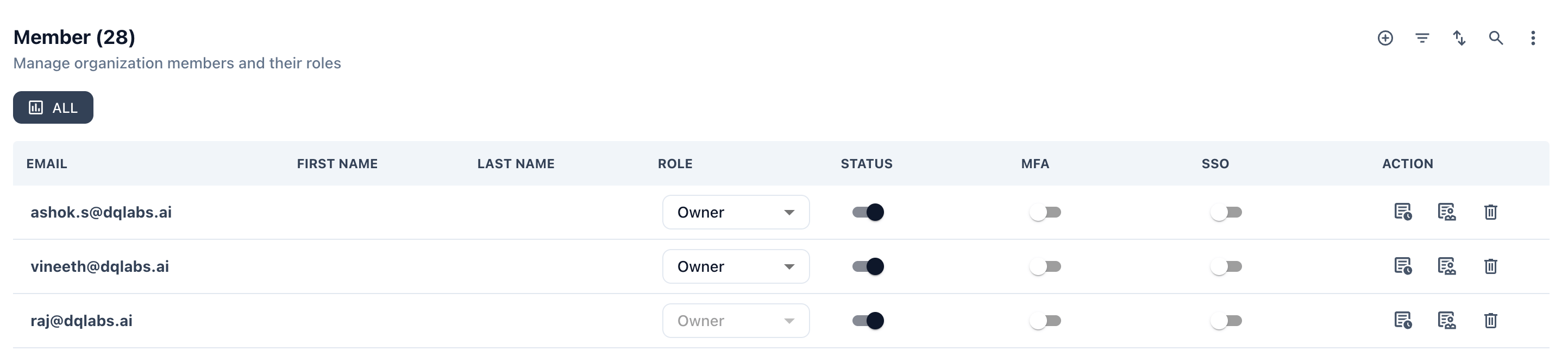 ### Member Fields
| Column | Description |
| -------------------------- | ----------------------------------------------------------------------- |
| **Email** | User's login email address |
| **First Name / Last Name** | Display name (populated from SSO or manually) |
| **Role** | The role assigned to this user — Owner, Steward, User, or a custom role |
| **Status** | Toggle — active (dark) or inactive (grey) |
| **MFA** | Whether multi-factor authentication is enrolled for this user |
| **SSO** | Whether this user authenticates via Single Sign-On |
| **Action** | Copy assignment, view details, or delete the member |
### Adding a Member
Click the **⊕** icon in the top-right of the Member section. You will be prompted to enter an email address and select a role. On first login, the user receives an invite email.
### Member Fields
| Column | Description |
| -------------------------- | ----------------------------------------------------------------------- |
| **Email** | User's login email address |
| **First Name / Last Name** | Display name (populated from SSO or manually) |
| **Role** | The role assigned to this user — Owner, Steward, User, or a custom role |
| **Status** | Toggle — active (dark) or inactive (grey) |
| **MFA** | Whether multi-factor authentication is enrolled for this user |
| **SSO** | Whether this user authenticates via Single Sign-On |
| **Action** | Copy assignment, view details, or delete the member |
### Adding a Member
Click the **⊕** icon in the top-right of the Member section. You will be prompted to enter an email address and select a role. On first login, the user receives an invite email.
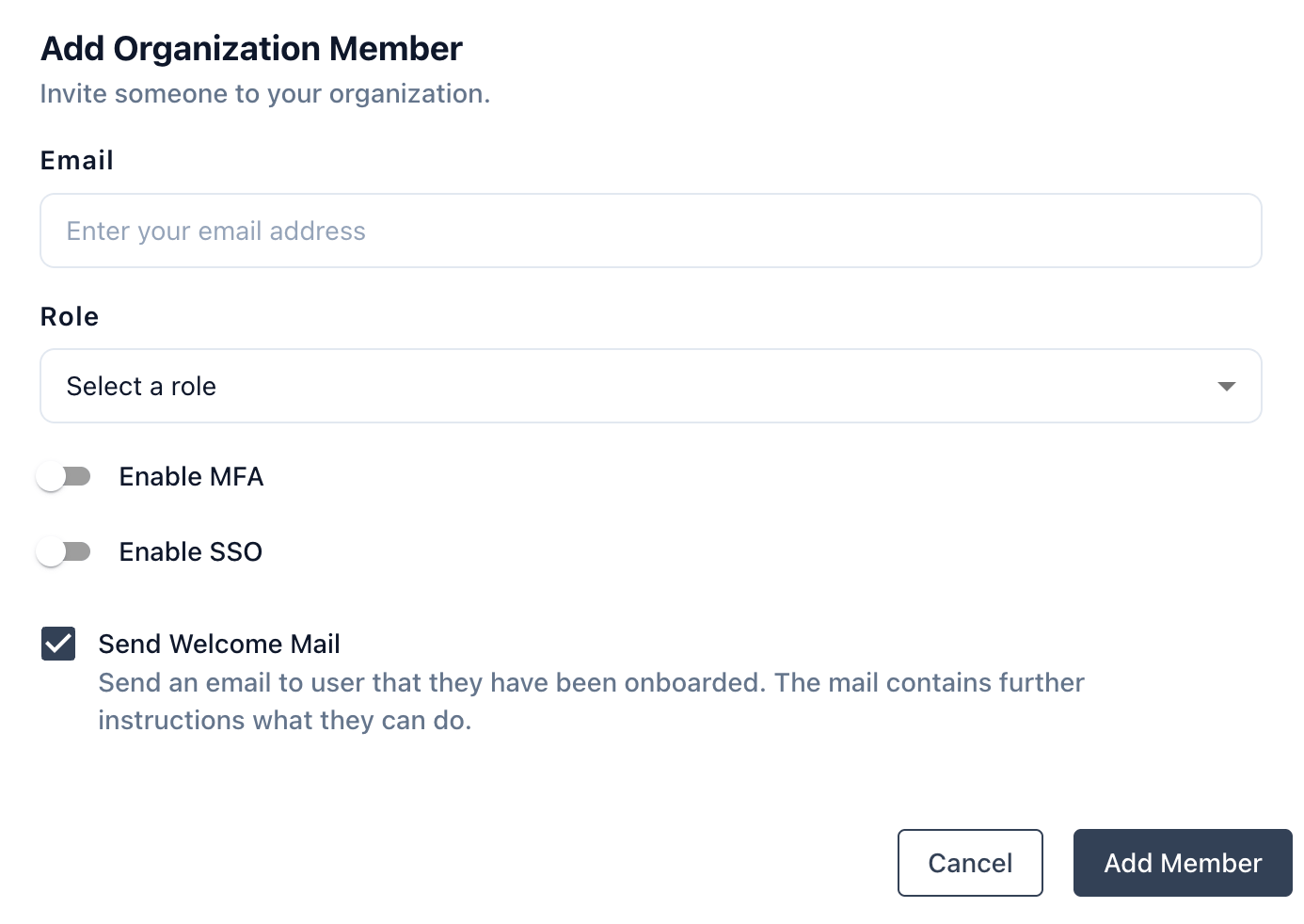 The **Owner** role cannot be deleted or downgraded by anyone other than another Owner. At least one active Owner must exist in every organization.
***
## Groups
Groups let you assign a single role to a collection of users. When a user's group membership changes in the identity provider, their Prizm permissions update automatically on next login.
The **Owner** role cannot be deleted or downgraded by anyone other than another Owner. At least one active Owner must exist in every organization.
***
## Groups
Groups let you assign a single role to a collection of users. When a user's group membership changes in the identity provider, their Prizm permissions update automatically on next login.
 ### Group Fields
| Column | Description |
| --------------- | ------------------------------------------------------------ |
| **Name** | Unique group name, editable inline |
| **Description** | Optional free-text description of the group's purpose |
| **Role** | The role applied to all members of this group |
| **Users** | Avatar stack showing assigned users; click **⊕** to add more |
| **Status** | Active / inactive toggle for the entire group |
| **Action** | Delete the group |
### Group vs. Direct Assignment
| Scenario | Recommendation |
| -------------------------------------------------------------- | ----------------------------------- |
| Stable team with a shared role (e.g., all Marketing → Steward) | Use a **Group** |
| Individual exception or temporary elevated access | Use a direct **Member** assignment |
| IdP-synced department structure | Use **Groups** mapped to SSO groups |
When a user has both a direct role assignment and a group role assignment, the **highest-priority role wins**.
***
## Roles
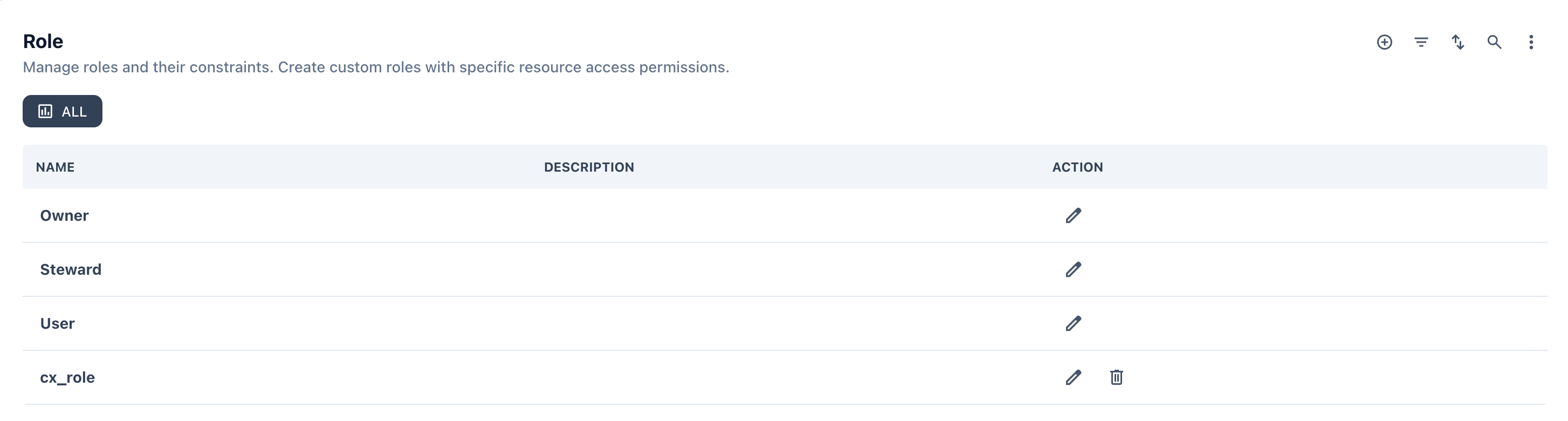
Roles define a named permission profile. Prizm ships with three built-in roles and supports custom roles created by administrators.
### Group Fields
| Column | Description |
| --------------- | ------------------------------------------------------------ |
| **Name** | Unique group name, editable inline |
| **Description** | Optional free-text description of the group's purpose |
| **Role** | The role applied to all members of this group |
| **Users** | Avatar stack showing assigned users; click **⊕** to add more |
| **Status** | Active / inactive toggle for the entire group |
| **Action** | Delete the group |
### Group vs. Direct Assignment
| Scenario | Recommendation |
| -------------------------------------------------------------- | ----------------------------------- |
| Stable team with a shared role (e.g., all Marketing → Steward) | Use a **Group** |
| Individual exception or temporary elevated access | Use a direct **Member** assignment |
| IdP-synced department structure | Use **Groups** mapped to SSO groups |
When a user has both a direct role assignment and a group role assignment, the **highest-priority role wins**.
***
## Roles
Roles define a named permission profile. Prizm ships with three built-in roles and supports custom roles created by administrators.
 ### Standard Roles
#### Role Definitions
| Role | Priority | Permissions Summary |
| ----------- | -------- | -------------------------------------------------------------------------------------------------------------------------------------------- |
| **User** | 1 | Read-only for non-sensitive assets; can request access |
| **Steward** | 2 | Limited to assigned resources; can edit metrics/sources, but not security |
| **Owner** | 3 | Full control over owned domains, applications, and products; can manage semantics, metrics, data sources, security, and approve all changes. |
| **Custom** | 5+ | Tailored by admins (e.g., Data Scientist, ViewerPII) with specific permission filters |
### Custom Roles
Custom roles (e.g., `cx_role`) are created by administrators and can be tailored with any combination of permissions from the Permission Set. Custom roles are assigned a priority of 5+ and appear with both **edit** and **delete** actions in the Role table.
To create a custom role:
1. Click **⊕** in the Role section
2. Enter a name and optional description
3. Select the Permission Set to associate with this role
4. Save — the role is immediately available for assignment to members and groups
Deleting a custom role immediately removes it from all members and groups currently assigned to it. Users will fall back to their next highest active role.
***
## Permission Sets
A Permission Set defines exactly which actions are enabled for each role. The Permission Set view shows a toggle matrix — rows are permission types and columns are the available roles (Admin, Editor, Viewer, and any custom sets).
### Standard Roles
#### Role Definitions
| Role | Priority | Permissions Summary |
| ----------- | -------- | -------------------------------------------------------------------------------------------------------------------------------------------- |
| **User** | 1 | Read-only for non-sensitive assets; can request access |
| **Steward** | 2 | Limited to assigned resources; can edit metrics/sources, but not security |
| **Owner** | 3 | Full control over owned domains, applications, and products; can manage semantics, metrics, data sources, security, and approve all changes. |
| **Custom** | 5+ | Tailored by admins (e.g., Data Scientist, ViewerPII) with specific permission filters |
### Custom Roles
Custom roles (e.g., `cx_role`) are created by administrators and can be tailored with any combination of permissions from the Permission Set. Custom roles are assigned a priority of 5+ and appear with both **edit** and **delete** actions in the Role table.
To create a custom role:
1. Click **⊕** in the Role section
2. Enter a name and optional description
3. Select the Permission Set to associate with this role
4. Save — the role is immediately available for assignment to members and groups
Deleting a custom role immediately removes it from all members and groups currently assigned to it. Users will fall back to their next highest active role.
***
## Permission Sets
A Permission Set defines exactly which actions are enabled for each role. The Permission Set view shows a toggle matrix — rows are permission types and columns are the available roles (Admin, Editor, Viewer, and any custom sets).
 ### Reading the Matrix
* **Dark toggle (●)** — permission is **enabled** for this role
* **Light toggle (○)** — permission is **disabled** for this role
* Each row is a `TYPE + ACCESS` combination (e.g., `ACCESS › Approve`, `ALERT › Create`)
### Default Permission Set Coverage
The four built-in permission sets cover **420 permissions** across 25 resource types. The table below summarizes what each role can do by default.
| Permission Set | Typical Role | Default Capabilities |
| -------------- | ------------ | --------------------------------------------------------------- |
| **Admin** | **Owner** | All permissions across all types enabled |
| **Editor** | **Steward** | Create, edit, view; limited approve; no delete of core entities |
| **Viewer** | **User** | View only across most types; can request access |
***
### Permission Set Matrix
Each Permission Set (Admin, Owner, Steward, Member, Custom) can be assigned with one to many permissions sets and its relevant access.
| Permission | Admin : 4 | Owner : 3 | Steward : 2 | Member : 1 | Custom : 5 |
| ----------------------------- | --------- | --------- | ----------- | ---------- | ------------ |
| Create/Edit Security | ✅ | ❌ | ❌ | ❌ | Configurable |
| Create/Edit Semantics | ✅ | ✅ | ❌ | ❌ | Configurable |
| Create/Edit Sources | ✅ | ✅ | ✅ | ❌ | Configurable |
| Create/Edit Metrics / Queries | ✅ | ✅ | ✅ | ❌ | Configurable |
| Approve Resources | ✅ | ✅ | ✅ | ❌ | Configurable |
| View / Request Access | ✅ | ✅ | ✅ | ✅ | Configurable |
### Permission Type Reference
The following table lists every permission type and the actions available for each. This set of permission sets are grouped under a particular permission and that can be tied to a resource assignment.
| Resource Type | Available Actions |
| ------------------------------------------ | ---------------------------------------------------------- |
| **Access** | approve, create, delete, edit, view |
| **Actions** | create, delete, edit, view |
| **Alert** | approve, create, delete, edit, view |
| **Analytics** | approve, create, delete, edit, view |
| **Application** | approve, create, delete, edit, view |
| **Asset** | approve, create, delete, edit, view |
| **Command Center – Jobs** | view |
| **Command Center – Logs** | view |
| **Command Center – Schedule** | approve, edit, view |
| **Command Center – Utility Import/Export** | edit, view |
| **Dimension** | create, delete, edit, view |
| **Domain** | approve, create, delete, edit, view |
| **Exception** | edit, view |
| **Field** | create, delete, edit, view |
| **Issue** | approve, create, delete, edit, view |
| **Metric and Queries** | approve, create, delete, edit, view |
| **Organization – Integration** | approve, create, delete, edit, view |
| **Organization – Overview** | approve, create, delete, edit, view |
| **Organization – SAML/SSO** | edit, view |
| **Product** | approve, create, delete, edit, view |
| **Setting** | approve, create, delete, edit, view |
| **Source** | approve, create, delete, edit, **run**, **schedule**, view |
| **Steward** | approve, create, delete, edit, view |
| **Tag** | approve, create, delete, edit, view |
| **Term** | approve, create, delete, edit, view |
**Source** is the only resource type with `run` and `schedule` actions in addition to the standard CRUD set. These allow a role to trigger data source syncs and set up recurring ingestion schedules independently of edit rights.
## Access Evaluation Logic
When a request arrives, Prizm evaluates permissions in this order:
Look up the authenticated user and resolve all group memberships.
Gather every role assignment — direct (Member tab) and via groups (Group tab) — at the Application level.
Apply the **highest-priority role** when a user has multiple assignments. Owner (3) beats Steward (2) beats User (1); custom roles at 5+ always take precedence.
Fetch the Permission Set associated with the winning role and read the enabled toggles.
If the assignment includes `allow` or `deny` tag constraints (ABAC), filter the resource list accordingly.
Return the final access decision. Deny constraints always override allow, even when only a single resource carries a deny tag.
**Role Consolidation:** All applicable roles are collected from user and group assignments. The highest-priority role's permissions take precedence. Tag-based filters then further refine which resources are accessible.
***
## Assignment Structure
Access assignments follow a consistent JSON format that maps users or groups to roles on specific resources:
```json theme={null}
{
"assignee_type": "user | group",
"assignee_id": "",
"resources": [
{
"resource_type": "domain | product | app | connection",
"resource": "",
"resource_role": "owner | steward | user | ",
"role_priority": 3,
"assigned_by": "",
"assigned_date": "2025-06-24T00:00:00Z",
"resource_constraints": {
"allow": ["tag1", "tag2"],
"deny": ["PII"]
}
}
]
}
```
### Key Rules
* `allow: ["*"]` — grants access to all tag variants of the resource
* `deny: ["PII"]` — blocks access to PII-tagged rows/columns even if other constraints allow
* A deny on **any one resource** is honoured even when all other resources in the assignment use `allow: ["*"]`
* Assignments have an optional `expiry_date` field for time-limited access grants
***
### Assignment Examples
```json theme={null}
{
"resources": [
{
"resource_type": "domain",
"resource_role": "owner",
"role_priority": 3,
"resource": "Customer360",
"assigned_by": "bob",
"assigned_date": "2025-06-24",
"resource_constraints": { "allow": ["*"] }
},
{
"resource_type": "domain",
"resource_role": "owner",
"role_priority": 3,
"resource": "Marketing",
"assigned_by": "bob",
"assigned_date": "2025-06-24",
"resource_constraints": { "allow": ["*"] }
}
]
}
```
```json theme={null}
{
"resources": [
{
"resource_type": "product",
"resource_role": "steward",
"role_priority": 2,
"resource": "MarketingData",
"assigned_by": "sarah",
"assigned_date": "2025-06-24",
"resource_constraints": { "allow": ["Internal"] }
}
]
}
```
```json theme={null}
{
"resources": [
{
"resource_type": "application",
"resource_role": "member",
"role_priority": 1,
"resource": "ETL-Pipeline",
"assigned_by": "priyam",
"assigned_date": "2025-06-24",
"resource_constraints": { "deny": ["PII"] }
},
{
"resource_type": "product",
"resource_role": "member",
"role_priority": 1,
"resource": "MarketingData",
"assigned_by": "priyam",
"assigned_date": "2025-06-24",
"resource_constraints": { "deny": ["PII"] }
}
]
}
```
```json theme={null}
{
"resources": [
{
"resource_type": "*",
"resource_role": "admin",
"role_priority": 5,
"resource": "*",
"assigned_by": "peter",
"assigned_date": "2025-06-24",
"resource_constraints": { "allow": ["*"] }
}
]
}
```
```json theme={null}
{
"resources": [
{
"resource_type": "*",
"resource_role": "steward",
"role_priority": 2,
"resource": "*",
"assigned_by": "ashok",
"assigned_date": "2025-06-24",
"resource_constraints": { "deny": ["PII"] }
}
]
}
```
Even if only one resource carries a `deny` constraint while others are tagged as `allow`, the deny takes precedence for that resource. Deny constraints are always enforced.
***
## Database Schema Reference
### Schema Components
| Table | Purpose |
| ------------------------------------------ | -------------------------------------------------------------- |
| `users`, `groups`, `user_groups` | Identity model for user and group management |
| `roles`, `permissions`, `role_permissions` | Role definitions with associated permission sets |
| `assignments` | Grants roles to users or groups scoped to specific resources |
| `resources` | Flattened table of all resource types (domain, app, tag, etc.) |
| `role_precedence` | Priority ranking for conflict resolution |
| `resource_tags`, `app_domains` | Optional mappings between loosely coupled assets |
### Assumptions
1. Assignments exist at either User or Group level, identified by the `assignee_type` value (`"user"` or `"group"`).
2. User-level assignments are implemented in application code by referencing the `user_groups` table, which stores user-group mapping information.
3. Access constraints are applied at the resource level (e.g., Domain: `"Marketing"`, Product: `"SAP_Prod"`).
4. The Assignments table contains only one record per user. The `assignee_id` field serves as a Unique Index or Business Key.
5. When no access constraints are defined for a resource, users/groups receive default `"allow": ["*"]` access.
***
## Access Evaluation Process
The system determines effective permissions through a multi-step evaluation process at runtime:
Identify the user and their group memberships.
Resolve all relevant role assignments — both group-level and user-level — at the Application Level.
Determine all permissions from the assigned roles.
Apply the **highest permission scope** when conflicts exist between roles.
Optionally filter results by tag, sensitivity, or ownership constraints.
***
### Reading the Matrix
* **Dark toggle (●)** — permission is **enabled** for this role
* **Light toggle (○)** — permission is **disabled** for this role
* Each row is a `TYPE + ACCESS` combination (e.g., `ACCESS › Approve`, `ALERT › Create`)
### Default Permission Set Coverage
The four built-in permission sets cover **420 permissions** across 25 resource types. The table below summarizes what each role can do by default.
| Permission Set | Typical Role | Default Capabilities |
| -------------- | ------------ | --------------------------------------------------------------- |
| **Admin** | **Owner** | All permissions across all types enabled |
| **Editor** | **Steward** | Create, edit, view; limited approve; no delete of core entities |
| **Viewer** | **User** | View only across most types; can request access |
***
### Permission Set Matrix
Each Permission Set (Admin, Owner, Steward, Member, Custom) can be assigned with one to many permissions sets and its relevant access.
| Permission | Admin : 4 | Owner : 3 | Steward : 2 | Member : 1 | Custom : 5 |
| ----------------------------- | --------- | --------- | ----------- | ---------- | ------------ |
| Create/Edit Security | ✅ | ❌ | ❌ | ❌ | Configurable |
| Create/Edit Semantics | ✅ | ✅ | ❌ | ❌ | Configurable |
| Create/Edit Sources | ✅ | ✅ | ✅ | ❌ | Configurable |
| Create/Edit Metrics / Queries | ✅ | ✅ | ✅ | ❌ | Configurable |
| Approve Resources | ✅ | ✅ | ✅ | ❌ | Configurable |
| View / Request Access | ✅ | ✅ | ✅ | ✅ | Configurable |
### Permission Type Reference
The following table lists every permission type and the actions available for each. This set of permission sets are grouped under a particular permission and that can be tied to a resource assignment.
| Resource Type | Available Actions |
| ------------------------------------------ | ---------------------------------------------------------- |
| **Access** | approve, create, delete, edit, view |
| **Actions** | create, delete, edit, view |
| **Alert** | approve, create, delete, edit, view |
| **Analytics** | approve, create, delete, edit, view |
| **Application** | approve, create, delete, edit, view |
| **Asset** | approve, create, delete, edit, view |
| **Command Center – Jobs** | view |
| **Command Center – Logs** | view |
| **Command Center – Schedule** | approve, edit, view |
| **Command Center – Utility Import/Export** | edit, view |
| **Dimension** | create, delete, edit, view |
| **Domain** | approve, create, delete, edit, view |
| **Exception** | edit, view |
| **Field** | create, delete, edit, view |
| **Issue** | approve, create, delete, edit, view |
| **Metric and Queries** | approve, create, delete, edit, view |
| **Organization – Integration** | approve, create, delete, edit, view |
| **Organization – Overview** | approve, create, delete, edit, view |
| **Organization – SAML/SSO** | edit, view |
| **Product** | approve, create, delete, edit, view |
| **Setting** | approve, create, delete, edit, view |
| **Source** | approve, create, delete, edit, **run**, **schedule**, view |
| **Steward** | approve, create, delete, edit, view |
| **Tag** | approve, create, delete, edit, view |
| **Term** | approve, create, delete, edit, view |
**Source** is the only resource type with `run` and `schedule` actions in addition to the standard CRUD set. These allow a role to trigger data source syncs and set up recurring ingestion schedules independently of edit rights.
## Access Evaluation Logic
When a request arrives, Prizm evaluates permissions in this order:
Look up the authenticated user and resolve all group memberships.
Gather every role assignment — direct (Member tab) and via groups (Group tab) — at the Application level.
Apply the **highest-priority role** when a user has multiple assignments. Owner (3) beats Steward (2) beats User (1); custom roles at 5+ always take precedence.
Fetch the Permission Set associated with the winning role and read the enabled toggles.
If the assignment includes `allow` or `deny` tag constraints (ABAC), filter the resource list accordingly.
Return the final access decision. Deny constraints always override allow, even when only a single resource carries a deny tag.
**Role Consolidation:** All applicable roles are collected from user and group assignments. The highest-priority role's permissions take precedence. Tag-based filters then further refine which resources are accessible.
***
## Assignment Structure
Access assignments follow a consistent JSON format that maps users or groups to roles on specific resources:
```json theme={null}
{
"assignee_type": "user | group",
"assignee_id": "",
"resources": [
{
"resource_type": "domain | product | app | connection",
"resource": "",
"resource_role": "owner | steward | user | ",
"role_priority": 3,
"assigned_by": "",
"assigned_date": "2025-06-24T00:00:00Z",
"resource_constraints": {
"allow": ["tag1", "tag2"],
"deny": ["PII"]
}
}
]
}
```
### Key Rules
* `allow: ["*"]` — grants access to all tag variants of the resource
* `deny: ["PII"]` — blocks access to PII-tagged rows/columns even if other constraints allow
* A deny on **any one resource** is honoured even when all other resources in the assignment use `allow: ["*"]`
* Assignments have an optional `expiry_date` field for time-limited access grants
***
### Assignment Examples
```json theme={null}
{
"resources": [
{
"resource_type": "domain",
"resource_role": "owner",
"role_priority": 3,
"resource": "Customer360",
"assigned_by": "bob",
"assigned_date": "2025-06-24",
"resource_constraints": { "allow": ["*"] }
},
{
"resource_type": "domain",
"resource_role": "owner",
"role_priority": 3,
"resource": "Marketing",
"assigned_by": "bob",
"assigned_date": "2025-06-24",
"resource_constraints": { "allow": ["*"] }
}
]
}
```
```json theme={null}
{
"resources": [
{
"resource_type": "product",
"resource_role": "steward",
"role_priority": 2,
"resource": "MarketingData",
"assigned_by": "sarah",
"assigned_date": "2025-06-24",
"resource_constraints": { "allow": ["Internal"] }
}
]
}
```
```json theme={null}
{
"resources": [
{
"resource_type": "application",
"resource_role": "member",
"role_priority": 1,
"resource": "ETL-Pipeline",
"assigned_by": "priyam",
"assigned_date": "2025-06-24",
"resource_constraints": { "deny": ["PII"] }
},
{
"resource_type": "product",
"resource_role": "member",
"role_priority": 1,
"resource": "MarketingData",
"assigned_by": "priyam",
"assigned_date": "2025-06-24",
"resource_constraints": { "deny": ["PII"] }
}
]
}
```
```json theme={null}
{
"resources": [
{
"resource_type": "*",
"resource_role": "admin",
"role_priority": 5,
"resource": "*",
"assigned_by": "peter",
"assigned_date": "2025-06-24",
"resource_constraints": { "allow": ["*"] }
}
]
}
```
```json theme={null}
{
"resources": [
{
"resource_type": "*",
"resource_role": "steward",
"role_priority": 2,
"resource": "*",
"assigned_by": "ashok",
"assigned_date": "2025-06-24",
"resource_constraints": { "deny": ["PII"] }
}
]
}
```
Even if only one resource carries a `deny` constraint while others are tagged as `allow`, the deny takes precedence for that resource. Deny constraints are always enforced.
***
## Database Schema Reference
### Schema Components
| Table | Purpose |
| ------------------------------------------ | -------------------------------------------------------------- |
| `users`, `groups`, `user_groups` | Identity model for user and group management |
| `roles`, `permissions`, `role_permissions` | Role definitions with associated permission sets |
| `assignments` | Grants roles to users or groups scoped to specific resources |
| `resources` | Flattened table of all resource types (domain, app, tag, etc.) |
| `role_precedence` | Priority ranking for conflict resolution |
| `resource_tags`, `app_domains` | Optional mappings between loosely coupled assets |
### Assumptions
1. Assignments exist at either User or Group level, identified by the `assignee_type` value (`"user"` or `"group"`).
2. User-level assignments are implemented in application code by referencing the `user_groups` table, which stores user-group mapping information.
3. Access constraints are applied at the resource level (e.g., Domain: `"Marketing"`, Product: `"SAP_Prod"`).
4. The Assignments table contains only one record per user. The `assignee_id` field serves as a Unique Index or Business Key.
5. When no access constraints are defined for a resource, users/groups receive default `"allow": ["*"]` access.
***
## Access Evaluation Process
The system determines effective permissions through a multi-step evaluation process at runtime:
Identify the user and their group memberships.
Resolve all relevant role assignments — both group-level and user-level — at the Application Level.
Determine all permissions from the assigned roles.
Apply the **highest permission scope** when conflicts exist between roles.
Optionally filter results by tag, sensitivity, or ownership constraints.
***