> ## Documentation Index
> Fetch the complete documentation index at: https://docs.dqlabs.ai/llms.txt
> Use this file to discover all available pages before exploring further.
# Setup
> Prerequisites, authentication options, and step-by-step instructions for connecting Databricks to Prizm.
## Prerequisites
Before connecting, create a Databricks Service Principal and grant it the minimum required permissions on your Unity Catalog workspace.
### Create a Service Principal (OAuth — Recommended)
1. In the Databricks account console, navigate to **Settings → Identity and Access → Service Principals**.
2. Click **Add service principal** and give it a name (e.g., `prizm-connector`).
3. Open the service principal, go to **Secrets**, and click **Generate Secret**. Secrets are valid for up to 730 days; a maximum of 5 secrets can exist per service principal.
4. Copy the **Client ID** (Application ID) and **Secret** — the secret is shown only once.
5. In your workspace, assign the service principal with **CAN USE** permission on the target SQL Warehouse or cluster.
### Required Permissions
Grant the service principal the following permissions. Run these SQL statements in a Databricks SQL Editor or notebook:
```sql theme={null}
-- Grant catalog and schema access
GRANT USE CATALOG ON CATALOG TO ``;
GRANT USE SCHEMA ON SCHEMA . TO ``;
-- Grant read access to information schema (metadata discovery)
GRANT SELECT ON TABLE .information_schema.tables TO ``;
GRANT SELECT ON TABLE .information_schema.columns TO ``;
GRANT SELECT ON TABLE .information_schema.schemata TO ``;
-- Grant access to system tables (lineage, performance, billing)
GRANT SELECT ON TABLE system.access.table_lineage TO ``;
GRANT SELECT ON TABLE system.access.column_lineage TO ``;
GRANT SELECT ON TABLE system.lakeflow.job_runs TO ``;
GRANT SELECT ON TABLE system.query.history TO ``;
GRANT SELECT ON TABLE system.billing.usage TO ``;
```
System table access (`system.access.*`, `system.lakeflow.*`, `system.query.history`, `system.billing.usage`) is required for lineage, pipeline observability, query performance, and cost metrics. Without these grants, those features will be unavailable.
### IP Whitelisting
If your organization uses a whitelist to manage Databricks access, Prizm will only access your Databricks workspace through the following IP addresses. Add these to your Databricks network policy before connecting.
| Cloud Platform | Region | IP Addresses |
| :------------- | :------------------- | :----------- |
| AWS | US-EAST-1 (Virginia) | `xxxx` |
### Permission Summary
| **Permission** | **Scope** | **Required For** |
| :------------------- | :----------------------------- | :------------------------------- |
| USE CATALOG | All target catalogs | Metadata discovery, all jobs |
| USE SCHEMA | All target schemas | Schema, table, column extraction |
| SELECT | `information_schema.*` | Metadata queries |
| CAN USE | SQL Warehouse / Cluster | JDBC/SQL connection |
| SELECT | `system.access.table_lineage` | Table-level lineage |
| SELECT | `system.access.column_lineage` | Column-level lineage |
| SELECT | `system.lakeflow.job_runs` | Pipeline/Job observability |
| SELECT | `system.query.history` | Query performance metrics |
| SELECT | `system.billing.usage` | Cost & usage data |
| ALTER TABLE SET TAGS | Target tables *(optional)* | Bi-directional tag sync only |
## Connector Setup
Navigate to **Source** and click **Add**. Select **Databricks** from the source type grid.
| **Field** | **Description** |
| --------------- | -------------------------------------------------------------------------------------- |
| Connection Name | A unique label for this instance (e.g., `databricks-prod`) |
| Description | Optional free-text description |
| Workspace URL | Your Databricks workspace URL (e.g., `https://dbc-abc12345-d678.cloud.databricks.com`) |
| HTTP Path | SQL Warehouse HTTP path: `/sql/1.0/warehouses/` |
| Default Catalog | The Unity Catalog name to scope queries |
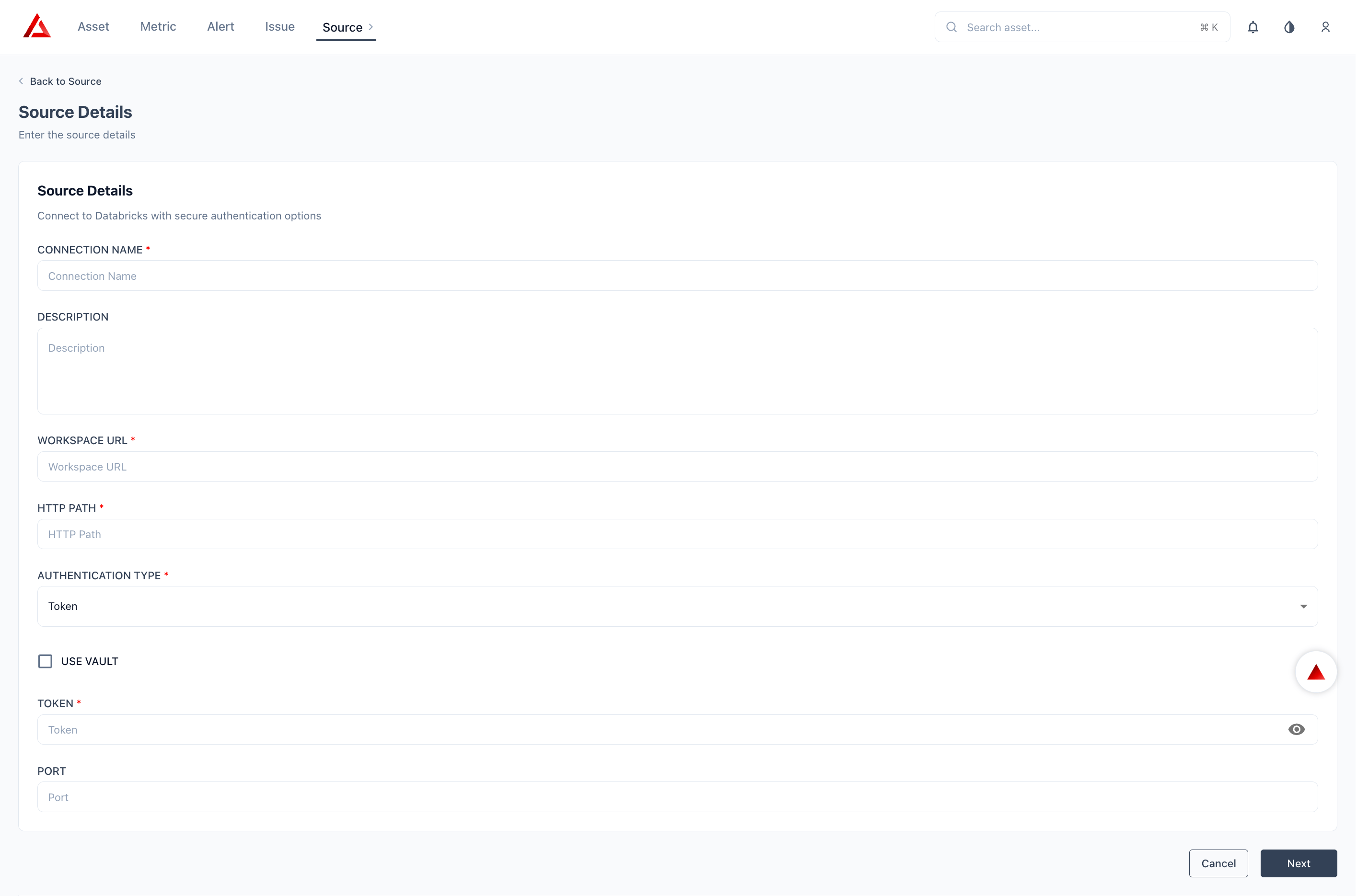 Select an authentication type from the dropdown and provide the required credentials.
Token authentication uses a Databricks Personal Access Token (PAT) — a long-lived credential. Use this only when OAuth-based authentication is not available, as long-lived tokens carry a higher exposure risk if compromised.
Select **Token** from the Authentication Type dropdown.
| **Field** | **Description** |
| --------- | ----------------------------------------------------------------------------------------------------------------------------- |
| Token | A Databricks Personal Access Token — generate from **User Settings → Developer → Access Tokens** in your Databricks workspace |
OAuth (M2M) tokens are short-lived and auto-refreshed by Prizm — no manual re-authentication required. This is the recommended authentication method for production environments.
Select **OAuth (M2M)** from the Authentication Type dropdown.
| **Field** | **Description** |
| ------------- | --------------------------------------------------------------------------------------------------------------------- |
| Client ID | Service Principal Application (Client) ID — found in the Service Principal settings in the Databricks account console |
| Client Secret | OAuth secret generated under the Service Principal → Secrets — stored encrypted in Vault, never shown after save |
Prizm automatically refreshes OAuth tokens before expiry. No manual re-authentication is required.
Use OAuth (Microsoft Entra ID) when your Databricks workspace is backed by Azure Active Directory / Microsoft Entra ID. This is the recommended authentication method for Azure-hosted Databricks workspaces.
Select **OAuth (Microsoft Entra ID)** from the Authentication Type dropdown.
| **Field** | **Description** |
| ------------- | ---------------------------------------------------------------------------------------------------------------- |
| Tenant ID | Your Microsoft Entra ID (Azure AD) Tenant ID — found in the Azure portal under **Microsoft Entra ID → Overview** |
| Client ID | Application (Client) ID of the registered Azure AD app |
| Client Secret | Client secret from the Azure AD app registration — stored encrypted in Vault, never shown after save |
The **Additional Configuration** section lets you override the organisation-level external storage settings for this specific Databricks source. By default, Prizm uses the storage provider configured at the organisation level (Settings → Configuration → External Storage) to store exception records, pipeline output data, and profiling artefacts.
Enable **Overwrite storage** if you need this source to write to a different storage location — for example, if your Databricks workspace is on Azure but your org-level storage is on AWS, you can redirect this source's outputs to an Azure-hosted bucket.
| **Field** | **Description** |
| ----------------- | ------------------------------------------------------------------------------------- |
| Overwrite storage | Toggle on to override the org-level storage configuration for this source only |
| Storage type | Cloud provider for the override storage destination (e.g., AWS, Azure) |
| Schema | Target schema or container name within the storage destination |
| Directory | Target path or directory within the storage destination where outputs will be written |
Schema and Directory are required when Overwrite storage is enabled. Leave this section disabled to inherit the organisation-level storage configuration.
The **Advanced Configuration** section controls pipeline and job observability for this Databricks source. These settings determine whether Prizm monitors Databricks Jobs, Workflows, and Delta Live Tables — and how far back it looks when building the initial run history.
| **Field** | **Default** | **Description** |
| ------------------------- | ----------- | ---------------------------------------------------------------------------------------------------------------------------------------------------------------------------------------------------------------------------------------------- |
| Enable pipelines and jobs | Off | Turns on pipeline observability for this source. When enabled, Prizm discovers all in-scope Jobs, Workflows, and Delta Live Tables and begins monitoring their run history, execution status, freshness, and data quality expectations. |
| No. of Runs (Days) | 7 | Lookback window in days for the initial run history ingestion. Prizm fetches all pipeline runs from this many days in the past to seed the observability baseline. Increase this value if you need deeper historical context on initial setup. |
| Enable dashboard | Off | Enables the Pipeline Analytics dashboard for this source — providing aggregate health, trend analysis, and incident analytics across all monitored pipelines. |
Enable **Enable pipelines and jobs** to unlock the [Pipeline metrics](/connectors/databricks/overview#metric-support) (Execution Status, Freshness, Rows Affected, Execution Time, Failure Rate, Dropped Records, Failed Records, Platform Outage) on your Databricks Job and DLT assets.
Use Include and Exclude wildcard patterns to control which catalogs, schemas, and object types are onboarded.
| **Level** | **Example Patterns** |
| ----------- | ------------------------------------------------------------------------------------------------------ |
| Catalog | Include: `prod_*`, `analytics` — Exclude: `dev_*`, `sandbox_*` |
| Schema | Include: `public`, `reporting` — Exclude: `information_schema`, `system` |
| Object Type | Tables (default on), Views (default on), Delta Live Tables (default off), Jobs/Pipelines (default off) |
Select an authentication type from the dropdown and provide the required credentials.
Token authentication uses a Databricks Personal Access Token (PAT) — a long-lived credential. Use this only when OAuth-based authentication is not available, as long-lived tokens carry a higher exposure risk if compromised.
Select **Token** from the Authentication Type dropdown.
| **Field** | **Description** |
| --------- | ----------------------------------------------------------------------------------------------------------------------------- |
| Token | A Databricks Personal Access Token — generate from **User Settings → Developer → Access Tokens** in your Databricks workspace |
OAuth (M2M) tokens are short-lived and auto-refreshed by Prizm — no manual re-authentication required. This is the recommended authentication method for production environments.
Select **OAuth (M2M)** from the Authentication Type dropdown.
| **Field** | **Description** |
| ------------- | --------------------------------------------------------------------------------------------------------------------- |
| Client ID | Service Principal Application (Client) ID — found in the Service Principal settings in the Databricks account console |
| Client Secret | OAuth secret generated under the Service Principal → Secrets — stored encrypted in Vault, never shown after save |
Prizm automatically refreshes OAuth tokens before expiry. No manual re-authentication is required.
Use OAuth (Microsoft Entra ID) when your Databricks workspace is backed by Azure Active Directory / Microsoft Entra ID. This is the recommended authentication method for Azure-hosted Databricks workspaces.
Select **OAuth (Microsoft Entra ID)** from the Authentication Type dropdown.
| **Field** | **Description** |
| ------------- | ---------------------------------------------------------------------------------------------------------------- |
| Tenant ID | Your Microsoft Entra ID (Azure AD) Tenant ID — found in the Azure portal under **Microsoft Entra ID → Overview** |
| Client ID | Application (Client) ID of the registered Azure AD app |
| Client Secret | Client secret from the Azure AD app registration — stored encrypted in Vault, never shown after save |
The **Additional Configuration** section lets you override the organisation-level external storage settings for this specific Databricks source. By default, Prizm uses the storage provider configured at the organisation level (Settings → Configuration → External Storage) to store exception records, pipeline output data, and profiling artefacts.
Enable **Overwrite storage** if you need this source to write to a different storage location — for example, if your Databricks workspace is on Azure but your org-level storage is on AWS, you can redirect this source's outputs to an Azure-hosted bucket.
| **Field** | **Description** |
| ----------------- | ------------------------------------------------------------------------------------- |
| Overwrite storage | Toggle on to override the org-level storage configuration for this source only |
| Storage type | Cloud provider for the override storage destination (e.g., AWS, Azure) |
| Schema | Target schema or container name within the storage destination |
| Directory | Target path or directory within the storage destination where outputs will be written |
Schema and Directory are required when Overwrite storage is enabled. Leave this section disabled to inherit the organisation-level storage configuration.
The **Advanced Configuration** section controls pipeline and job observability for this Databricks source. These settings determine whether Prizm monitors Databricks Jobs, Workflows, and Delta Live Tables — and how far back it looks when building the initial run history.
| **Field** | **Default** | **Description** |
| ------------------------- | ----------- | ---------------------------------------------------------------------------------------------------------------------------------------------------------------------------------------------------------------------------------------------- |
| Enable pipelines and jobs | Off | Turns on pipeline observability for this source. When enabled, Prizm discovers all in-scope Jobs, Workflows, and Delta Live Tables and begins monitoring their run history, execution status, freshness, and data quality expectations. |
| No. of Runs (Days) | 7 | Lookback window in days for the initial run history ingestion. Prizm fetches all pipeline runs from this many days in the past to seed the observability baseline. Increase this value if you need deeper historical context on initial setup. |
| Enable dashboard | Off | Enables the Pipeline Analytics dashboard for this source — providing aggregate health, trend analysis, and incident analytics across all monitored pipelines. |
Enable **Enable pipelines and jobs** to unlock the [Pipeline metrics](/connectors/databricks/overview#metric-support) (Execution Status, Freshness, Rows Affected, Execution Time, Failure Rate, Dropped Records, Failed Records, Platform Outage) on your Databricks Job and DLT assets.
Use Include and Exclude wildcard patterns to control which catalogs, schemas, and object types are onboarded.
| **Level** | **Example Patterns** |
| ----------- | ------------------------------------------------------------------------------------------------------ |
| Catalog | Include: `prod_*`, `analytics` — Exclude: `dev_*`, `sandbox_*` |
| Schema | Include: `public`, `reporting` — Exclude: `information_schema`, `system` |
| Object Type | Tables (default on), Views (default on), Delta Live Tables (default off), Jobs/Pipelines (default off) |
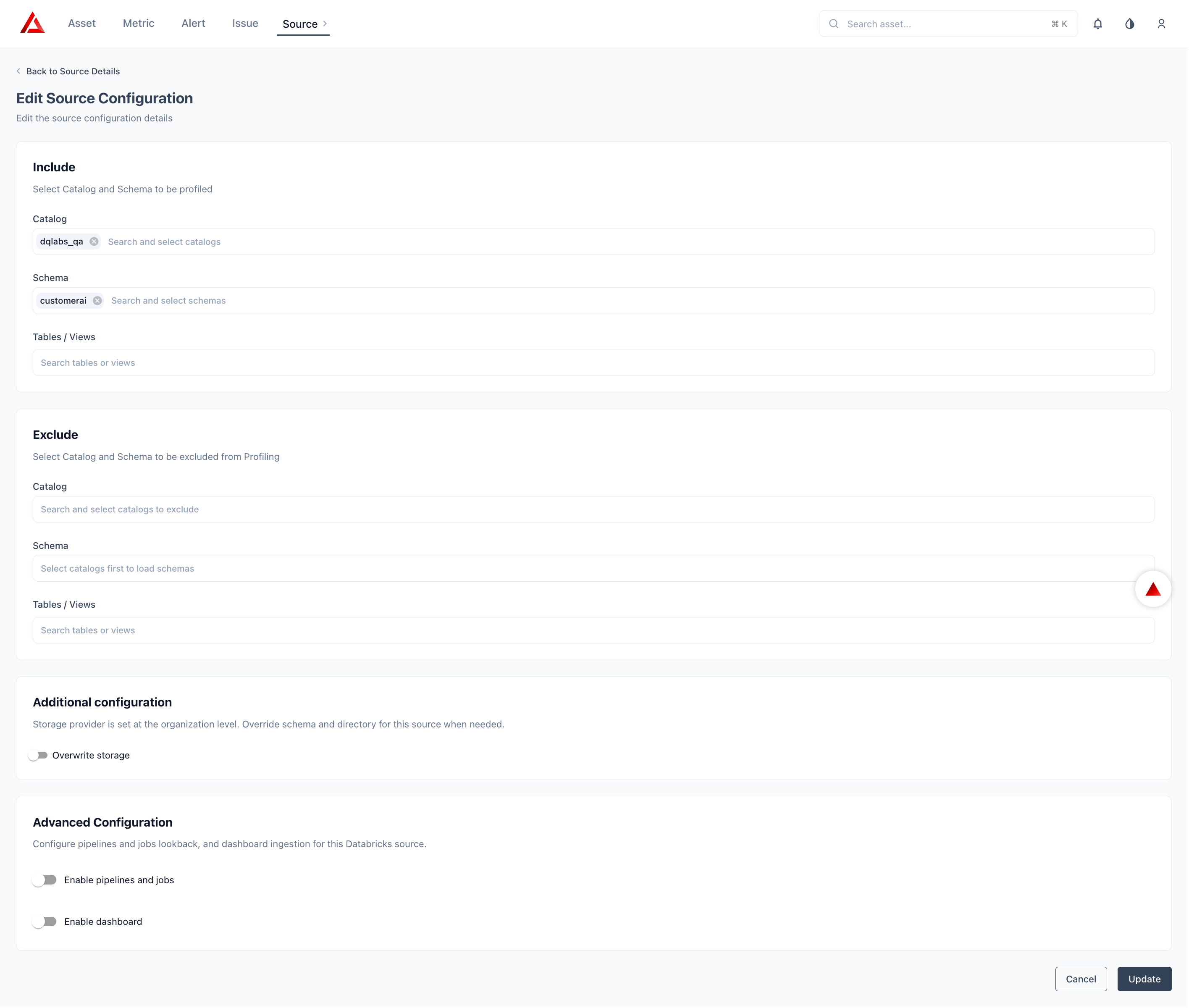 Exclude rules take precedence over include rules when both match the same object. The `information_schema` and `system` schemas are excluded by default and cannot be included.
**Data Assets** (selected by default): Catalog/Database, Schema, Table (includes External Tables, Iceberg Tables), View, Columns.
**Pipeline Assets** (off by default): Delta Live Tables, Jobs & Pipelines, Stored Procedures, Functions.
| **Job Type** | **Default Schedule** | **What It Does** |
| ------------- | ----------------------------- | ------------------------------------------------------------- |
| Observability | Hourly | Volume, freshness, schema change, anomaly detection on tables |
| Catalog | Daily | Catalogs, schemas, tables, views, columns, tags, procedures |
| Performance | Daily *(disabled by default)* | Query history, warehouse utilization, billing usage |
| Pipeline | Configurable | Delta Live Tables, jobs, and pipeline run history |
You can override each schedule from the connector detail page after saving. Schedules for core job types are created automatically when the source is configured. Custom metric schedules can be created manually.
**How schedule overrides work:** Any updated schedule overrides the existing one and applies to subsequent job executions. If a job is triggered manually, it runs immediately without affecting the configured schedule.
The Performance Job is **disabled by default** and must be explicitly enabled per connector instance. It requires `SELECT` on `system.query.history` and `system.billing.usage`.
Click **Save** to save the connection. Prizm runs an initial Catalog scan immediately — assets appear in the catalog within a few minutes. Navigate to **Settings → Connectors → Logs** to monitor scan progress.
Click **Test Connection** before saving to validate credentials and permissions. A failed test returns specific details about which permissions are missing.
## Concurrency & Performance Impact
Prizm controls workload concurrency at the job orchestration layer. Higher concurrency settings increase the number of parallel SQL queries against the configured SQL Warehouse. Invalid or inactive sources are excluded from scheduling.
| **Setting** | **Default** | **Impact** |
| --------------------------- | ---------------------------------------------- | -------------------------------------------------------- |
| Global concurrent jobs | 20 (overridable via `MAX_JOBS` env) | Caps how many Prizm jobs run in parallel platform-wide |
| Catalog metadata extraction | Batch concurrency 8 | Parallel `information_schema` queries against Databricks |
| Lineage extraction | On DDL change detected | Per-table, triggered only when `LAST_ALTERED` changes |
| Performance/billing queries | Per-job-type limits from platform `job_config` | Controls parallel system table queries |
## Next Steps
See the full field-level breakdown of every metadata object Prizm extracts.
Common questions about credentials, scoping, and permissions.
Exclude rules take precedence over include rules when both match the same object. The `information_schema` and `system` schemas are excluded by default and cannot be included.
**Data Assets** (selected by default): Catalog/Database, Schema, Table (includes External Tables, Iceberg Tables), View, Columns.
**Pipeline Assets** (off by default): Delta Live Tables, Jobs & Pipelines, Stored Procedures, Functions.
| **Job Type** | **Default Schedule** | **What It Does** |
| ------------- | ----------------------------- | ------------------------------------------------------------- |
| Observability | Hourly | Volume, freshness, schema change, anomaly detection on tables |
| Catalog | Daily | Catalogs, schemas, tables, views, columns, tags, procedures |
| Performance | Daily *(disabled by default)* | Query history, warehouse utilization, billing usage |
| Pipeline | Configurable | Delta Live Tables, jobs, and pipeline run history |
You can override each schedule from the connector detail page after saving. Schedules for core job types are created automatically when the source is configured. Custom metric schedules can be created manually.
**How schedule overrides work:** Any updated schedule overrides the existing one and applies to subsequent job executions. If a job is triggered manually, it runs immediately without affecting the configured schedule.
The Performance Job is **disabled by default** and must be explicitly enabled per connector instance. It requires `SELECT` on `system.query.history` and `system.billing.usage`.
Click **Save** to save the connection. Prizm runs an initial Catalog scan immediately — assets appear in the catalog within a few minutes. Navigate to **Settings → Connectors → Logs** to monitor scan progress.
Click **Test Connection** before saving to validate credentials and permissions. A failed test returns specific details about which permissions are missing.
## Concurrency & Performance Impact
Prizm controls workload concurrency at the job orchestration layer. Higher concurrency settings increase the number of parallel SQL queries against the configured SQL Warehouse. Invalid or inactive sources are excluded from scheduling.
| **Setting** | **Default** | **Impact** |
| --------------------------- | ---------------------------------------------- | -------------------------------------------------------- |
| Global concurrent jobs | 20 (overridable via `MAX_JOBS` env) | Caps how many Prizm jobs run in parallel platform-wide |
| Catalog metadata extraction | Batch concurrency 8 | Parallel `information_schema` queries against Databricks |
| Lineage extraction | On DDL change detected | Per-table, triggered only when `LAST_ALTERED` changes |
| Performance/billing queries | Per-job-type limits from platform `job_config` | Controls parallel system table queries |
## Next Steps
See the full field-level breakdown of every metadata object Prizm extracts.
Common questions about credentials, scoping, and permissions.