
Prerequisites
Prizm is read-only on Azure Data Factory. It reads metadata (pipelines, activities, datasets, data flows, linked services, and triggers) and run history through the Azure Resource Manager REST API, and never creates, changes, triggers, or deletes anything in ADF. Choose one authentication type below. Create an identity in Microsoft Entra ID for Prizm to use, then give it read-only access to the data factories you want to observe. Which identity you create depends on the authentication type you’ll choose:- Service principal — an app registration with a client secret.
- Certificate — an app registration with a certificate uploaded, and the matching PEM-encoded private key.
- Managed identity — a system-assigned or user-assigned managed identity that Prizm can use.
Before You Start
You need to sign in to the Azure portal as a user who can create app registrations in Microsoft Entra ID and assign roles (Owner or User Access Administrator on the target scope). Collect these values:
Managed identity applies only when the Prizm agent itself runs on Azure (a virtual machine, AKS, App Service, or Container Apps). To keep secrets out of Prizm, store the client secret or the PEM in Azure Key Vault and grant the identity Prizm uses Key Vault Secrets User on that secret.
To create a service principal: in the Azure portal, go to Microsoft Entra ID → App registrations → New registration, name it (for example
prizm-adf-reader), choose single tenant, and leave the redirect URI empty. Note the Application (client) ID and Directory (tenant) ID. Under Certificates & secrets, create a client secret and copy its value immediately, because it is shown only once. For a certificate, upload the public certificate (.crt) instead and keep the private key and certificate together as a PEM file.
To use a managed identity: enable a system-assigned identity on the resource that hosts the Prizm agent, or create a user-assigned identity and attach it. Note the identity’s object (principal) ID, and for a user-assigned identity its client ID.
Required Azure Roles
The built-in Reader role can’t query run history, because the run-query actions are POST actions. Create a custom role with these read-only actions and assign it alongside Reader:
These roles are read-only. If Prizm gets a
403 only when it queries pipeline runs, the run-query actions are missing from the identity’s roles. Prizm doesn’t need write access to ADF, access to the underlying data stores, or access to linked-service credentials.Information Prizm Needs
Prizm lists the subscriptions, resource groups, and factories the identity can see, so the scope of the role assignment controls what appears.
Optional Access
Assign Log Analytics Reader on the workspace that receives your ADF diagnostics (theADFPipelineRun and ADFActivityRun tables) if you want richer failure detail. It isn’t required.
Check Access Before You Connect
Test with the same identity Prizm will use. Get a token forhttps://management.azure.com/.default, then call the Azure Resource Manager API:
Network Access
Prizm must reachhttps://login.microsoftonline.com and https://management.azure.com on port 443. No firewall change is needed on the data factory itself.
Connector Setup
1
Open the connector wizard
Navigate to Source and click the + icon next to the source list. Select Azure Data Factory from the connector grid.
2
Enter source details
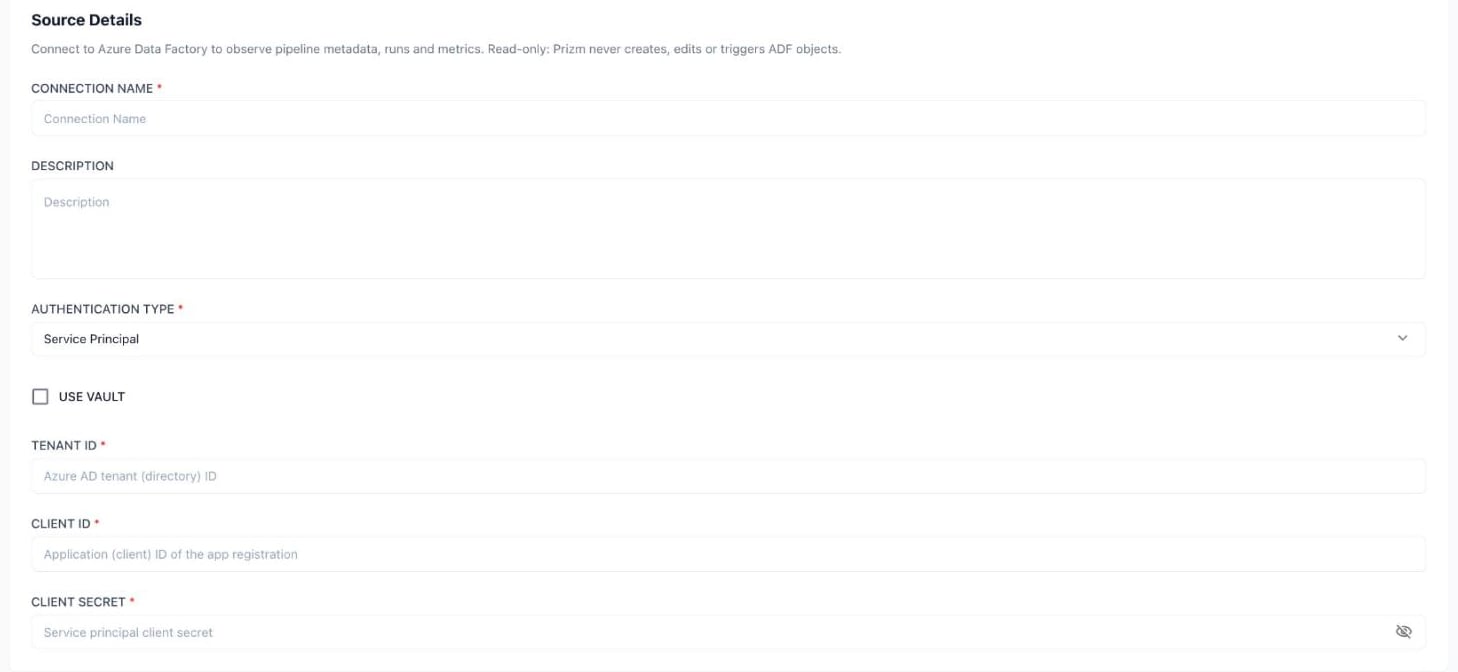
Azure Data Factory source details. Service Principal is the default authentication type
3
Provide credentials
The fields depend on the authentication type. For service principal and certificate connections you can toggle Use Vault to retrieve the credential from a vault instead.
- Service Principal
- Certificate
- Managed Identity
- Use Vault
4
Continue to scope
Click Next to continue to the source configuration step, where you choose the data factories and pipelines Prizm should observe.
5
Save
Complete the configuration. The source appears in the Source list, and pipelines appear in the catalog once the first scan completes.
Default Behavior
The metadata and run-collection schedules are set on the source’s job schedule, so they follow whatever your Prizm administrator configured.
Next Steps
What We Collect
See the pipeline metadata, run history, and metrics Prizm extracts.
FAQ
Common questions about credentials, scoping, and permissions.
Troubleshooting
Diagnose connection failures, permission errors, and timeouts.