
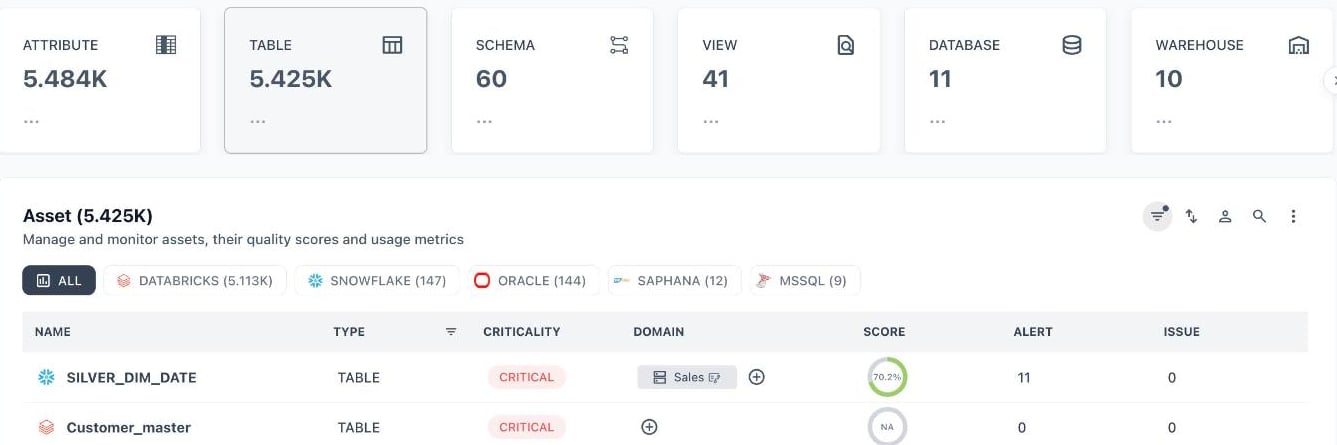
Selecting the Table card filters the Asset list to tables
1. Storage / Structural Assets
| Asset Type | Description | Snowflake |
|---|---|---|
| Database | A logical container holding schemas, tables, and other objects within a data warehouse or RDBMS (e.g., Snowflake database, PostgreSQL database). | |
| Schema | A namespace within a database that groups related tables, views, and other objects together for organization and access control. | |
| Table | A physical structured dataset stored in rows and columns; the most fundamental unit of stored data in a warehouse or database. | ✓ |
| View | A virtual table defined by a SQL query that dynamically pulls from underlying tables without storing data itself. | ✓ |
| Materialized View | A view whose results are physically computed and stored, refreshed on a schedule or trigger, to improve query performance. | |
| Attribute | An individual data element within a table or view, including its data type, constraints, and statistical profile. | |
| Seed | Static, version-controlled reference data (often CSV) loaded directly into the warehouse, common in dbt projects. | |
| Partition | A logical or physical subdivision of a table (often by date or key range) used to optimize query performance and storage. | |
| Index | A database structure that improves the speed of data retrieval operations on a table at the cost of additional storage. | |
| Stage / External Table | A reference to data sitting outside the warehouse (e.g., S3, GCS, Blob Storage) that can be queried without full ingestion. |
2. Connection / Infrastructure Assets
| Asset Type | Description |
|---|---|
| Warehouse | A compute and storage platform instance (e.g., Snowflake, Redshift, BigQuery, Databricks) that hosts databases and processes queries. |
| Source | A raw, upstream system or connector definition from which data is ingested (e.g., Salesforce, Postgres, Kafka, API). |
| Account | A platform-level or service-level entity representing a tenant or organizational unit within a connected system. |
| Site | The top-level container in BI platforms like Tableau, representing an isolated workspace or organization unit. |
| Project | An organizational grouping of related assets, common in dbt, Looker, Power BI, and Tableau, used to scope permissions and structure. |
| Cluster | A compute resource grouping (e.g., a Databricks cluster or Spark cluster) used to run jobs and queries. |
| Connection | A configured link between a tool and a data source/destination, often used in ETL/ELT tools like Fivetran or Airbyte. |
3. Transformation / Modeling Assets
| Asset Type | Description |
|---|---|
| Model | A transformed, version-controlled definition of data logic, most commonly associated with dbt models (staging, intermediate, mart layers). |
| Query | A saved or ad-hoc SQL statement used to retrieve, transform, or analyze data; tracked for lineage and reuse. |
| Worksheet | A saved SQL workspace (e.g., Snowflake Worksheets, Redshift Query Editor) used for interactive querying. |
| Macro | A reusable, parameterized SQL snippet or function, common in dbt, used to standardize transformation logic. |
| Function / Stored Procedure | A reusable block of SQL or code logic stored in the database, executed on demand or as part of a pipeline. |
| Semantic Model | A business-friendly abstraction layer defining metrics, dimensions, and relationships, used in tools like Looker (LookML), dbt Semantic Layer, and Power BI datasets. |
| Metric / KPI | A defined, calculated business measure (e.g., revenue, churn rate) often tied to a semantic model for consistent reporting. |
4. Pipeline / Orchestration Assets
| Asset Type | Description |
|---|---|
| Pipeline | An end-to-end data flow definition that moves and transforms data from source to destination (ETL/ELT). |
| Job | A scheduled or triggered unit of execution that runs one or more tasks (e.g., Airflow DAG run, dbt job, Databricks job). |
| Task | An individual step or unit of work within a job or pipeline (e.g., a single dbt model run, an Airflow task). |
| DAG (Directed Acyclic Graph) | A workflow definition representing task dependencies and execution order, central to orchestration tools like Airflow, Dagster, and Prefect. |
| Workflow | A broader term for an orchestrated sequence of jobs/tasks, used interchangeably with pipeline or DAG depending on the platform. |
| Trigger | An event or schedule definition that initiates a job or pipeline run (e.g., cron schedule, file arrival, API call). |
| Run / Execution | A single instance of a job, pipeline, or task being executed, with associated logs, status, and duration. |
5. Quality Assets
| Asset Type | Description |
|---|---|
| Test | A data quality validation rule (e.g., not null, uniqueness, referential integrity) applied to a table, column, or model. |
6. Consumption / Reporting Assets
| Asset Type | Description |
|---|---|
| Dashboard | A visual collection of charts, metrics, and KPIs assembled for monitoring and decision-making (e.g., Tableau, Power BI, Looker). |
| Report | A structured, often static or scheduled, presentation of data intended for distribution to stakeholders. |
| Workbook | A container holding multiple dashboards, sheets, or worksheets, common in Tableau and Excel-based BI tools. |
| Exposure | A defined downstream consumer of data (e.g., a dashboard or application) tracked explicitly in dbt for lineage purposes. |
| Chart / Visualization | An individual visual element (graph, chart, table) within a dashboard or report. |
| Dataset | A curated, often denormalized dataset prepared specifically for BI tool consumption (e.g., Power BI Dataset, Looker Explore). |
| Application / App | An interactive data application built on top of curated datasets, common in platforms like Looker (Looker Studio) and Sigma. |